Basic rules
Application Open Platform delivers resources and services to developers through server-side API operations. Developers can read and write user information only after users grant the corresponding permissions. Open Authorization (OAuth) 2.0 is used to grant developers permission to read and write user information in miniapps, enabling access to users' basic information and business data.
OAuth 2.0
OAuth 2.0 is an industry-standard authorization framework for RESTful APIs. It lets you grant a third-party application access to user resources without exposing the user's account credentials. OAuth 2.0 is token-based: applications get limited access to user data without handling the user's password, and separates authentication from authorization.
OAuth 2.0 terms
Third-party application: Also called the client. The application requesting access to user resources on the resource owner's behalf.
Resource owner: The user who controls the protected resource and can grant access to it.
HTTP service: The service provider that owns the resource server and provides user information.
Authorization server: The server that authenticates the resource owner and issues access tokens to the client.
Resource server: The server that stores user-generated resources and responds to protected resource requests using access tokens. The resource server and authorization server can run on the same physical node but occupy different logical nodes.
User agent: Typically a browser.
Client credentials: The client ID, password, and authorization code used to authenticate users.
Access token: A token issued by the authorization server after the resource owner grants access. The client uses this token to request protected resources.
Refresh token: A long-lived token used to obtain a new access token after the current one expires, without requiring the user to re-authorize.
Token acquisition grants in OAuth 2.0
A client can obtain a token only after the user grants the corresponding permissions. OAuth 2.0 defines four grant types for issuing tokens to a third-party application:
Authorization code grant: The most common and secure grant. Supports token refresh.
Implicit grant: Designed for browser-based applications. Does not support token refresh.
Resource owner password credentials grant: Designed for legacy systems. Supports token refresh.
Client credentials grant: Designed for API services (machine-to-machine). Does not support token refresh.
For miniapp scenarios, the authorization code grant is used. The other grants are listed for reference only.
Authorization procedure using OAuth
In a miniapp scenario, the authorization code grant delegates user resource permissions to a third-party application. The following figure shows the full authorization flow.
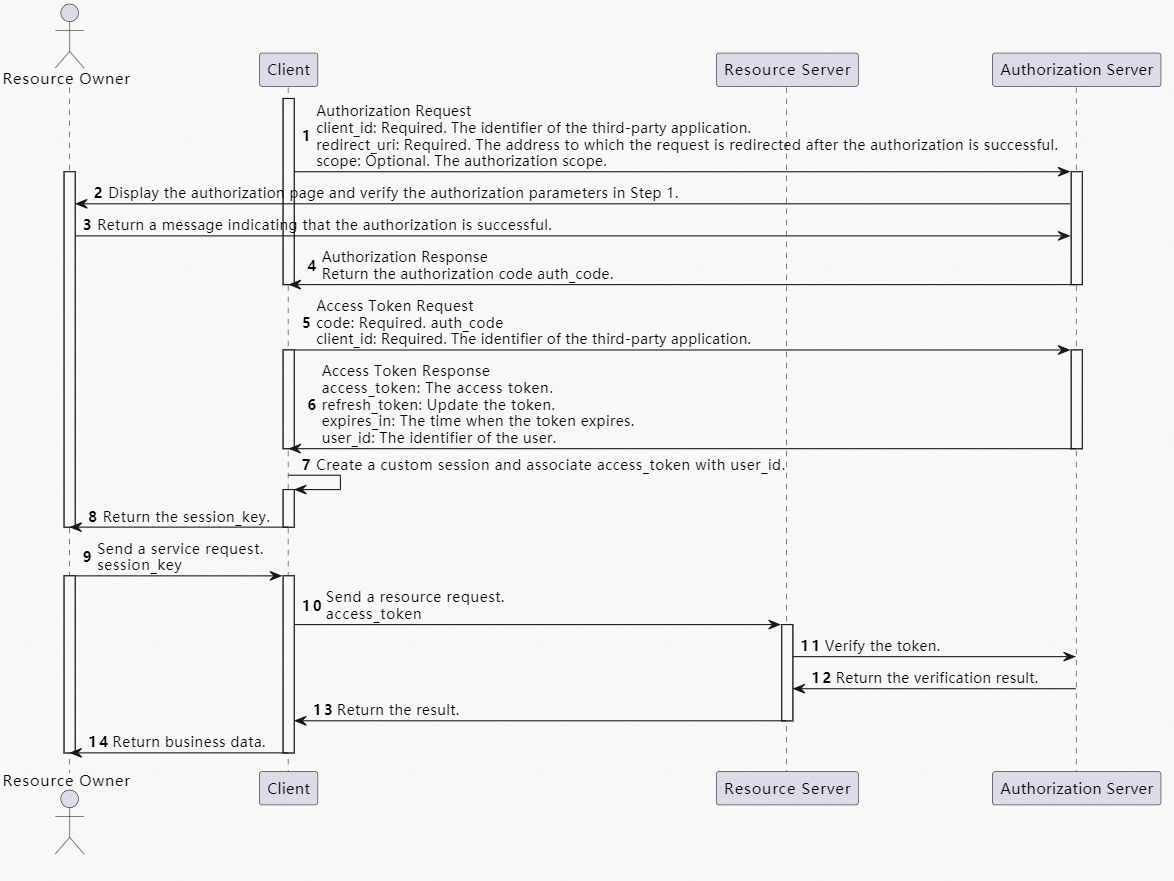
The following table maps OAuth 2.0 roles to the services in a miniapp:
|
OAuth 2.0 role |
Service in a miniapp |
|
Resource owner |
Miniapp user |
|
Resource server |
SuperApp server |
|
Authorization server |
SuperApp server |
|
HTTP service |
SuperApp server |
|
Third-party application (client) |
Merchant's miniapp |
|
User agent |
SuperApp |
Authorize a merchant to call an API operation
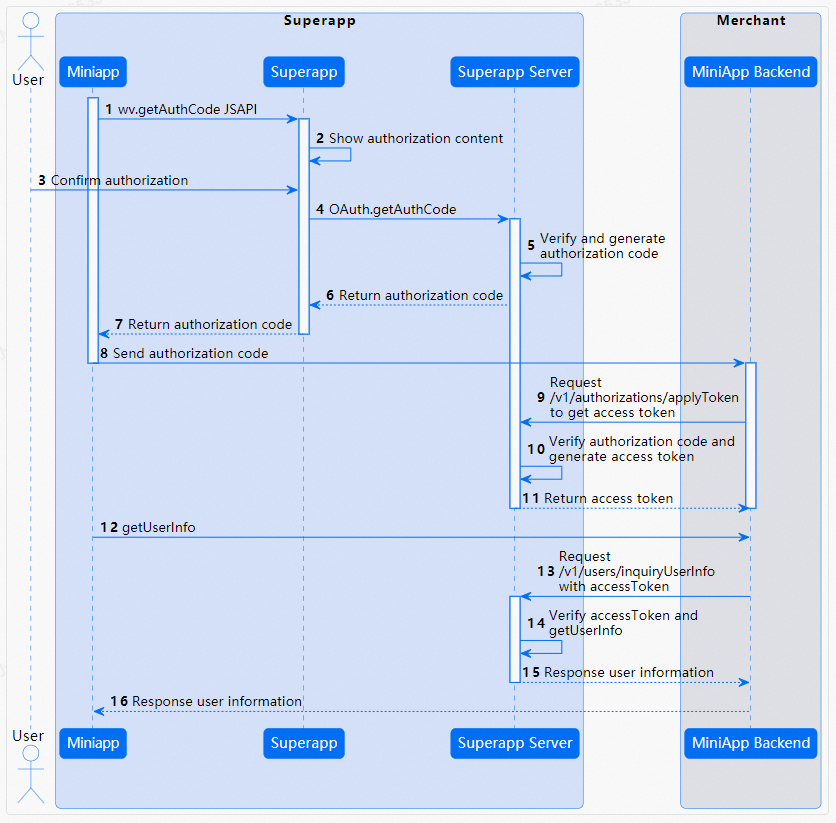
The following figure shows how to authorize a merchant to call an API operation.