Use the WVUIDialog API to display alerts, confirms, prompts, and permission guidance dialogs in HTML5 apps and MiniApps. This topic also covers the WVUIDatePicker API for date selection.
WVUIDialog.alert
Displays an alert.
|
On iOS |
On Android |
|
|
|
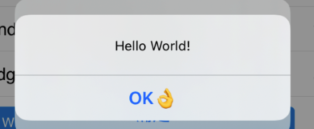
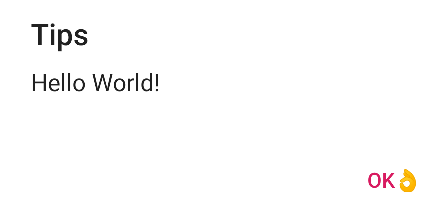
Input parameters
-
message(string): The message to display in the alert. -
okbutton(string): The text for the OK button. -
identifier(string): The identifier for the alert.
Events
WV.Event.Alert fires when the user responds to the alert.
Event parameters
-
identifier(string): The identifier of the alert.
Callback parameters
The success callback fires when the alert displays. The failure callback fires on error. Neither callback returns parameters.
var params = {
        // The message to display in the alert.
        message: 'Hello World!',
        // The text for the OK button.
        okbutton: 'OK'
};
window.WindVane.call('WVUIDialog', 'alert', params, function(e) {
}, function(e) {
        alert('failure: ' + JSON.stringify(e));
});
WVUIDialog.confirm
Displays a confirm dialog.
|
On iOS |
On Android |
|
|
|
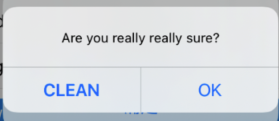
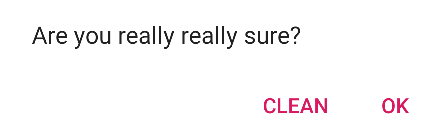
Input parameters
-
message(string): The message to display in the confirm dialog. -
okbutton(string): The text for the OK button. -
cancelbutton(string): The text for the Cancel button. -
_index(int): A unique index to identify the confirm dialog.
Callback parameters
The success callback fires when the dialog displays. The failure callback fires on error. Neither callback returns parameters.
Events
wv.dialog fires when the user responds to the confirm dialog.
Event parameters
-
type(string): The tapped button text, matching theokbuttonorcancelbuttoninput parameter. -
_index(int): The confirm dialog index, matching the_indexinput parameter.
document.addEventListener('wv.dialog', function(e) {
alert(JSON.stringify(e.param));
}, false);

var params = {
// The message to display in the confirm dialog.
message: 'Are you really really sure?',
// The text for the OK button.
 okbutton: 'OK',
// The text for the Cancel button.
cancelbutton: 'Cancel',
// The index of the confirm dialog.
_index: 10086
};
window.WindVane.call('WVUIDialog', 'confirm', params, function(e) {
}, function(e) {
alert('failure: ' + JSON.stringify(e));
});
WVUIDialog.enableAlertBeforeUnload
This API is supported only in WindVane for Android 1.0.3.4 or later.
Enables a leave-page confirmation alert for MiniApp pages. Once enabled, pressing the back button triggers this alert.
Input parameters
-
message(string): Optional. The dialog message. Default: "Leave this page?".
Callback parameters
Success callback:
-
None.
Failure callback:
-
msg (
string): The error message.
var params = {
    // The content of the dialog.
    message: 'Are you sure you want to leave this page?',
};

window.WindVane.call('WVUIDialog', 'enableAlertBeforeUnload', params, function(e) {
}, function(e) {
        alert('failure: ' + JSON.stringify(e));
});
WVUIDialog.disableAlertBeforeUnload
This API is supported only in WindVane for Android 1.0.3.4 or later.
Disables the leave-page confirmation alert for MiniApp pages.
Input parameters
-
None.
Callback parameters
Success callback:
-
None.
Failure callback:
-
msg (
string): The error message.
window.WindVane.call('WVUIDialog', 'disableAlertBeforeUnload', {}, function(e) {
}, function(e) {
        alert('failure: ' + JSON.stringify(e));
});
WVUIDialog.prompt
This API is supported only in WindVane for Android 1.0.3.4 or later.
Displays a prompt for text input.
Input parameters
-
title(string): Optional. The title of the prompt. -
message(string): The message displayed in the prompt. Default: "Please enter content." -
hint(string): Optional. The placeholder text in the input field. -
okbutton(string): Optional. The text for the OK button. Default: "OK". -
cancelbutton(string): Optional. The text for the Cancel button. Default: "Cancel".
Callback parameters
Success callback:
-
ok(boolean): Returnstrueif the OK button is tapped, orfalseif the Cancel button is tapped. -
inputValue(string): Ifokistrue, this parameter contains the text entered by the user.
Failure callback:
-
msg (
string): The error message.
var params = {
  	    title: 'Prompt',
        message: 'Please enter xxx',
  		  hint: 'Please enter xxx',
        okbutton: 'OK',
  		  cancelbutton: 'Cancel'
};
window.WindVane.call('WVUIDialog', 'prompt', params, function(e) {
}, function(e) {
        alert('failure: ' + JSON.stringify(e));
});
WVUIDialog.showAuthGuide
This API is supported only in WindVane for Android 1.0.3.4 or later.
Displays a permission guidance dialog that prompts the user to grant specific permissions.
Input parameters
-
permission(string): The name of the permission, such ascameraoraddress book. -
okbutton(string): The text for the OK button. -
jumpToSettings(string): Optional. Set to1to redirect to the app details page after the user taps OK, or0to skip. Default:0.
Callback parameters
Success callback:
-
None.
Failure callback:
-
msg (
string): The error message.
var params = {
  	    permission: 'address book',
  		  cancelbutton: 'Cancel',
  		  okbutton:'OK'
};
window.WindVane.call('WVUIDialog', 'showAuthGuide', params, function(e) {
}, function(e) {
        alert('failure: ' + JSON.stringify(e));
});
WVUIDatePicker.show
Displays a date picker. Defaults to the current date if no default date is specified.
Input parameters
-
year(string): The default selected year. -
month(string): The default selected month. -
dayOfMonth(string): The default selected day of the month. -
minYear(string): The minimum selectable year. -
minMonth(string): The minimum selectable month. -
minDayOfMonth(string): The minimum selectable day of the month. -
maxYear(string): The maximum selectable year. -
maxMonth(string): The maximum selectable month. -
maxDayOfMonth(string): The maximum selectable day of the month.
Callback parameters
The success callback returns the selected date. The failure callback fires if the operation fails.
-
year(string): The selected year. -
month(string): The selected month. -
dayOfMonth(string): The selected day of the month.
var params = {
  	    year: 2022,
  		  month: 11,
  			dayOfMonth: 15
};
window.WindVane.call('WVUIDatePicker', 'show', params, function(e) {
}, function(e) {
        alert('failure: ' + JSON.stringify(e));
});