Use the WVUIActionSheet JSAPI to display action sheets in your HTML5 apps and MiniApps.
WVUIActionSheet.show
Displays an action sheet at the bottom of the screen.
|
Effect on iOS devices |
Effect on Android devices |
|
|
|
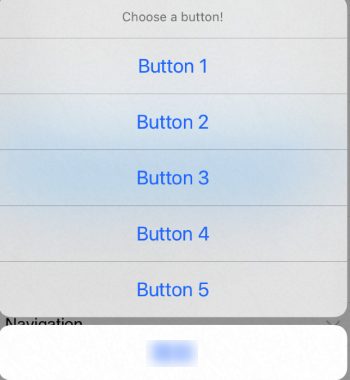
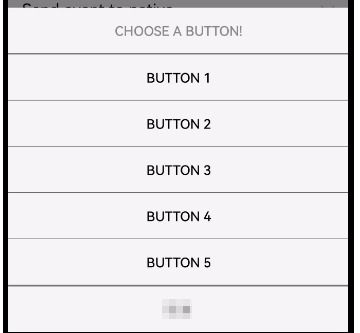
Input parameters
-
[
string] title: the title of the action sheet. -
[
int] _index: the unique identifier of the action sheet. -
[
array] buttons: an array of button titles for the action sheet. Each item is a string.An action sheet always ends with an extra button: the Cancel button.
Callback parameters
None. The success callback fires when the action sheet displays successfully; otherwise, the failure callback fires.
Event listening
Listen for the wv.actionsheet event to handle user selections.
Event parameters:
-
[
string] type: the text of the tapped button. -
[
int] _index: the index of the action sheet.
-
On iOS, tapping Cancel or outside the action sheet triggers an event with type cancel.
-
On Android, tapping Cancel triggers an event without the
typeproperty. Tapping outside the action sheet triggers no event.
document.addEventListener('wv.actionsheet', function(e) {
        alert(JSON.stringify(e.param));
}, false);

var params = {
        // The title of the action sheet.
        title: 'Choose a button!',
        // The index of the action sheet.
        _index: 32768,
        // The buttons that are displayed in the action sheet.
        buttons: ['Button 1', 'Button 2', 'Button 3', 'Button 4', 'Button 5']
};
window.WindVane.call('WVUIActionSheet', 'show', params, function(e) {
}, function(e) {
        alert('failure: ' + JSON.stringify(e));
});