This topic describes the issue that you fail to start the Elastic Compute Service (ECS) instance created based on a custom image after you migrate a server by using Server Migration Center (SMC). This topic also describes the causes of and solutions to this issue.
Problem description
You fail to start the ECS instance created based on a custom image after you migrate a server by using SMC.
Cause
The VirtIO driver is not installed on the source server before you create an I/O optimized instance.
The GRand Unified Bootloader (GRUB) configurations of the source server are valid.
The operating system of the source server is an early Linux distribution such as CentOS 5 or Debian 7, and the built-in GRUB version is earlier than V1.99.
ECS instances that are based on the SHENLONG architecture are incompatible with some early operating system versions.
Solution
Perform the following operations:
Check the driver. Before you create an I/O optimized instance, make sure that the VirtIO driver is installed on the source server. For more information, see Install the virtio driver.
Check whether the GRUB configurations of the source server are valid.
If the following conditions apply, you must update GRUB to version 1.9 or later, and then perform the migration again: The operating system of the source server is an early Linux distribution such as CentOS 5 or Debian 7, and the built-in GRUB version is earlier than V1.99. In addition, the following output appears when you connect to the ECS instance by using a management terminal in the ECS console. For more information, see Install GRUB on a Linux server.
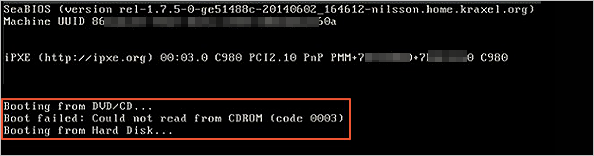
ECS instances that are based on the SHENLONG architecture are incompatible with some early operating system versions. For more information about the incompatible early operating system versions and the related solutions, see How do I resolve downtime issues that occur on migrated instances?