This topic describes the cause of the "fail to download rpm packages" error message that is reported when you use Server Migration Center (SMC) to migrate a Linux operating system. This topic also describes how to resolve the error.
Problem description
The "fail to download rpm packages" error message is reported when a Linux operating system is being migrated by using SMC.
Cause
To migrate an operating system, you need to reinstall the software packages on the source operating system, such as a CentOS operating system, to align with the software packages that are available in the destination operating system. The reinstallation process includes the following stages: dependency parsing for software packages, software package download, and software package installation. If the dependencies are invalid, the RPM package may fail to be installed.
Solution
Connect to the source server. For more information, see Connect to an instance.
Run the following command to query the logs.
The Leapp tool is used for cross-version migrations. For example, if you fail to migrate a source CentOS 7 operating system to Alibaba Cloud Linux 3, you need to query the error logs of the Leapp tool and find the error information in
package_download: Error: Transactionof the error logs.cat /var/log/leapp/leapp-upgrade.log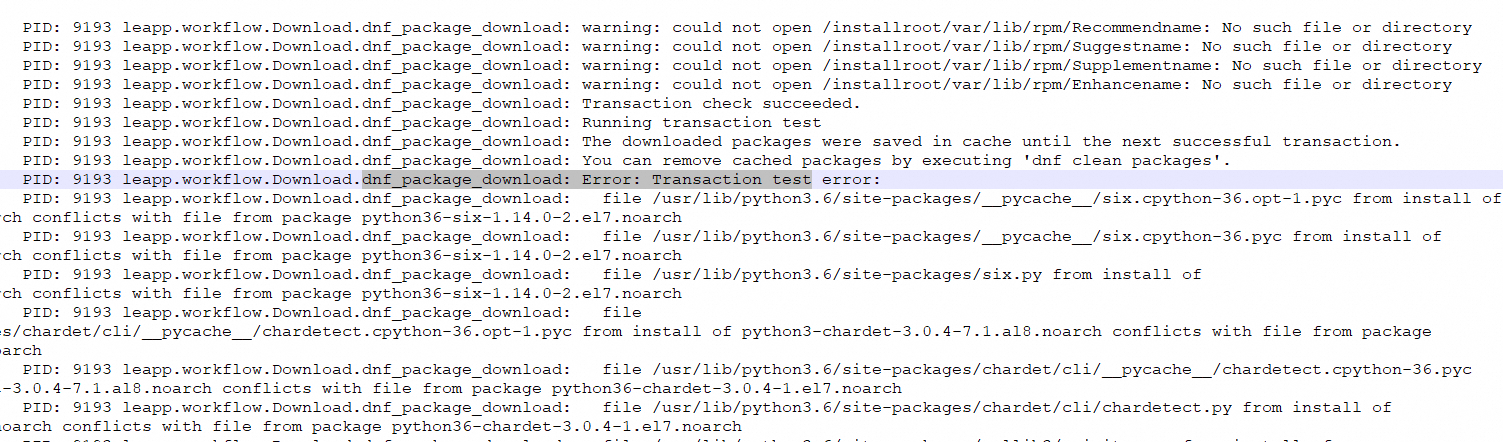
Analyze the dependencies that are mentioned in the error information.
Example 1

The preceding error information indicates that the
python3-six-1.11.0-8.1.al8.noarchsoftware package to be installed conflicts with thepython36-six-1.14.0-2.el7.noarchsoftware package on the source operating system. In this case, run the following command to uninstall thepython36-six-1.14.0-2.el7.noarchsoftware package from the source operating system. Then, thepython3-six-1.11.0-8.1.al8.noarchsoftware package can be installed for the migration. This method is used to handle all conflicts.yum remove python36-sixExample 2

The preceding error information indicates that the
cmake-3.20.2-5.al8.x86_64software package to be installed conflicts with thecmake3-3.17.5-1.el7.x86_64software package on the source operating system. In this case, run the following command to uninstall thecmake3-3.17.5-1.el7.x86_64software package from the source operating system. Then, thecmake-3.20.2-5.al8.x86_64software package can be installed for the migration. This method is used to handle all conflicts.yum remove cmake3-3.17.5-1.el7.x86_64
After the error is resolved, run the SMC client and retry the migration job. For more information, see Run the SMC client.