A StoreView lets you run federated queries across Logstores, Metricstores, and regions within a Simple Log Service project.
What is a StoreView
A StoreView is a virtual resource in an SLS project that maps relationships between Logstores or Metricstores. You can query data across stores through a StoreView, but cannot modify data. Two types exist: StoreView for Logstore supports querying, analysis, and predefinition with SPL syntax. StoreView for Metricstore supports cross-Metricstore queries only.

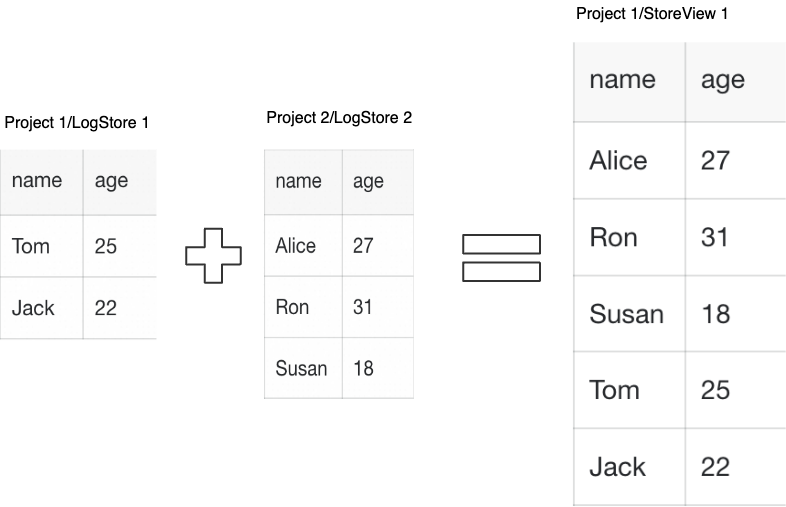
In a Log Data View or Time Series Data View, you can query data across Logstores or Metricstores. For example, if Logstore1 and Logstore2 both contain an age field and are associated in Storeview1, querying age in Storeview1 returns matching results from both.
Permissions
RAM users and RAM roles require explicit permissions to use a StoreView. For details, see Create a RAM user and grant permissions, Create a RAM role for an Alibaba Cloud service and grant permissions to the RAM role, and Use a RAM role for cross-account resource access.
You can grant permissions by using a system policy or a custom policy.
-
System policy: Predefined by Alibaba Cloud. You can use but not modify these policies.
-
Read-only permissions for Simple Log Service: AliyunLogReadOnlyAccess.
-
Full management permissions for Simple Log Service: AliyunLogFullAccess.
-
-
Custom policy: User-defined policies that you create and manage.
-
To create a StoreView or query data as a RAM user or RAM role, you must have permission to query logs in a Logstore on all associated Logstores and Metricstores. Add the following statement to your custom policy:
Important-
In a policy,
Logstorecan refer to either a Logstore or a Metricstore. -
In a policy,
storeviewcan refer to both a Log Data View and a Time Series Data View.
{ "Version": "1", "Statement": [ { "Action": "log:GetLogStoreLogs", "Resource":[ "acs:log:*:*:project/${projectName}/Logstore/*", "acs:log:*:*:project/${projectName}/storeview/*" ], "Effect": "Allow" } ] } -
-
Limitations
-
Up to 10 Log Data View or Time Series Data View in each Simple Log Service project.
-
Each Log Data View or Time Series Data View can be associated with a maximum of 50 Logstores or Metricstores.
-
All Logstores or Metricstores in a Log Data View or Time Series Data View must belong to the same Alibaba Cloud account.
-
Storeviews support cross-region analysis only within the Chinese mainland. Cross-border analysis is not supported.
Predefinition
Concept
When you create a StoreView for Logstore, you can attach predefined SPL statements that filter data or align field names before aggregation. Predefined queries support only SPL commands and functions, and the keywords of SPL commands and functions. For example, to aggregate the a field from LogStore1 and the b field from LogStore2, use extend a = b to align column names. Example.
Limitations
Predefinition is supported only for StoreView for Logstore, not for StoreView for Metricstore.
Supported commands
Predefined queries support the operators listed in SPL commands and functions and SPL commands and functions.
For SQL and SPL functions, see Function overview.
Examples
To create or modify a StoreView for Logstore, see Create a Storeview for Logstore.
For example, if you need to aggregate field a from Logstore1 and field b from Logstore2, you can use extend a = b (predefinition) when you create or modify a storeview to make the column names consistent.
Example 1
If you predefine * | where a>1 in Logstore1, only the logs in the StoreView that match a>1 are included in subsequent analysis.
The actual query is * | where cast(a as integer) > 1. The data preview table shows that the values for a in the filtered logs are 10 and 9, both of which are greater than 1.
Example 2
In Logstore1, predefining * | extend b = a adds a column named b to Logstore1 in the StoreView. This column has the same values as column a and is used for subsequent aggregation.
After predefining extend b = a, the data preview table shows that a new column b is added to Logstore1, and its values are the same as those in column a.
Query
Storeview for Logstore
A StoreView for Logstore queries data across multiple Logstores simultaneously. For example, if a Log Data View is associated with LogStore-1 and LogStore-2, and both contain the request_method field, the query (request_method:GET or request_method:POST) and status in [200 299] returns matching logs from both. For query syntax, see Query syntax and features.
If a Log Data View contains two Logstores with identical log content, a keyword search returns results from both. Use the tag field to identify the source Logstore for each log entry.
In the query results, each log is identified by the __tag__:__logstore__ tag field, which indicates its source Logstore. For example, a value of logstore-2 indicates that the log is from Logstore-2.
Storeview for Metricstore
A StoreView for Metricstore supports cross-store queries. If a StoreView for Metricstore is associated with metricstore1 and metricstore2, enter a PromQL statement in the query box. The backend automatically queries all associated Metricstores. For query syntax, see Syntax for querying and analyzing metric data. To create or modify a StoreView for Metricstore, see Query data across Metricstores.
A StoreView for Metricstore supports PromQL queries only. SQL queries, analysis, and predefinition are not supported.
In the Create StoreView dialog box, enter a StoreView Name, such as metric_storeview_test, select Time Series for StoreView Type, add the desired Metricstores in the Associated Stores area, and then click OK.
Analysis
Concept
Data View supports cross-store aggregation. For example, if a StoreView is associated with LogStore-1 and LogStore-2, and both contain field a, the query * | select a, count(1) group by a returns the combined count for field a across both Logstores.
Aggregation requires consistent field names. When field names differ across stores, use predefinition to rename them. See Predefinition capabilities.
Limitations
Data analysis is supported only for StoreView for Logstore, not for StoreView for Metricstore.
Supported functions
For SQL and SPL functions, see Function overview.
Examples
Example 1
A Log Data View is associated with Logstores from the same service with identical log content. Ensure the index configurations are identical across Logstores (for example, full-text indexing enabled or field indexes configured the same way). Then add the Logstores to the Log Data View.
After you create a Log Data View, you can use SQL for analysis. The statistical results for different status values in the last 15 minutes are the aggregated results of all logs from the two Logstores.
The query statement is SELECT status, count(*) AS PV GROUP BY status. The query result shows PV=4 for status=200 and PV=8 for status=302.
Example 2
A Log Data View is associated with Logstores from the same service whose log fields have different names. Use a predefined SPL statement to align field names. For example, *|extend request_method = method renames the method field to request_method. Click Preview data to verify the predefinition results.
Later, you can use request_method to perform query analysis.
Run the query * | SELECT request_method, count(*) GROUP BY request_method order by request_method desc in the storeview_test Storeview. The chart shows 4 requests where request_method is GET and 1 request where request_method is null.
StoreView vs. Store
|
Feature |
Logstore/Metricstore |
Storeview |
|
Quick analysis |
Supported |
Supported |
|
Chart |
Supported |
Supported |
|
Dashboard |
Supported |
Supported |
|
Log download |
Supported |
Supported |
|
Saved search |
Supported |
Not supported |
|
Scheduled SQL |
Supported |
Not supported |
|
Alert |
Supported |
Not supported |
|
Log clustering |
Supported |
Not supported |
|
Field analysis |
Supported |
Not supported |