Analyze billing data, optimize costs, and detect spending anomalies across Alibaba Cloud services. Cost Manager stores data in Tablestore with daily automatic full updates for accuracy and timeliness.
Features
-
Cost optimization: Analyze pay-as-you-go bills per service and estimate the cost of switching to subscription.
-
Automated bill export: Configure once for automatic bill transfers.
-
Interactive analysis: Run custom SQL queries on billing data and get results in seconds.
-
AI-powered insights: Forecast cost trends and detect billing anomalies with machine learning.
-
Automated reports and alerts: Schedule analysis reports via DingTalk or email. Use machine learning to forecast cost trends and automatically trigger anomaly alerts.
-
Open integration: Connect with 30+ data analysis products, including Hadoop, Spark, and Flink.
Access
Log on to the Simple Log Service console.
-
In the Log Application area, on the Business Analysis tab, click Cost Manager.
-
Click Custom Analysis.
Query syntax
Basic syntax
Cost Manager exposes billing data as an external Logstore table. All queries must target this external table.
-
The search statement before the pipe character (|) must be an asterisk (
*). -
The external table name is
instance_bill. Add all query conditions to theWHEREclause.
* | select xxx from instance_bill where xxx group by xxx limit xxxFor example, query daily SLS costs:
* |
select
  date_trunc('day', __time__) as day,
  sum(PretaxAmount) as cost
FROM  instance_bill
where
  productcode = 'sls'
group by
  day
Example 1: Aggregation query
To get the total cost for SLS:
-
Query and analysis statement
* | select sum(PretaxAmount) as cost FROM instance_bill where productcode = 'sls' -
Query and analysis result

Example 2: Group query
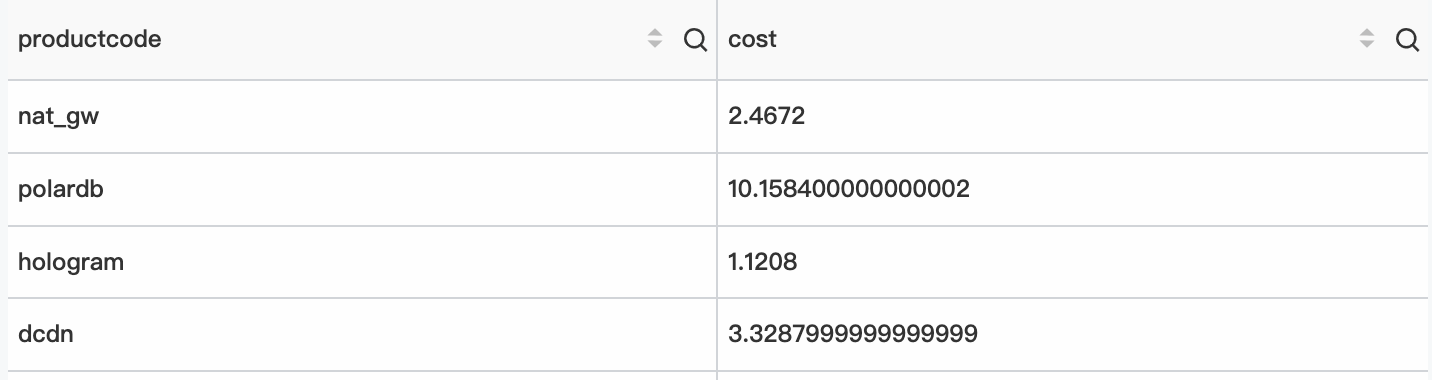
To query costs by service:
-
Query and analysis statement
* | select productcode, sum(PretaxAmount) as cost FROM instance_bill group by productcode -
Query and analysis result
Example 3: Time-based comparison
To compare costs month-over-month:
-
Query and analysis statement
* | SELECT diff [1] AS "Current month cost", diff [2] AS "Previous month cost", diff [3] * 100 -100 as "Increase (%)" FROM ( SELECT compare(amount, 2592000) as diff FROM ( SELECT sum(PretaxAmount) AS amount FROM instance_bill ) ) -
Query and analysis result

Example 4: Billable item analysis
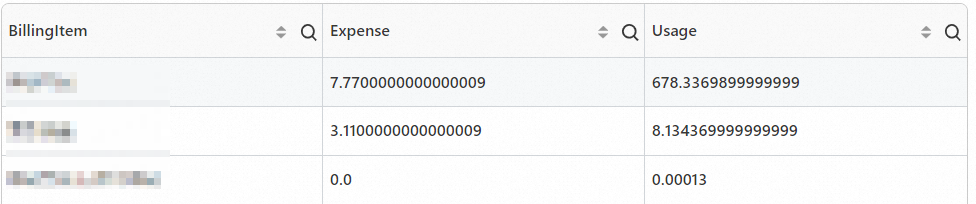
To query the cost and usage of each billable item in SLS:
-
Query and analysis statement
* | SELECT BillingItem, sum(PretaxAmount) AS "Cost", sum(Usage) as "Usage" FROM instance_bill where productcode = 'sls' GROUP by BillingItem -
Query and analysis result
Example 5: Daily usage trend analysis
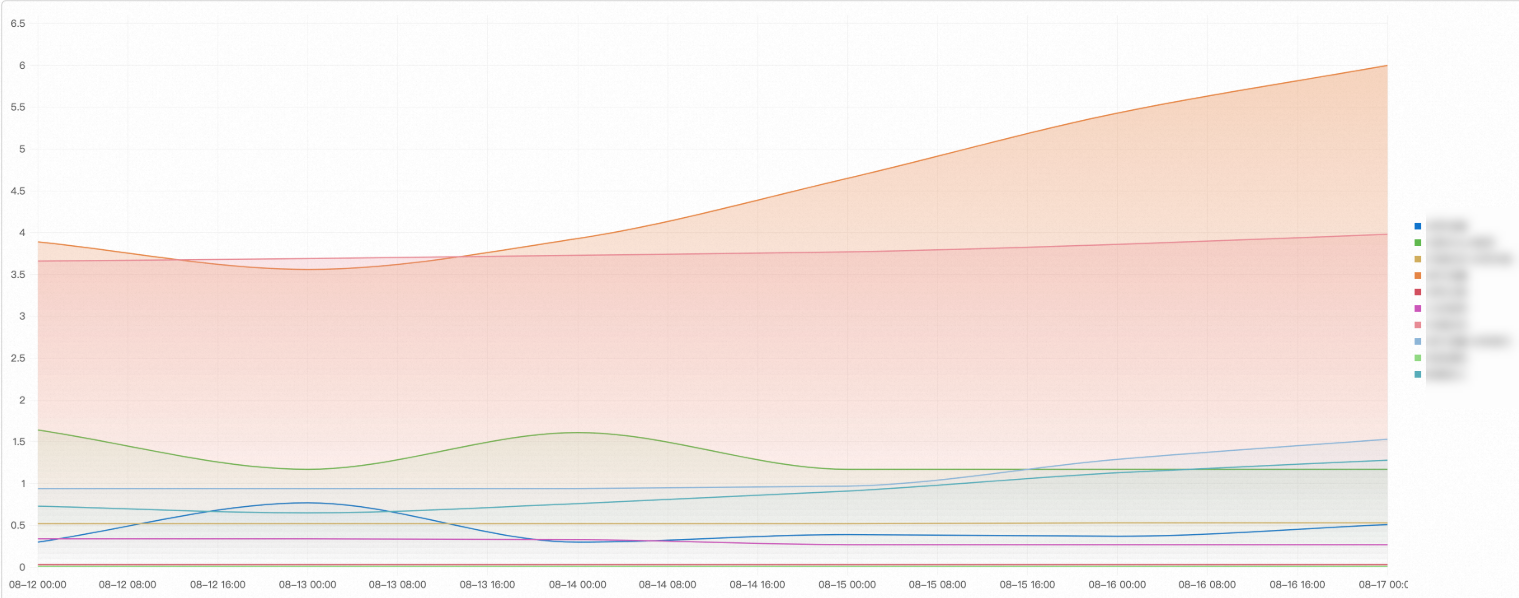
To analyze the daily usage trend of billable items:
-
Query and analysis statement
* | SELECT date_trunc('day', __time__) as t, BillingItem, sum(PretaxAmount) AS "Cost", sum(Usage) as "Usage" FROM instance_bill where productcode = 'sls' GROUP by BillingItem, t ORDER by t -
Query and analysis result
Example 6: Instance analysis
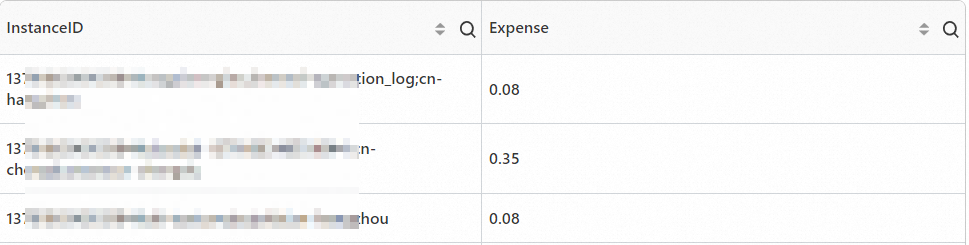
To query the cost for each SLS instance:
-
Query and analysis statement
* | SELECT InstanceID, sum(PretaxAmount) AS "Cost" FROM instance_bill where productcode = 'sls' GROUP by InstanceID -
Query and analysis result
Example 7: Daily instance cost analysis
To analyze the daily cost trend of each SLS instance:
-
Query and analysis statement
* | SELECT date_trunc('day', __time__) as t, InstanceID, sum(PretaxAmount) AS "Cost" FROM instance_bill where productcode = 'sls' GROUP by InstanceID, t ORDER by t -
Query and analysis result
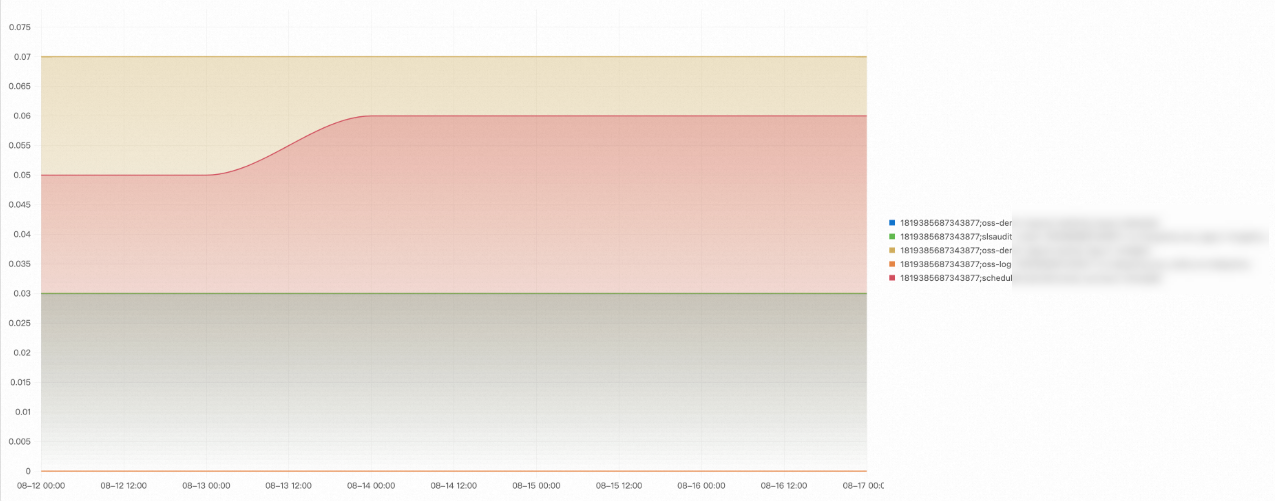
Example 8: External table joins
To join billing data with a custom external table:
This example joins instance_bill with a custom external table instance_name_table that maps instance IDs to names.
-
Query and analysis statement
* | with t1 as (
  select
    InstanceID,
    sum(PretaxAmount) as PretaxAmount
  FROM    instance_bill
),
t2 as (
  select
    InstanceID,
    InstanceName
  FROM    instance_name_table
)
select
  t1.InstanceID,
  t1.PretaxAmount,
  t2.InstanceName
FROM  t1
  left join t2 on t1.InstanceID = t2.InstanceID
Bill data description
|
Field |
Description |
Example |
|
BillingDate |
The billing cycle. |
2022-11-06 |
|
BillingItem |
The billable item. |
Number of PUT and other types of requests |
|
BillingType |
The billing method. |
Other |
|
CostUnit |
The financial unit. |
Unassigned |
|
Currency |
The currency. |
USD |
|
DeductedByCashCoupons |
The amount deducted by cash coupons. |
0.0 |
|
DeductedByCoupons |
The discount amount from coupons. |
0.0 |
|
DeductedByPrepaidCard |
The amount deducted by a prepaid card. |
0.0 |
|
DeductedByResourcePackage |
The amount deducted by a resource package. |
0 |
|
InstanceConfig |
The detailed instance configuration. |
None |
|
InstanceID |
The instance ID. |
me-east-1%3Bstandard |
|
InstanceSpec |
The instance specifications. |
None |
|
InternetIP |
The public IP address. |
None |
|
IntranetIP |
The internal IP address. |
None |
|
InvoiceDiscount |
The discount amount. |
0.001 |
|
Item |
The type of the bill. Valid values:
|
PayAsYouGoBill |
|
ListPrice |
The unit price. |
1.020000 |
|
ListPriceUnit |
The price unit. |
CNY per 10,000 requests |
|
NickName |
The instance nickname. |
test |
|
OutstandingAmount |
The outstanding amount. |
0.0 |
|
OwnerID |
The account ID. |
12***3212 |
|
PaymentAmount |
The cash payment. |
0.0 |
|
PretaxAmount |
The amount payable. |
0.0 |
|
PretaxGrossAmount |
The original amount. |
0.005 |
|
ProductCode |
The service code. |
oss |
|
ProductDetail |
The service details. |
Object Storage Service (OSS) |
|
ProductName |
The service name. |
Object Storage Service |
|
ProductType |
The service type. |
None |
|
Region |
The region. |
China (Shanghai) |
|
ResourceGroup |
The resource group. |
None |
|
ServicePeriod |
The service period. |
10800 |
|
SubscriptionType |
The subscription type. Valid values:
|
PayAsYouGo |
|
Tag |
The tag. |
None |
|
Usage |
The usage. |
0.005000 |
|
UsageUnit |
The usage unit. |
10,000 requests |
|
Zone |
The zone. |
cn-shanghai-b |
Next steps
After a query succeeds, visualize results as statistical charts in a dashboard.