Simple Log Service (SLS) and Application Load Balancer (ALB) jointly offer CloudLens for ALB. This service helps you analyze Layer 7 logs, analyze metrics in seconds, and receive real-time alerts. It also provides automatic anomaly detection based on AIOps. CloudLens for ALB lets you understand client behavior, geographic distribution, request success rates, and response latency. This topic describes the features, assets, billing, and limits of CloudLens for ALB.
Features
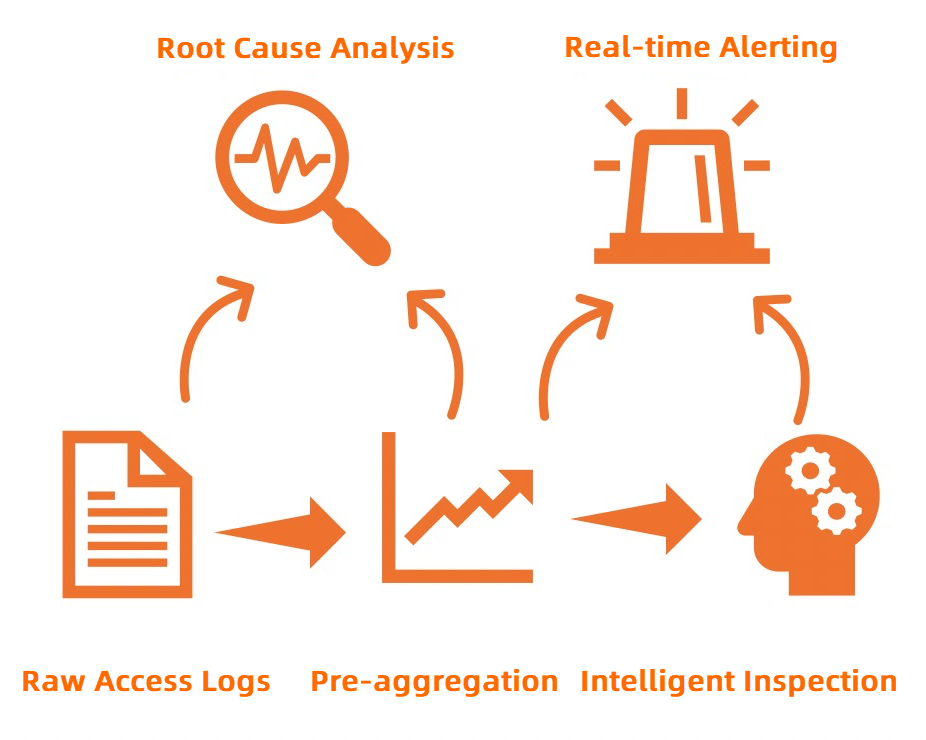
CloudLens for ALB automatically aggregates real-time access logs and provides features such as intelligent inspection and real-time alerting.
Centrally manage all ALB instances under your Alibaba Cloud account.
Enable data collection for ALB access logs with a single click and manage the collection status of all instances.
Store, query, and analyze ALB access logs in real time.
Extract various metrics from raw access logs in real time. These metrics include page views (PVs), request success rate, average latency, P50 latency, P99 latency, and inbound and outbound traffic. You can also combine multiple dimensions, such as app_lb_id, host, and status.
Access rich visual reports, such as a monitoring center, real-time monitoring, and instance inspection. You can subscribe to reports by email or through DingTalk groups.
Use the intelligent inspection feature, which supports global and app_lb_id granularity inspections. You can also annotate anomalies directly in the visual reports.
Customize alert configurations. You can send alert notifications through Message Center, text messages, email, voice calls, or DingTalk. You can also integrate with custom webhooks.
Benefits
Simple: Enable the service with a single click and manage it centrally. You do not need to manage log collection, storage, computing, or visualization. This frees up developers and O&M engineers from time-consuming log processing so they can focus on business development.
Scalable: The volume of access logs is proportional to the PVs of ALB instances. This can result in large amounts of data. Processing these logs requires balancing performance and cost.
Real-time: Scenarios such as DevOps, monitoring, and alerting require real-time log data. CloudLens for ALB, combined with the powerful big data computing capabilities of Simple Log Service, analyzes and processes logs in seconds.
ImportantIn 99.9% of cases, log latency does not exceed 3 minutes.
Flexible: Enable or disable the access log feature for each ALB instance. You can set any log storage period. The Logstore capacity scales dynamically to meet your business growth.
Intelligent: The service provides automatic inspection of ALB metrics based on AIOps algorithms from DAMO Academy. This helps you find and locate issues faster and more accurately.
Asset description
All assets are located in the project that you select. The assets in the project include the following:
Logstore
An access log Logstore that you create to store Layer 7 access logs from ALB.
An inspection result Logstore that stores inspection results. After you enable data collection, a dedicated Logstore named access_log_logstore_name-metrics-result is automatically created.
ImportantDo not delete the Logstore for ALB Layer 7 access logs. If you do, logs cannot be collected and shipped to Simple Log Service.
Do not delete the indexes of some fields in the access log Logstore. If you do, metric transformation will fail.
Metricstore
A Metricstore that stores aggregated metric information. After you enable data collection, a dedicated Metricstore named access_log_logstore_name-metrics is automatically created.
NoteThe Metricstore stores aggregated metrics. The data volume is much smaller than that of raw access logs, which makes it suitable for long-term storage.
Aggregation rules
Rule name
Time granularity
Aggregation dimension
Generated metric name
total
10s
total
pv
body_bytes_sent_avg
body_bytes_sent_sum
request_length_avg
request_length_sum
upstream_response_time_avg
upstream_response_time_p50
upstream_response_time_p90
upstream_response_time_p99
request_time_avg
request_time_p50
request_time_p90
request_time_p99
app_lb_id
10s
app_lb_id
pv:app_lb_id
body_bytes_sent_avg:app_lb_id
body_bytes_sent_sum:app_lb_id
request_length_avg:app_lb_id
request_length_sum:app_lb_id
upstream_response_time_avg:app_lb_id
upstream_response_time_p50:app_lb_id
upstream_response_time_p90:app_lb_id
upstream_response_time_p99:app_lb_id
request_time_avg:app_lb_id
request_time_p50:app_lb_id
request_time_p90:app_lb_id
request_time_p99:app_lb_id
app_lb_id_host_status
10s
app_lb_id+host+status
pv:app_lb_id:host:status
body_bytes_sent_avg:app_lb_id:host:status
body_bytes_sent_sum:app_lb_id:host:status
request_length_avg:app_lb_id:host:status
request_length_sum:app_lb_id:host:status
upstream_response_time_avg:app_lb_id:host:status
upstream_response_time_p50:app_lb_id:host:status
upstream_response_time_p90:app_lb_id:host:status
upstream_response_time_p99:app_lb_id:host:status
request_time_avg:app_lb_id:host:status
request_time_p50:app_lb_id:host:status
request_time_p90:app_lb_id:host:status
request_time_p99:app_lb_id:host:status
Inspection rules
Rule name
Inspection algorithm
Inspection metric
alb-patrol-total
Time2Graph
pv
body_bytes_sent_avg
body_bytes_sent_sum
request_length_avg
request_length_sum
upstream_response_time_avg
upstream_response_time_p50
upstream_response_time_p90
upstream_response_time_p99
request_time_avg
request_time_p50
request_time_p90
request_time_p99
alb-patrol-alb
Time2Graph
pv:alb
body_bytes_sent_avg:alb
body_bytes_sent_sum:alb
request_length_avg:alb
request_length_sum:alb
upstream_response_time_avg:alb
upstream_response_time_p50:alb
upstream_response_time_p90:alb
upstream_response_time_p99:alb
request_time_avg:alb
request_time_p50:alb
request_time_p90:alb
request_time_p99:alb
Dedicated dashboards
Dashboard name
Associated Logstore or Metricstore
Description
Monitoring Overview
access_log_logstore_name-metrics
Displays an overview of ALB instance monitoring metrics. The metrics include core indicators, error codes, traffic, anomalies, PVs, request success rate, and average latency.
Monitoring Center
access_log_logstore_name-metrics
access_log_logstore_name
Displays real-time monitoring data for the ALB instance. The data includes PVs, request success rate, average latency, number of 4xx requests, status distribution, traffic, P50 latency, P90 latency, P99 latency, top requested hosts, top latency hosts, top failure rate hosts, top requested URLs, top latency URLs, top failure rate URLs, top requested backends, top latency backends, and top failure rate backends.
Real-time Monitoring
access_log_logstore_name
Displays monitoring information at a one-second granularity to help you identify transient jitter and anomalies. The information includes QPS, access latency, upstream latency, success rate, request traffic, response body traffic, 2xx status codes, 3xx status codes, error status codes, upstream 2xx status codes, upstream 3xx status codes, and upstream error status codes.
Instance Inspection
access_log_logstore_name-metrics
access_log_logstore_name-metrics-result
Automatically detects anomalies in the ALB instance based on machine learning algorithms provided by Simple Log Service. The metrics include total anomalies, high-severity anomalies, anomaly severity distribution, medium-severity anomalies, low-severity anomalies, anomaly metric distribution, anomaly list, and anomalies.
Access Overview
access_log_logstore_name
Displays the overall status of the ALB instance. The metrics include PVs vs. yesterday, PVs vs. last week, UVs vs. yesterday, UVs vs. last week, PV distribution, UV distribution, today's PVs, 7-day PVs, top 10 provinces by access, mobile client ratio, top 10 hosts by access, top 10 user agents by access, and top IP addresses by access.
Billing
Application Load Balancer does not charge extra fees for the log management feature.
After you enable ALB access logs, Simple Log Service charges you for items such as storage space, read traffic, requests, data transformation, and data shipping. For more information, see Billable items of the pay-by-feature billing method.
Limits
The Simple Log Service project and the ALB instance must be in the same region.
CloudLens for ALB is available in the following regions.
Cloud type
Region
Public cloud
China (Qingdao), China (Beijing), China (Zhangjiakou), China (Ulanqab), China (Hangzhou), China (Shanghai), China (Nanjing-Local Region-Discontinued), China (Shenzhen), China (Guangzhou), China (Chengdu), China (Hong Kong), Singapore, Malaysia (Kuala Lumpur), Indonesia (Jakarta), Japan (Tokyo), US (Silicon Valley), US (Virginia), Germany (Frankfurt)
Notes
The CloudLens feature requires at least one project to exist under your Alibaba Cloud account.
When you enable and use CloudLens, Simple Log Service checks whether a project exists under your account using the following logic.
Detection logic
-
When you enable the CloudLens feature for the first time, Simple Log Service checks whether a project exists under your Alibaba Cloud account. If no project exists, a project named
aliyun-product-data-Alibaba Cloud account ID-cn-heyuanis created in the China (Heyuan) region. -
After you enable CloudLens and navigate to the CloudLens page, Simple Log Service only checks whether a project exists under your Alibaba Cloud account. It does not automatically create a project in the China (Heyuan) region. To create a project manually, see Manage projects.
Delete a project
-
To delete the
aliyun-product-data-Alibaba Cloud account ID-cn-heyuanproject, open Cloud Shell and run the following command. Replace Alibaba Cloud account ID with your actual account ID.aliyunlog log delete_project --project_name=aliyun-product-data-Alibaba Cloud account ID-cn-heyuan --region-endpoint=cn-heyuan.log.aliyuncs.com -
To delete other projects and Logstores, see Manage Logstores and Manage projects.