This topic describes how to import trace data from iOS apps to Simple Log Service by using OpenTelemetry SDK for iOS.
Prerequisites
A trace instance is created. For more information, see Create a trace instance.
Step 1: Integrate the SDK
Swift project
Import the opentelemetry-swift package.
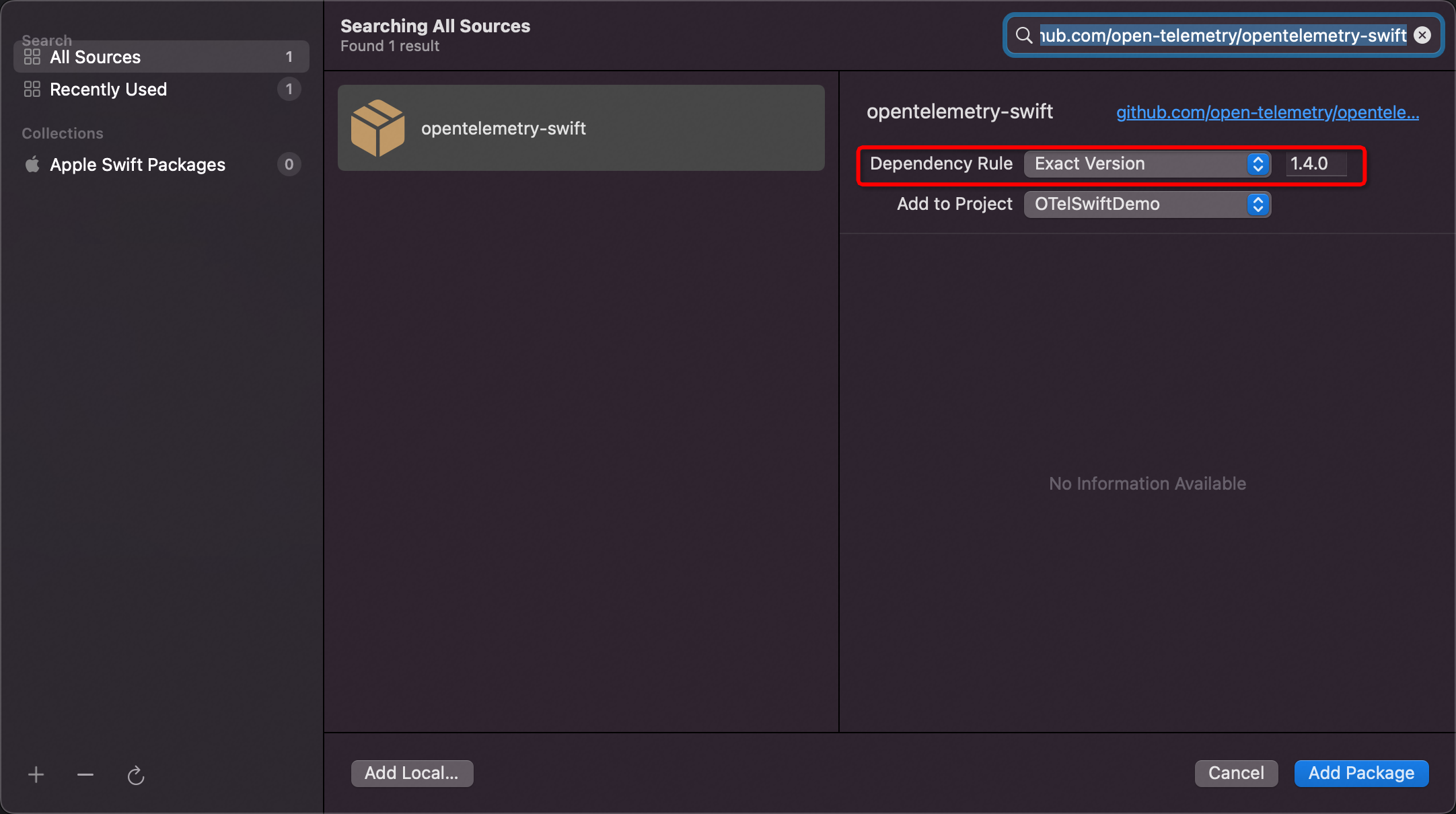
In Xcode, choose File > Add Package.
Enter the following link in the search box in the upper-right corner:
https://github.com/open-telemetry/opentelemetry-swiftSelect Exact Version for Dependency Rule and enter 1.4.0 as the version number.
For more information, see OpenTelemetry iOS SDK Release.
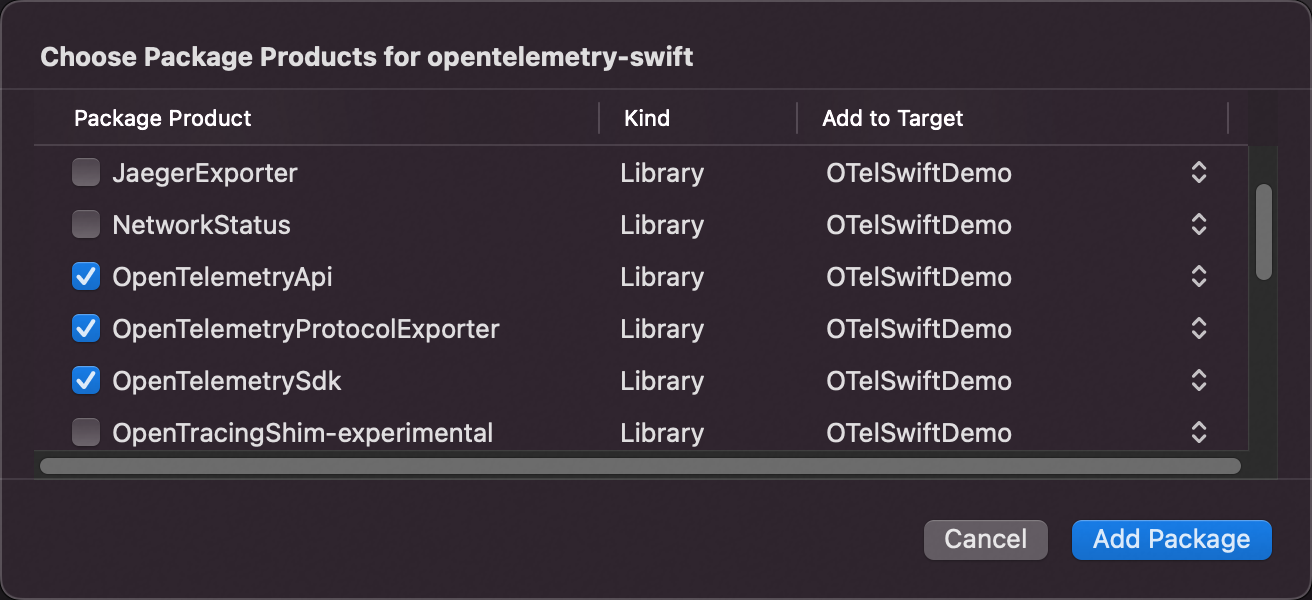
Select products for the opentelemetry-swift package.
We recommend that you select the following products:
OpenTelemetryApi
OpenTelemetryProtocolExporter
OpenTelemetrySdk
URLSessionInstrumentation
StdoutExporter
ResourceExtension
For more information about the products that are available for the opentelemetry-swift package, see Appendix: Descriptions of OpenTelemetry products.
Objective-C project
The opentelemetry-swift package has poor compatibility with the Objective-C programming language. Therefore, Simple Log Service extends an Objective-C class based on the opentelemetry-swift package. You must configure settings required for a Swift project in your Objective-C project. You must also add the opentelemetry-objc-extension package to your Objective-C project.
Configure settings required for a Swift project.
Import the opentelemetry-objc-extension package.
In Xcode, choose File > Add Package.
Enter the following link in the search box in the upper-right corner:
https://github.com/aliyun-sls/opentelemetry-objc-extensionSelect Exact Version for Dependency Rule and enter 1.0.0 as the version number.
For more information, see OpenTelemetry iOS Objc Extension SDK Release.

Select products for the opentelemetry-objc-extension package.
We recommend that you select the following products:
OpenTelemetryApiObjc
OpenTelemetryProtocolExporterObjc
OpenTelemetrySdkObjc
ResourceExtensionObjc
URLSessionInstrumentationObjc
StdoutExporterObjc
For more information about the products that are available for the opentelemetry-objc-extension package, see Appendix: Descriptions of OpenTelemetry products.
Step 2: Initialize the SDK
We recommend that you initialize the SDK by using the - (BOOL)application:(UIApplication *)application didFinishLaunchingWithOptions:(NSDictionary *)launchOptions method of the AppDelegate class.
Swift project
// Import the following modules:
import GRPC
import NIO
import OpenTelemetryApi
import OpenTelemetrySdk
import OpenTelemetryProtocolExporter
import StdoutExporter
import URLSessionInstrumentation

// Initialize the exporter. The exporter is used to export trace data to a Log Service Logstore.
let client = ClientConnection.usingPlatformAppropriateTLS(for: MultiThreadedEventLoopGroup(numberOfThreads: 1))
.connect(host: "${endpoint}", port: ${port})
let otlpTraceExporter = OtlpTraceExporter(
 channel: client,
 config: OtlpConfiguration(
 timeout: OtlpConfiguration.DefaultTimeoutInterval,
 headers:
 [
 ("x-sls-otel-project", "${project}"),
 ("x-sls-otel-instance-id", "${instanceId}"),
 ("x-sls-otel-ak-id", "${access-key-id}"),
 ("x-sls-otel-ak-secret", "${access-key-secret}")
 ]
 )
)

// Initialize the tracer provider. The tracer provider is used to expose major API operations, preprocess spans, and configure custom clocks.
// Configure the custom rules that are used to generate trace IDs and span IDs and configure custom samplers. You can configure the settings based on your business requirements.
let spanExporters = MultiSpanExporter(spanExporters: [StdoutExporter(isDebug: true), otlpTraceExporter])
let spanProcessor = SimpleSpanProcessor(spanExporter: spanExporters)
OpenTelemetry.registerTracerProvider(
 tracerProvider: TracerProviderBuilder()
 .add(spanProcessor: spanProcessor)
 .with(resource:
 Resource(attributes:
 [
 ResourceAttributes.serviceName.rawValue: AttributeValue.string("${service}"),
 ResourceAttributes.serviceNamespace.rawValue: AttributeValue.string("${service.namespace}"),
 ResourceAttributes.serviceVersion.rawValue: AttributeValue.string("${version}"),
 ResourceAttributes.hostName.rawValue: AttributeValue.string("${host}"),
 ResourceAttributes.deploymentEnvironment.rawValue: AttributeValue.string("${environment}"),
 ]
 )
 )
 .build()
)

// Configure other instrumentation collectors based on your business requirements. The following configuration is used to collect data from the NSUrlSession network library.
URLSessionInstrumentation(configuration: URLSessionInstrumentationConfiguration(
 shouldInstrument: { request in
 return true
 })
)
let tracer = OpenTelemetry.instance.tracerProvider.get(instrumentationName: "OTel Application", instrumentationVersion: "1.0.0")
Objective-C project
// Import the following modules:
@import OpenTelemetryApiObjc;
@import OpenTelemetrySdkObjc;
@import OpenTelemetryProtocolExporterObjc;
@import URLSessionInstrumentationObjc;
@import StdoutExporterObjc;

// Initialize the exporter. The exporter is used to export trace data to a Log Service Logstore.
NSDictionary *headers = @{
 @"x-sls-otel-project": @"${project}",
 @"x-sls-otel-instance-id": @"${instanceId}",
 @"x-sls-otel-ak-id": @"${access-key-id}",
 @"x-sls-otel-ak-secret": @"${access-key-secret}"
};
OtlpConfigurationObjc *configuration = [OtlpConfigurationObjc configuration:OtlpConfigurationObjc.DefaultTimeoutInterval headers:headers];
OtlpTraceExporterObjc *exporter = [OtlpTraceExporterObjc exporter:@"https://${endpoint}"
 port:@"${port}"
 configuration:configuration
];

// Initialize the tracer provider. The tracer provider is used to expose major API operations, preprocess spans, and configure custom clocks.
// Configure the custom rules that are used to generate trace IDs and span IDs, and configure custom samplers. You can configure the settings based on your business requirements.
NSArray *exporters = @[
 [StdoutExporterObjc stdoutExporter:true], // During development and debugging, we recommend that you enable stdoutExporter to display span content in the console.
 exporter
];
SpanProcessorObjc *spanProcessor = [BatchSpanProcessorObjc processor: [MultiSpanExporterObjc multiSpanExporter:exporters]];

TracerProviderBuilderObjc *providerBuilder = [TracerProviderBuilderObjc builder];
NSDictionary *resources = @{
 ResourceAttributesObjc.serviceName: [AttributeValueObjc string:@"${service}"], // The name of the service that you want to trace. We recommend that you use the name of a module, such as homepage and member center.
 ResourceAttributesObjc.serviceNamespace: [AttributeValueObjc string:@"${service.namespace}"], // We recommend that you set the namespace of the service to iOS, iPadOS, macOS, tvOS, or watchOS.
 ResourceAttributesObjc.serviceVersion: [AttributeValueObjc string:@"${version}"], // We recommend that you set the version of the service to the version of the app.
 ResourceAttributesObjc.hostName: [AttributeValueObjc string:@"${host}"], // We recommend that you set the hostname to iOS.
 ResourceAttributesObjc.deploymentEnvironment: [AttributeValueObjc string:@"${environment}"] // The deployment environment. We recommend that you use dev for a development environment and prod for a production environment.
};
providerBuilder = [providerBuilder withResource: [ResourceObjc resource:resources]];
providerBuilder = [providerBuilder addSpanProcessor: spanProcessor];

// Initialize OpenTelemetry SDK.
[OpenTelemetryObjc registerTracerProvider:[providerBuilder build]];

// Configure other instrumentation collectors based on your business requirements. The following configuration is used to collect data from the NSUrlSession network library.
[URLSessionInstrumentationObjc urlSessionInstrumentation:
 [URLSessionInstrumentationConfigurationObjc urlSessionInstrumentationConfiguration:[TestURLSessionInstrumentation instrumentation]]
];
The following table describes the variables.
Variable | Description | Example |
| The Simple Log Service endpoint for the region where the project resides. You can access Simple Log Service by using an internal or public endpoint. An internal endpoint can be accessed over the classic network or a virtual private cloud (VPC). A public endpoint can be accessed over the Internet. For more information, see Endpoints. | cn-hangzhou.log.aliyuncs.com |
| The network port. Set the value to 10010. | 10010 |
| The name of the Simple Log Service project. | test-project |
| The ID of the trace instance. For more information, see Create a trace instance. | test-traces |
| The AccessKey ID of your Alibaba Cloud account. We recommend that you use the AccessKey pair of a RAM user that has only the write permissions on the Simple Log Service project. An AccessKey pair consists of an AccessKey ID and an AccessKey secret. For more information about how to grant the write permissions on a specified project to a RAM user, see Use custom policies to grant permissions to a RAM user. For more information about how to obtain an AccessKey pair, see AccessKey pairs. | None |
| The AccessKey secret of your Alibaba Cloud account. We recommend that you use the AccessKey pair of a RAM user that has only the write permissions on the Simple Log Service project. | None |
| The namespace to which the service belongs. | order |
| The name of the service. Specify the value based on your business requirements. | payment |
| The version of the service. We recommend that you specify a version in the | v0.1.2 |
| The hostname. | localhost |
| The deployment environment. Example: test environment or production environment. Specify the value based on your business requirements. | pre |
Step 4: Use the SDK
Create a tracer
We recommend that you create a tracer based on your business scenario. When you create a tracer, you must specify an instrumentation scope name. This way, you can distinguish trace data by scope.
Sample code for a Swift project
let tracer: Tracer = OpenTelemetry.instance.tracerProvider.get(instrumentationName: "OTel Application", instrumentationVersion: "1.0.0")Sample code for an Objective-C project
TracerObjc *tracer = [OpenTelemetryObjc.instance.tracerProvider getWithInstrumentationName:@"app" instrumentationVersion:@"1.0"];Create a basic span
A span indicates an operation in a transaction. Each span encapsulates the operation name, start timestamp and end timestamp, attributes, events, and context.
Sample code for a Swift project
let spanBuilder = tracer.spanBuilder(spanName: "operation name")
let span = spanBuilder .setSpanKind(spanKind: .client).startSpan()
// do stuff
// ...
span.end()
Sample code for an Objective-C project
SpanBuilderObjc *spanBuilder = [_tracer spanBuilder:@"operation name"];
SpanObjc *span = [[spanBuilder setSpanKind:SpanKindObjc.CLIENT] startSpan];
// do stuff
// ...
[span end];
Create a nested span
If you want to create a nested span to trace work in a nested operation, you can use OpenTelemetry to trace the operation threads in an on-premises process and across remote processes. In the following examples, method A calls method B. You can create a nested span based on the following examples:
Sample code for a Swift project
func methodA() {
 let span = tracer.spanBuilder(spanName: "operation methodA").setSpanKind(spanKind: .client).startSpan()
	method(span)
 span.end()
}

func methodB(_ parent: Span) {
 let spanBuilder = tracer.spanBuilder(spanName: "operation methodB")
 spanBuilder.setParent(parent)
 let child = spanBuilder .setSpanKind(spanKind: .client).startSpan()
 // do stuff
 // ...
 child.end()
}
Sample code for an Objective-C project
- (void) methodA {
 SpanObjc *span = [[[_tracer spanBuilder:@"operation methodA"] setSpanKind:SpanKindObjc.CLIENT] startSpan];
 [self methodB: span];
 [span end];
}

- (void) methodB: (SpanObjc *)parent {
 SpanBuilderObjc *spanBuilder = [_tracer spanBuilder:@"operation name"];
 [spanBuilder setParent: parent];
 SpanObjc *span = [[spanBuilder setSpanKind:SpanKindObjc.CLIENT] startSpan];
 // do stuff
 // ...
 [span end];
}
OpenTelemetry API provides an automated method that is used to propagate a parent span.
Sample code for a Swift project
func methodA() {
 let span = tracer.spanBuilder(spanName: "operation methodA").setSpanKind(spanKind: .client).startSpan()
 OpenTelemetry.instance.contextProvider.setActiveSpan(span)

 methodB(span)

 span.end()
}

func methodB(_ parent: Span) {
 let child = tracer.spanBuilder(spanName: "operation methodB").setSpanKind(spanKind: .client).startSpan()
 // do stuff
 // ...
 child.end()
}
Sample code for an Objective-C project
- (void) methodA {
 SpanObjc *span = [[[_tracer spanBuilder:@"operation methodA"] setSpanKind:SpanKindObjc.CLIENT] startSpan];
 [OpenTelemetryObjc.instance.contextProvider setActiveSpan:span];
 [self methodB];
 // do stuff
 // ...
 [span end];
}

- (void) methodB {
 SpanBuilderObjc *spanBuilder = [_tracer spanBuilder:@"operation name"];
 SpanObjc *span = [[spanBuilder setSpanKind:SpanKindObjc.CLIENT] startSpan];
 // do stuff
 // ...
 [span end];
}
Create a span annotated with attributes
You can provide context for a specific operation in a span by specifying attributes. For example, you can provide execution result and related business information. Examples:
Sample code for a Swift project
let spanBuilder = tracer.spanBuilder(spanName: "GET /resource/catalog")
let span = spanBuilder .setSpanKind(spanKind: .client).startSpan()
span.setAttribute(key: "http.method", value: "GET")
span.setAttribute(key: "http.url", value: "http url")
Sample code for an Objective-C project
SpanBuilderObjc *spanBuilder = [_tracer spanBuilder:@"GET /resource/catalog"];
SpanObjc *span = [[spanBuilder setSpanKind:SpanKindObjc.CLIENT] startSpan];
[span setAttribute:@"http.method" stringValue:@"GET"];
[span setAttribute:@"http.url" stringValue:request.URL.baseURL];
Create a span annotated with events
You can use multiple events to annotate a span.
Sample code for a Swift project
span.addEvent(name: "start")
// do stuff
// ...
span.addEvent(name: "start")

// Use attributes to annotate an event.
span.addEvent(name: "event with attributes",
 attributes: [ "key1": AttributeValue.string("value1"),
 "key2": AttributeValue.double(2.2)
 ]
)
Sample code for an Objective-C project
[chilsSpan addEvent:@"start"];
// do stuff
// ...
[chilsSpan addEvent:@"end"];

// Use attributes to annotate an event.
[chilsSpan addEvent:@"event with attributes" attributes:@{
 @"key1": [AttributeValueObjc string:@"value1"],
 @"key2": [AttributeValueObjc double:1.1],
}];
Create a span annotated with links
A span can be linked to one or more other spans that are causally related.
Sample code for a Swift project
spanBuilder.addLink(spanContext: parent.context)
let span = spanBuilder .setSpanKind(spanKind: .client).startSpan()
Sample code for an Objective-C project
SpanBuilderObjc *spanBuilder = [_tracer spanBuilder:@"Another"];
[spanBuilder addLink:parent.context];

SpanObjc *span = [[spanBuilder setSpanKind:SpanKindObjc.CLIENT] startSpan];
For more information about how to read context information from a remote process, see Context Propagation.
Specify a state for a span
You can specify one of the following states for a span: StatusCode.UNSET, StatusCode.OK, and StatusCode.ERROR. StatusCode.UNSET indicates the default state. StatusCode.OK indicates that the operation is successful. StatusCode.ERROR indicates that an error occurs after the operation is called. In the following examples, StatusCode.ERROR is specified for a span.
Sample code for a Swift project
let span = tracer.spanBuilder(spanName: "operation name").startSpan()
do {
 try expression
 // do stuff
 // ...
} catch {
 span.status = .error(description: "\(error)")
}
Sample code for an Objective-C project
SpanObjc *span = [[_tracer spanBuilder:@"operation name"] startSpan];
@try {
 // do stuff
 // ...
} @catch (NSException *exception) {
 [span setStatus:[StatusObjc error: exception.description]];
} @finally {
 [span end];
}
Propagate context
OpenTelemetry provides a text-based method to propagate context. In the following examples, an HTTP request is initiated by using NSURLSession.
Sample code for a Swift project
// Initialize URLSessionInstrumentation during SDK initialization.
// Pass parameters based on your business requirements.
URLSessionInstrumentation(
 configuration: URLSessionInstrumentationConfiguration(
 shouldInstrument: { request in
 // Specify whether to collect data from the request.
 return true
 }
 )
)
Sample code for an Objective-C project
// Initialize URLSessionInstrumentationObjc during SDK initialization.
// When you initialize URLSessionInstrumentationObjc, you must pass a class that implements URLSessionInstrumentationConfigurationImpl. The following code provides an example of a class.
[URLSessionInstrumentationObjc urlSessionInstrumentation:
 [URLSessionInstrumentationConfigurationObjc urlSessionInstrumentationConfiguration:[TestURLSessionInstrumentation instrumentation]]
];

// An example of a class that implements TestURLSessionInstrumentation.
#pragma mark - URLSessionInstrumentation
@interface TestURLSessionInstrumentation: NSObject<URLSessionInstrumentationConfigurationImpl>
+ (instancetype) instrumentation;
@end

@implementation TestURLSessionInstrumentation
+ (instancetype) instrumentation {
 return [[TestURLSessionInstrumentation alloc] init];
}
- (void)createdRequest:(NSURLRequest * _Nonnull)request span:(SpanObjc * _Nonnull)span {
 // Initiate a callback if the request is created.
 [span setAttribute:@"createdRequest" stringValue:@"request created"];
}
- (void)injectCustomHeaders:(NSURLRequest * _Nonnull)request span:(SpanObjc * _Nullable)span {
 // Inject custom headers of the request.
 [(NSMutableURLRequest *)request addValue:@"custom header" forHTTPHeaderField:@"injectCustomHeaders"];
}
- (NSString * _Nullable)nameSpan:(NSURLRequest * _Nonnull)request {
 // Rename the span.
 if ([request.URL.host containsString:@"dns.alidns.com"]) {
 return @"Initiate a request for DNS resolution";
 }
 return nil;
}
- (void)receivedError:(NSError * _Nonnull)error dataOrFile:(NSObject * _Nullable)dataOrFile span:(SpanObjc * _Nonnull)span {
 // Initiate a callback if the operation fails.
}
- (void)receivedResponse:(NSURLResponse * _Nonnull)response dataOrFile:(NSObject * _Nullable)dataOrFile span:(SpanObjc * _Nonnull)span {
 // Initiate a callback if the operation is successful.
 NSLog(@"receivedResponse: %@", dataOrFile);
}
- (BOOL)shouldInjectTracingHeaders:(NSURLRequest * _Nonnull)request {
 // Inject tracing headers.
 return YES;
}
- (BOOL)shouldInstrument:(NSURLRequest * _Nonnull)request {
 // Specify whether to collect data from the request.
 return YES;
}
- (BOOL)shouldRecordPayload:(NSURLSession * _Nonnull)session {
 // Specify whether to collect information about the request body.
 return YES;
}
- (void)spanCustomization:(NSURLRequest * _Nonnull)request spanBuilder:(SpanBuilderObjc * _Nonnull)spanBuilder {
 // Specify additional information for the span.
 [spanBuilder setAttribute:@"spanCustomization" stringValue:@"customize span"];
}
@end
OpenTelemetry SDK supports context propagation in compliance with the W3C Trace Context specification. For more information, see W3CTraceContextPropagator classes.
For more information about OpenTelemetry SDK, see the Official documentation.
Appendix: Descriptions of OpenTelemetry products
Swift | Objective-C | Purpose |
OpenTelemetryApi | OpenTelemetryApiObjc | The conventions and minimal implementation of OpenTelemetry API. |
OpenTelemetrySdk | OpenTelemetrySdkObjc | The minimal implementation of OpenTelemetry API. |
OpenTelemetryProtocolExporter | OpenTelemetryProtocolExporterObjc | The implementation of the OpenTelemetry protocol. |
StdoutExporter | StdoutExporterObjc | The standard output exporter, which is used to display trace data in the console. |
ResourceExtension | ResourceExtensionObjc | The extended collection from resources. |
URLSessionInstrumentation | URLSessionInstrumentationObjc | The automatic collection from the URLSession network library. |
FAQ
Q: No data is uploaded to Simple Log Service after I use SDK for Swift. What do I do?
A: The SDK for Swift can upload data only by using OtlpTraceExporter. You must check whether the configuration of OtlpTraceExporter is valid. The following code provides an example of a valid configuration.
ImportantYou cannot add
http://orhttps://tohost.You must set
portto 10010.
let client = ClientConnection
.usingPlatformAppropriateTLS(for: MultiThreadedEventLoopGroup(numberOfThreads: 1))
.connect(host: "cn-beijing.log.aliyuncs.com", port: 10010)

let otlpTraceExporter = OtlpTraceExporter(channel: client, config: OtlpConfiguration(timeout: OtlpConfiguration.DefaultTimeoutInterval, headers: [
 ("x-sls-otel-project", "your trace project"),
 ("x-sls-otel-instance-id", "your trace instance id"),
 ("x-sls-otel-ak-id", "your access key id"),
 ("x-sls-otel-ak-secret", "your access key secret")
]))