This topic describes the causes of and solutions for data transformation rule errors.
After data is read from the source Logstore, the data transformation engine transforms the log events.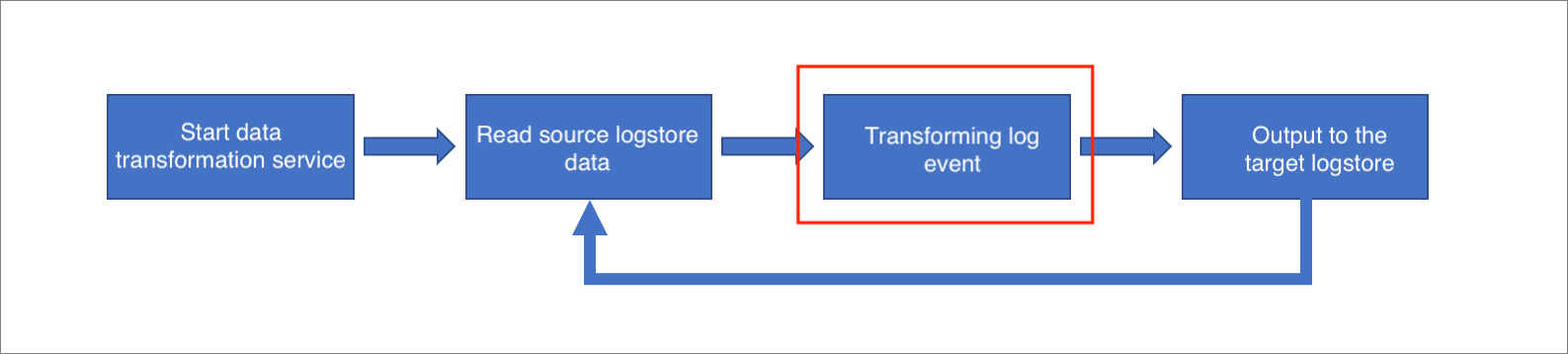
-
Errors at this stage are typically logic errors that arise when log events do not match the data transformation rules.
-
If the transformation rules involve external resources such as ApsaraDB RDS or other Logstores, resource loading or refresh errors can also occur.
This topic focuses on troubleshooting logic errors. For information about troubleshooting resource loading errors, see Resource loading errors.
Error impact
The logging.levelname field in the error log specifies the error level: WARNING or ERROR.
-
For ERROR-level errors, the affected log event is discarded. The transformation output does not include this event, and processing continues with the next log event without a retry.
-
For WARNING-level errors, such as a regex mismatch, the current DSL step is skipped for that event, and processing moves to the next step.
Troubleshooting
-
Check the
logging.levelnamefield in the error log to determine the error level. -
Check the
messagefield in the error log to identify which log event caused the error. For more information, see View error logs. -
Check the
reasonfield in the error log to determine the cause of the error for that log event.
Based on the cause, add logic to your transformation script to handle these exceptions. You can use process control functions, such as e_if and e_switch, to catch and manage these errors. The following is an error log example: The message field contains the details of the log event that failed, and the reason field shows the cause of the error, integer division or modulo by zero:
07-26 16:21:48
    __source__:
    __tag__:__job_name__: etl-preview-1564110081-604324
    __tag__:__schedule_type__: DryRun
    __topic__: __etl-log-status__
    etl_context: {
      "project": "ali-licheng-test-uk2",
      "logstore": "source_logstore",
      "shard_id": "2"}
    event_id: transorm_data:process:fail
    extra_info_params: {"src_event": {"__time__": "1563266137", "__topic__": "", "__source__": xxx, "__tag__:__client_ip__": xxx,
    "__tag__:__receive_time__": "1563774221", "body_bytes_sent": "740", "client_ip": "1.2.3.4", "host": "m.abcd.com", "status": "403"}}
    logging: {"process": "34", "levelname": "ERROR", "funcName": "_transform_events_to_logstore", "module": "logclient_operator", "threadName": "MainThread",
    "thread": "139890150307648", "processName": "ForkProcess-1"}
    message: [ali-licheng-test-uk2/source_logstore/2]transform_data: fail to process event: {"__time__": "1563266137", "__topic__": "", "__source__": xxx,
    "__tag__:__client_ip__": xxx, "__tag__:__receive_time__": "1563774221", "body_bytes_sent": "740", "client_ip": "1.2.3.4", "host": "m.abcd.com", "status": "403"},
    detail=integer division or modulo by zero
    reason: integer division or modulo by zero
Common error scenarios
Abnormal values in log events
Division by zero
# A division by zero error occurs because the value of field 'b' in some log events is 0.
e_set("c", op_div_floor(v("a"), v("b")))-
Error log:
{ "reason": "error when calling : floordiv\nDetail: integer division or modulo by zero", } -
Troubleshooting:
Check the failed log events to confirm if the value of the field
bis 0. If so, the cause is division by zero. -
Solution:
The error occurs only when the value of the field
bin a log event is 0. To fix this, adde_iflogic to handle cases where the value of the fieldbis 0.e_if_else(op_eq(v("b"), "0"), e_set("c", v("a")), e_set("c", op_div_floor(v("a"), v("b")))
Invalid timestamp format
# An error occurs because the value of field 'a' in some log events is not a valid timestamp format.
e_set("b", dt_fromtimestamp(v("a")))-
Error log:
{ "reason": "error when calling : int\nDetail: invalid literal for int() with base 10: 'invalid_value'", } -
Troubleshooting:
Check the failed log events to verify that the value of field
ais a numeric string, which is the required format for a valid timestamp. -
Solution:
Add conditional logic. If the value of field
ais not a valid timestamp format, route the log event totarget2.e_if_else(str_isdigit(v("a"))), e_set("b", dt_fromtimestamp(v("a"))), e_output("target2"))
Missing data type conversion
Sample transformation rule:
e_set("a", 10)
e_set("b", 10)
e_set("c", op_mul(v("a"), v("b")))-
Error log:
{ "reason": "error when calling : mul\nDetail: can't mulltiply sequence by non-int of type' str'", } -
Cause:
During DSL processing, the values of all fields in a log event are stored as strings. In the preceding rule example,
v("a")andv("b")are both strings. Passing them directly toop_mulcauses an error. -
Troubleshooting:
Check your DSL rules for missed data type conversions before a numeric calculation.
-
Solution:
Use the
ct_intfunction to convert a string to an integer, and then pass the result to theop_mulfunction.e_set("a", 10) e_set("b", 10) e_set("c", op_mul(c_int(v("a")), c_int(v("b"))))