Global Accelerator (GA) access logs record endpoint traffic through Simple Log Service (SLS), giving you visibility into request details, response status, and host information. Use these logs to audit access control and troubleshoot network issues. This page covers the assets, billing, and limits of the access log feature.
How it works
Access logs capture traffic information for endpoints in your GA instance — including request details, response status, and host information — and deliver the data as structured logs to Simple Log Service. You can enable access logging for one or more endpoint groups within a single GA instance.
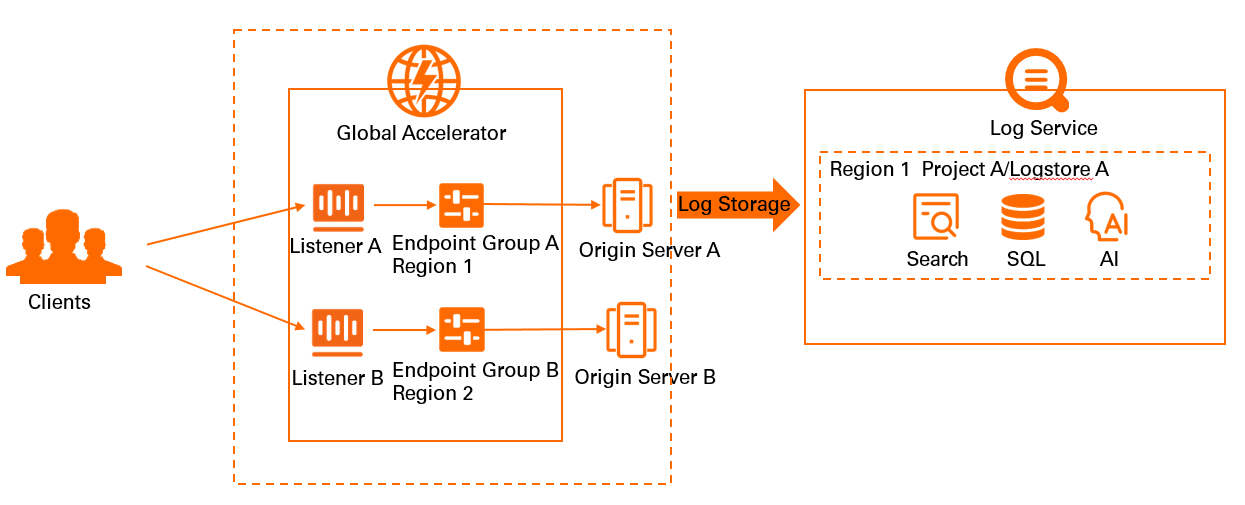
Asset details
-
Custom Simple Log Service projects and Logstores
ImportantDo not delete the associated Simple Log Service project and Logstore before you disable the access log feature for Global Accelerator. Otherwise, logs cannot be delivered to Simple Log Service.
When you create a custom Logstore, billable items vary based on the billing mode. For more information, see Billable items.
-
Dedicated dashboards
None.
Billing
Global Accelerator does not charge for the access log feature. All charges come from Simple Log Service, based on the billing method of the associated Logstore.
If the associated Logstore uses the pay-by-feature billing method, Simple Log Service charges for storage usage, read traffic, the number of requests, data transformation, and data shipping. For more information, see Billable items of pay-by-feature.
If the associated Logstore uses the pay-by-ingested-data billing method, Simple Log Service charges based on the amount of raw data ingested. For more information, see Billable items of pay-by-ingested-data.
Use cases
-
Troubleshooting
Access logs help you identify request failures quickly. Check the
statusfield to see how Global Accelerator responded to each request and identify why a request did not receive the expected response. -
Business planning
Analyze traffic trends to make informed decisions about bandwidth. For example, use traffic data for an acceleration region to provision bandwidth before peak periods, or scale down during low-traffic windows to reduce costs. The
http_hostfield also shows which hosts accessed your application over a given period — useful for planning application upgrades.
Limits
The access log feature is available only in regions where Simple Log Service is supported. For more information, see Supported regions.
The access log feature is available only for standard Global Accelerator instances.
Access logs cannot be collected for endpoint groups deployed on Alibaba Cloud point of presence (PoP) nodes.
The access log feature is available for GA instances created after January 8, 2022. If your instance was created before this date and you want to enable access logging, contact your account manager to request an upgrade.