Data distribution processes source logs based on preset SPL rules and writes the results to one or more destination Logstores, including cross-account and cross-region destinations. Simple Log Service (SLS) provides two distribution modes:
-
Static distribution: In this mode, you specify the destination project and logstore during task configuration. This mode supports up to 20 destinations and is ideal for scenarios with fixed destination logstores.
-
Dynamic distribution: This mode dynamically generates the destination based on business fields in the logs, such as
tenant_id,service, orlevel. The generated destination overrides the statically configured project and logstore. This mode is useful when you name destination projects and logstores based on log content.
Core mechanism
Dynamic distribution builds upon static distribution by replacing field values:
-
__tag__:__sls_etl_output_project__: Replaces the statically configured destination project. -
__tag__:__sls_etl_output_logstore__: Replaces the statically configured destination logstore.
In dynamic distribution, the static configuration provides the execution context (account, region, and permissions) rather than the final write destination.
Dynamic distribution cannot change the destination region or override cross-account permissions. Configure these correctly in the static destination project and Logstore.
Common use cases include:
-
Multi-tenant data isolation: A SaaS platform stores logs for different tenants separately based on the tenant ID (
tenant_id). This simplifies access control, billing, and data analytics. -
Route logs by environment: Logs are automatically routed to the logstore of the corresponding environment based on an environment identifier, such as
prod,staging, ordev. This simplifies debugging and monitoring workflows. -
Categorize by business module: Logs from different business modules in a complex application, such as orders, payments, and users, are distributed to separate logstores for dedicated storage and analysis.
Prepare the source logstore
Ensure that the source Logstore has ingested raw logs and that the logs contain the fields required for routing.
{
  "timestamp": "2025-04-05T10:00:00Z",
  "method": "POST",
  "uri": "/api/v1/orders",
  "status": 200,
  "tenant_id": "t-7a8b9c",
  "service": "order-service",
  "log_type": "access",
  "user_id": "u-12345"
}
Key routing fields in the sample log:
-
tenant_id: The unique tenant identifier. Determines the destination project for tenant-level isolation.
-
service: The microservice name, used to construct the destination Logstore name. Assume the system includes the following services:
-
user-service
-
order-service
-
payment-service
-
auth-service
-
Write SPL rules for dynamic routing
-
Log on to the Simple Log Service console.
-
Click the name of the source project to go to the project details page.
-
In the left-side navigation pane, click
 Job Management.
 -
On the Data Transformation tab, click Create Data Transformation Job, select the source logstore, and then click Confirm.
-
Select a time range for the data and enter the SPL rules.
Dynamic project (fixed logstore)
Suitable for multi-tenant platforms where each tenant has Logstores with the same structure. Sample SPL rule:
*
| extend "__tag__:__sls_etl_output_project__" = concat('saas-tenant-', tenant_id)
// The destination logstore uses the static configuration value, for example, 'access-log'.
Debug the SPL rule and configure the default storage destination:
-
In the Raw Logs section, select log data and click Add Test Data.
-
On the Test Data tab, click Debug SPL to view the Transformation Results.
-
If the transformation results are as expected, click Save as Transformation Job (New Version).
-
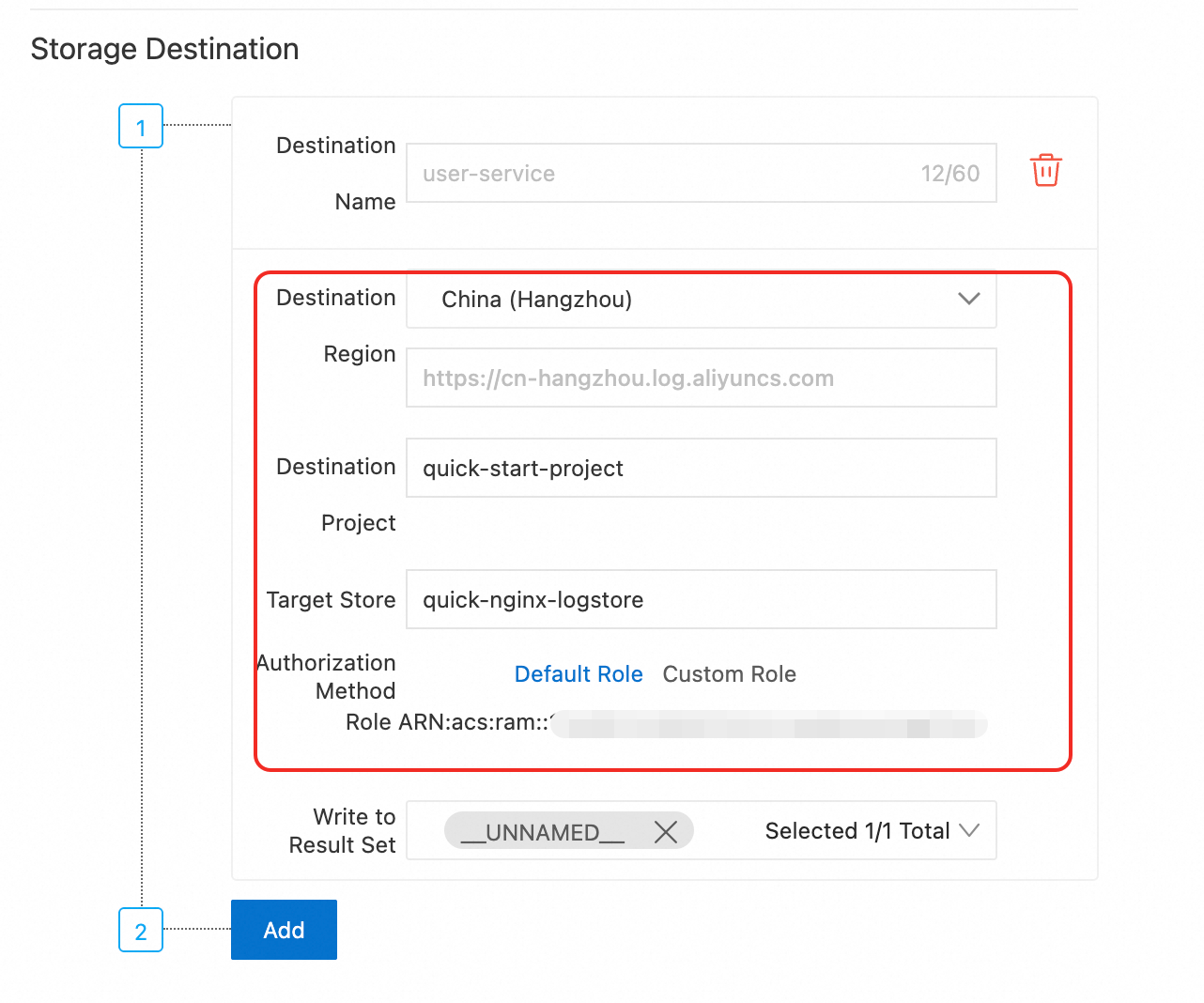
In the Create Data Transformation Job (New Version) panel, configure the storage destination:
-
For Destination Region, select the region where the dynamic projects are located.
-
For Destination Project, you can select any existing project in the region. This setting will be overridden by the dynamic value.
-
The Target Store setting must be accurate because it will not be overridden.
-
Ensure that the dynamically generated project exists and that you have permission to access it.
-
-
Verify the distribution result. After the task starts, query the data in each destination logstore to confirm that the routing works as expected. Example:
Input log feature
Actual write location
tenant_id=t-7a8b9cproject:
saas-tenant-t-7a8b9c, logstore: The statically configured destination logstoretenant_id=t-xyz123project:
saas-tenant-t-xyz123, logstore: The statically configured destination logstore
Dynamic logstore (fixed project)
Suitable for categorizing logs by service or level within the same project. Sample SPL rule:
*
| extend "__tag__:__sls_etl_output_logstore__" = concat(service,'-logs')
// The destination project uses the static configuration value, for example, 'central-project'.
Debug the SPL rule and configure the default storage destination:
-
In the Raw Logs section, select log data and click Add Test Data.
-
On the Test Data tab, click Debug SPL to view the Transformation Results.
-
If the transformation results are as expected, click Save as Transformation Job (New Version).
-
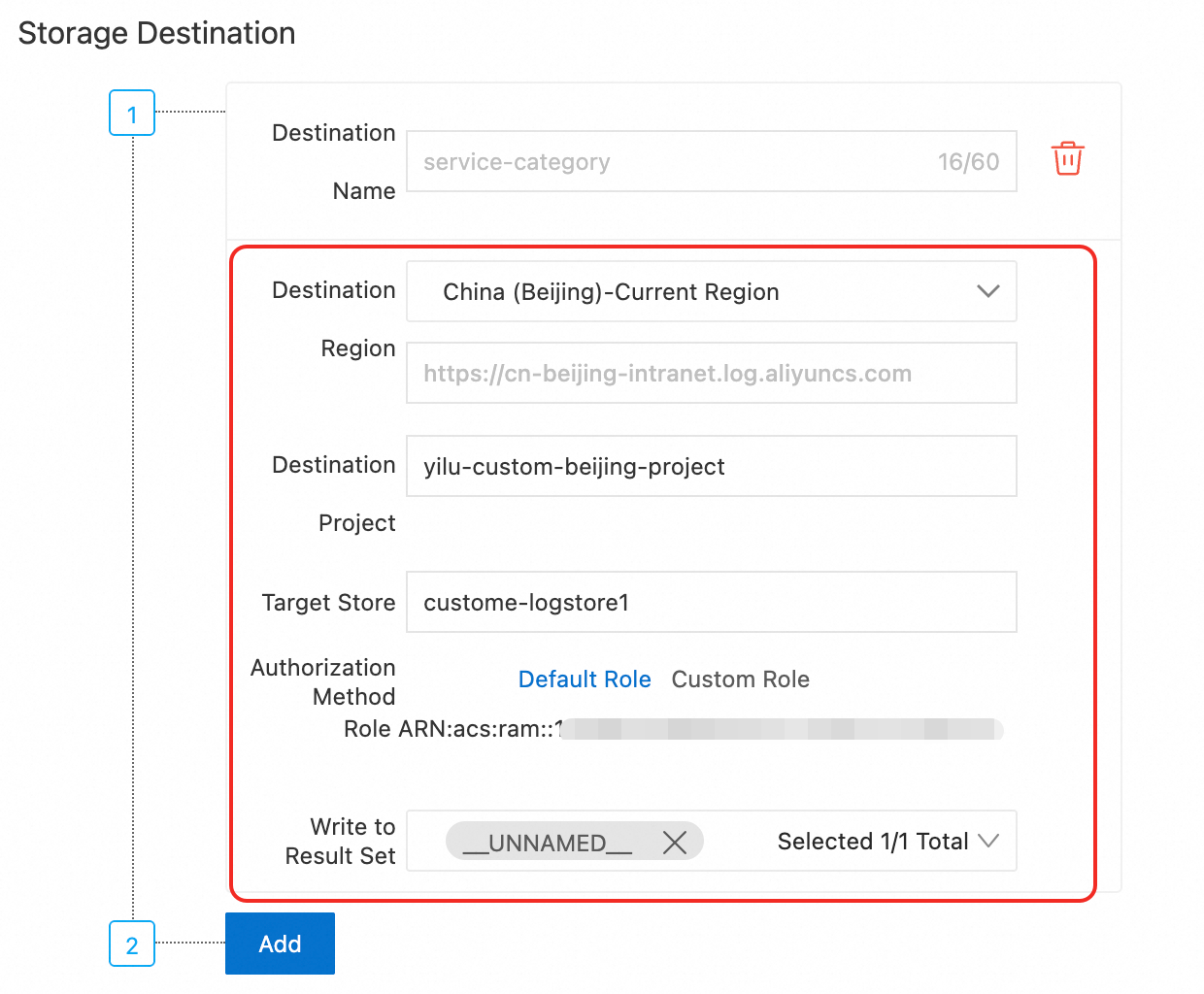
In the Create Data Transformation Job (New Version) panel, configure the storage destination:
-
Destination Region: Select the region where the fixed project is located.
-
Destination Project: Ensure that the dynamically generated logstores exist within this project.
-
For Target Store, you can select any existing logstore in the destination project. This setting will be overridden by the dynamic value.
-
-
Verify the distribution result. After the task starts, query the data in each destination logstore to confirm that the routing works as expected. Example:
Input log feature
Actual write location
service=user-serviceproject:
central-projectlogstore:
user-service-logsservice=order-serviceproject:
central-projectlogstore:
order-service-logsservice=payment-serviceproject:
central-projectlogstore:
payment-service-logsservice=auth-serviceproject:
central-projectlogstore:
auth-service-logs
Dynamic project and logstore
Suitable for fully automated, log-driven routing scenarios. Sample SPL rule:
*
-- Dynamically specify the destination project (isolated by tenant).
| extend "__tag__:__sls_etl_output_project__" = concat('saas-tenant-', tenant_id)
-- Dynamically specify the destination logstore (format: {service-name}-logs).
| extend "__tag__:__sls_etl_output_logstore__" = concat(service, '-logs')
Debug the SPL rule and configure the default storage destination:
-
In the Raw Logs section, select log data and click Add Test Data.
-
On the Test Data tab, click Debug SPL to view the Transformation Results.
-
If the transformation results are as expected, click Save as Transformation Job (New Version).
-
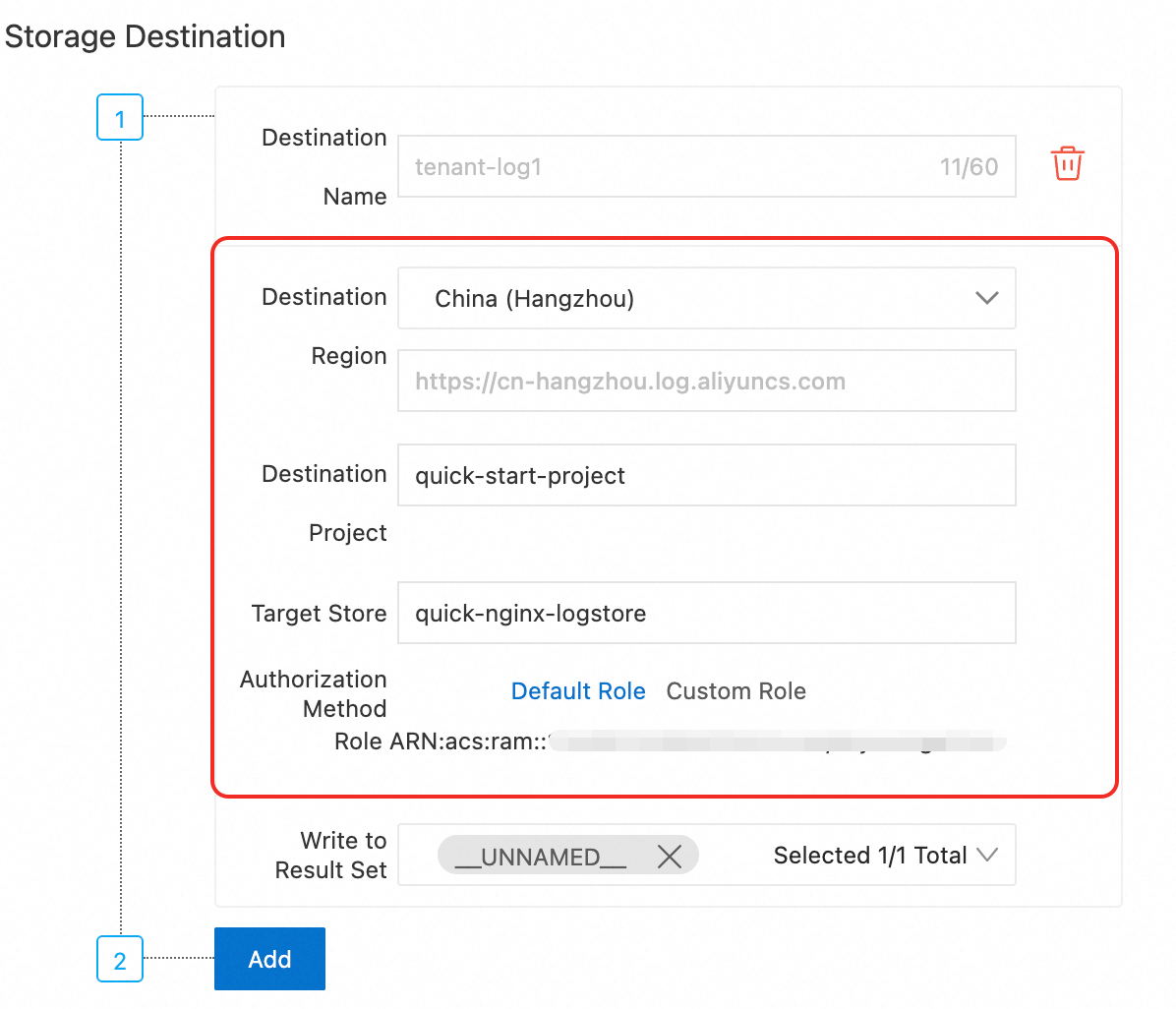
In the Create Data Transformation Job (New Version) panel, configure the storage destination:
NoteEven though all destination parameters are dynamically overridden, you must still configure a default storage destination to define the:
-
Destination region
-
Execution role
-
For Destination Region, select the region where the dynamic projects are located.
-
For Destination Project and Target Store, you can select any existing project and logstore in the region. Both settings will be overridden by the dynamic values.
-
Ensure that the dynamically generated projects and logstores exist and that you have permission to access them.
-
-
Verify the distribution result. After the task starts, query the data in each destination logstore to confirm that the routing works as expected.
This method uses the
tenant_idandservicefields to automate multi-tenant log isolation. Logs from the same tenant are stored in the same project and routed to different Logstores based on theservicefield. Example:Input log feature
Actual write location
tenant_id=t-1001,service=user-serviceproject:
saas-tenant-t-1001logstore:
user-service-logstenant_id=t-1002,service=payment-serviceproject:
saas-tenant-t-1002logstore:
payment-service-logs