This topic describes various scenarios for distributing data to multiple Logstores, such as dynamic distribution, cross-account distribution, dynamic cross-account distribution, and complex dynamic distribution, and the steps for each.
Background information
The data transformation feature of Log Service lets you distribute results to multiple Logstores. You can use AccessKey pairs to send results to Logstores in different accounts, or use the e_output and e_coutput functions to dynamically route results to a specific Project and Logstore.
-
You can distribute results to Logstores across a maximum of 20 accounts.
-
The
e_outputfunction sends logs to the specified Logstore and stops applying subsequent transformation rules. To continue applying rules after sending logs, use thee_coutputfunction. For more information, see e_output and e_coutput functions. This topic uses thee_outputfunction as an example.
Scenario 1: Cross-account distribution
For example, all access logs for a website are stored in a single Logstore. You want to route logs with different HTTP statuses to Logstores in different accounts.
You can accomplish this by using the data transformation feature of Log Service.
-
Raw logs
http_host: example.com http_status: 200 request_method: GET request_uri: /pic/icon.jpg scheme: https http_host: example.org http_status: 301 request_method: POST request_uri: /data/data.php scheme: http http_host: example.net http_status: 404 request_method: GET request_uri: /category/abc/product_id scheme: https http_host: aliyundoc.com http_status: 504 request_method: GET request_uri: /data/index.html scheme: https -
Distribution requirements
-
Logs with an http_status of 2XX are stored in Logstore0 in the storage target target0, and the topic is set to success_event.
-
Logs where http_status is 3XX are distributed to Logstore1 in the storage target target1, and the topic is set to redirection_event.
-
Logs with an http_status of 4XX are distributed to Logstore2 in the storage target target2, and the topic is set to unauthorized_event.
-
Logs with an http_status of 5XX are distributed to Logstore3 in the storage target target3, and the topic is set to internal_server_error_event.
target0 is in account A, and target1, target2, and target3 are in account B.
-
-
Transformation rule
e_switch(e_match("status", r"2\d+"), e_set("__topic__", "success_event"), e_match("status", r"3\d+"), e_compose(e_set("__topic__", "redirection_event"), e_output("target1")), e_match("status", r"4\d+"), e_compose(e_set("__topic__", "unauthorized_event"), e_output("target2")), e_match("status", r"5\d+"), e_compose(e_set("__topic__", "internal_server_error_event'"), e_output("target3")) ) -
Storage targets
In the Create Data Transformation Job panel, configure the storage targets. For more information, see Create a data transformation job. The target region for Target 2 (target1) is China (Beijing), and its endpoint is
https://cn-beijing.log.aliyuncs.com. The target region for Target 3 (target2) is China (Hangzhou) - Current Region, and its endpoint iscn-hangzhou-intranet.log.aliyuncs.com.Label
Storage target
Destination Project and Logstore
AccessKey
1
target0
Project0, Logstore0
AccessKey pair for Account A
2
target1
Project1, Logstore1
AccessKey pair for Account B
3
target2
Project2, Logstore2
AccessKey pair for Account B
4
target3
Project3, Logstore3
AccessKey pair for Account B
-
Transformation results
## Logs with an http_status of 2xx are distributed to Logstore0, which belongs to Account A.
__topic__:  success_event
http_host:  example.com
http_status:  200
request_method:  GET
request_uri:  /pic/icon.jpg
scheme:  https
## Logs with an http_status of 3xx are distributed to Logstore1, which belongs to Account B.
__topic__:  redirection_event
http_host:  example.org
http_status:  301
request_method:  POST
request_uri:  /data/data.php
scheme:  http
## Logs with an http_status of 4xx are distributed to Logstore2, which belongs to Account B.
__topic__: unauthorized_event
http_host:  example.net
http_status:  404
request_method:  GET
request_uri:  /category/abc/product_id
scheme:  https
## Logs with an http_status of 5xx are distributed to Logstore3, which belongs to Account B.
__topic__: internal_server_error_event
http_host:  aliyundoc.com
http_status:  504
request_method:  GET
request_uri:  /data/index.html
scheme:  https
Scenario 2: Simple dynamic distribution
For example, all access logs for a website are stored in a single Logstore. You want to distribute these logs to different Logstores based on the project and LogStore fields.
You can accomplish this by using the data transformation feature of Log Service.
-
Raw logs
__tag__:type: dynamic_dispatch host: example.aliyundoc.com project: Project1 logstore: Logstore1 http_status: 200 request_method: GET request_uri: /pic/icon.jpg scheme: https __tag__:type: dynamic_dispatch host: demo.aliyundoc.com project: Project1 logstore: Logstore2 http_status: 301 request_method: POST request_uri: /data/data.php scheme: http __tag__:type: dynamic_dispatch host: learn.aliyundoc.com project: Project2 logstore: Logstore1 http_status: 404 request_method: GET request_uri: /category/abc/product_id scheme: https __tag__:type: dynamic_dispatch host: guide.aliyundoc.com project: Project2 logstore: Logstore2 http_status: 504 request_method: GET request_uri: /data/index.html scheme: https -
Distribution requirements
-
Logs are dynamically distributed based on the values of the project and Logstore fields.
-
Add the tag:type field with the value dynamic_dispatch to the log.
-
-
Transformation rule
e_output(project=v("project"), logstore=v("logstore"), tags={"type": "dynamic_dispatch"})The e_output function dynamically extracts the values of the project field and the Logstore field to distribute logs.
-
Storage target
On the Create Data Transformation Job page, you only need to configure a default storage target. This target is used to store logs that are not dropped during the transformation process.
NoteIn this scenario, the destination Project and Logstore for dynamic distribution are determined by the configuration in the
e_outputfunction. This destination is independent of the one configured for the default storage target (Label 1) on the Create Data Transformation Job page.Example configuration for the default storage target (Label 1): Set Target Name to
target0, Destination Region to China (Zhangjiakou), Destination Project toProject0, and Destination Logstore toLogstore0. For Authorization Method, select Default Role. -
Transformation results
## Distributed to Logstore1 in Project1.
__tag__:type: dynamic_dispatch
host:  example.aliyundoc.com
project: Project1
logstore: Logstore1
http_status:  200
request_method:  GET
request_uri:  /pic/icon.jpg
scheme:  https
## Distributed to Logstore2 in Project1.
__tag__:type: dynamic_dispatch
host:  demo.aliyundoc.com
project: Project1
logstore: Logstore2
http_status:  301
request_method:  POST
request_uri:  /data/data.php
scheme:  http
## Distributed to Logstore1 in Project2.
__tag__:type:  dynamic_dispatch
host:   learn.aliyundoc.com
project: Project2
logstore: Logstore1
http_status:  404
request_method:  GET
request_uri:  /category/abc/product_id
scheme:  https
## Distributed to Logstore2 in Project2.
__tag__:type: dynamic_dispatch
host:   guide.aliyundoc.com
project: Project2
logstore: Logstore2
http_status:  504
request_method:  GET
request_uri:  /data/index.html
scheme:  https
Scenario 3: Dynamic cross-account distribution
For example, all access logs for a website are stored in a single Logstore. You want to dynamically route logs to Logstores in different accounts based on the project and logstore fields in the logs.
You can accomplish this by using the data transformation feature of Log Service.
-
Raw logs
host: example.aliyundoc.com project: Project1 logstore: Logstore1 http_status: 200 request_method: GET request_uri: /pic/icon.jpg scheme: https host: demo.aliyundoc.com project: Project1 logstore: Logstore2 http_status: 301 request_method: POST request_uri: /data/data.php scheme: http host: learn.aliyundoc.com project: Project2 logstore: Logstore1 http_status: 404 request_method: GET request_uri: /category/abc/product_id scheme: https host: guide.aliyundoc.com project: Project2 logstore: Logstore2 http_status: 504 request_method: GET request_uri: /data/index.html scheme: https -
Distribution requirements
Data is dynamically distributed to Projects in different accounts based on the values of the project and LogStore fields in a log. For example, Project1 (containing Logstore1 and Logstore2) belongs to Account A, and Project2 (containing Logstore1 and Logstore2) belongs to Account B.
-
Transformation rule
e_switch(e_match(v("project"), "Project1"), e_output(name="target1", project=v("project"), logstore=v("logstore")), e_match(v("project"), "Project2"), e_output(name="target2", project=v("project"), logstore=v("logstore"))) -
Storage targets
On the Create Data Transformation Job page, configure the storage targets. For more information, see Create a data transformation job.
NoteIn this scenario, the destination Project and Logstore are determined by the configuration in the
e_outputfunction. This destination is independent of the one configured for the default storage target (Label 1) on the Create Data Transformation Job page.For the Authorization Method of each storage target, select AccessKey Pair, and then enter the AccessKey ID and AccessKey Secret of the corresponding account.
Label
Storage target
Destination Project and Logstore
AccessKey
1
target0
Project0, Logstore0
Not applicable
2
target1
Can be any value. The destination is determined by the
e_outputfunction.AccessKey pair for Account A
3
target2
Can be any value. The destination is determined by the
e_outputfunction.AccessKey pair for Account B
-
Transformation results
## Distributed to Logstore1 in Account A's Project1.
host:  example.aliyundoc.com
project: Project1
logstore: Logstore1
http_status:  200
request_method:  GET
request_uri:  /pic/icon.jpg
scheme:  https
## Distributed to Logstore2 in Account A's Project1.
host:  demo.aliyundoc.com
project: Project1
logstore: Logstore2
http_status:  301
request_method:  POST
request_uri:  /data/data.php
scheme:  http
## Distributed to Logstore1 in Account B's Project2.
host:   learn.aliyundoc.com
project: Project2
logstore: Logstore1
http_status:  404
request_method:  GET
request_uri:  /category/abc/product_id
scheme:  https
## Distributed to Logstore2 in Account B's Project2.
host:   guide.aliyundoc.com
project: Project2
logstore: Logstore2
http_status:  504
request_method:  GET
request_uri:  /data/index.html
scheme:  https
Scenario 4: Complex dynamic distribution
For example, a company runs advertisements for a game and stores all API request logs for the game in a single Logstore. The company wants to parse the user_agent request header to route requests from different devices (iOS, Android, and Windows) to separate Logstores, and analyze the request_method field to calculate the ad conversion rate.
You can accomplish these requirements by using the data transformation and query and analysis features of Log Service.
-
Raw log
__source__:127.0.0.0 __tag__:__receive_time__: 1589541467 ip:10.0.0.0 request_method: GET user_agent: Mozilla/5.0 (Macintosh; Intel Mac OS X 10.9; rv:50.0) Gecko/20100101 Firefox/50.0 -
Distribution requirements
-
Distribute request logs from Windows users to Logstore1 in storage target
target1. -
Distribute request logs from iOS users to Logstore2 in storage target
target2. -
Distribute request logs from Android users to Logstore3 in storage target
target3.
-
-
Transformation rule
In this example, you can use the ua_parse_os function to parse the user_agent field, the dct_get function to retrieve operating system information from the request header, and the e_set function to add a new field named os and set its value to the operating system information. You can then use the e_output function and conditional functions to perform dynamic distribution.
e_set("os", dct_get(ua_parse_os(v("user_agent")),"family")) e_if(e_search("os==Windows"),e_output(name="target1")) e_if(e_search("os=iOS"),e_output(name="target2")) e_if(e_search("os==Android"),e_output(name="target3")) -
Storage targets
On the Create Data Transformation Job page, configure the storage targets. For more information, see Create a data transformation job.
For each storage target, configure its Target Name, Destination Project, and Destination Logstore. You must also select a Destination Region (for example, China (Hangzhou)) and an Authorization Method (Default Role or Custom Role). If you select Custom Role, you must provide the Role ARN.
Label
Storage target
Destination Project and Logstore
1
target0
Project0, Logstore0
2
target1
Project1, Logstore1
3
target2
Project2, Logstore2
4
target3
Project3, Logstore3
-
Query and analysis
Run queries in the destination Logstores to determine the ad conversion rate. The following results indicate that Android users have a higher conversion rate. For more information, see Query and analysis quick start.
-
On the Search & Analysis page for Logstore2, run the following query to count the GET and POST requests from iOS users.
* | SELECT Request_method, COUNT(*) as number GROUP BY Request_method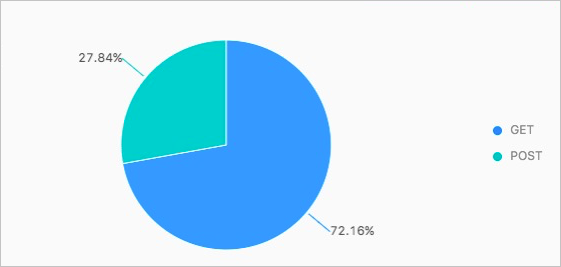
-
On the Search & Analysis page for Logstore3, run the following query to count the GET and POST requests from Android users.
* | SELECT Request_method, COUNT(*) as number GROUP BY Request_method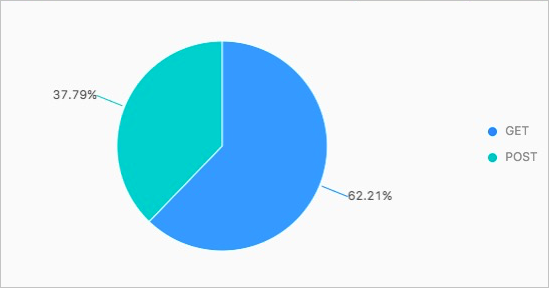
-