This topic describes how to share the pages of query and analysis results and dashboard pages of Simple Log Service with other users and how to embed the Simple Log Service console pages into third-party systems. This way, users can view your logs in password-free and logon-free mode. The URLs of the shared pages are referred to as password-free and logon-free URLs.
Background information
A ticket is a token that is valid for a short period of time. A ticket is used to generate a password-free and logon-free URL. After a user obtains a password-free and logon-free URL, the user can directly access specified query and analysis pages or dashboard pages without the need to log on to the Simple Log Service console by using an Alibaba Cloud account.
Procedure:
Grant the required permissions to a Resource Access Management (RAM) user.
Obtain the URL of a Simple Log Service console page.
Call the
CreateTicketoperation to obtain aticket.Generate a password-free and logon-free URL based on the
ticketand the URL of the Simple Log Service console page.
For a password-free and logon-free URL, the operations that can be performed on the landing page vary based on the permissions of the caller of the CreateTicket operation on Simple Log Service. To mitigate the data security risks that arise when you use an Alibaba Cloud account to call the CreateTicket operation, we recommend that you use a RAM user to call the CreateTicket operation and grant permissions to the RAM user based on the principle of least privilege. For more information, see Step 1: Grant the required permissions to a RAM user.
Generate a password-free and logon-free URL
Step 1: Grant the required permissions to a RAM user
If you use an Alibaba Cloud account, you can skip this step and go to Step 2.
Grant the permissions on resources such as projects and Logstores and the permissions to call the CreateTicket operation to the RAM user.
For more information about how to grant permissions on specific resources, see Examples of using custom policies to grant permissions to a RAM user.
For more information about how to grant permissions to call the CreateTicket operation, see Grant permissions to a RAM user and Create custom policies.
{
    "Version": "1",
    "Statement": [
        {
            "Effect": "Allow",
            "Action": "log:CreateTicket",
            "Resource": "acs:log:*:*:ticket/*"
        }
    ]
}
Step 2: Obtain the URL of a Simple Log Service console page
Query and analysis page:
https://sls.console.alibabacloud.com/lognext/project/<Project name>/logsearch/<Logstore name>?slsRegion=<Region where the project resides>&hideTopbar=true&hideSidebar=true&ignoreTabLocalStorage=trueFor more information about project names, see Manage a project. For more information about Logstore names, see Manage a Logstore. For more information about the supported regions of projects, see the Region ID column in Endpoints.
Query page:
https://sls.console.alibabacloud.com/lognext/project/<Project name>/logsearch/<Logstore name>?slsRegion=<Region where the project resides>&isShare=true&hideTopbar=true&hideSidebar=true&ignoreTabLocalStorage=trueDashboard page:
ImportantDashboard ID is displayed only in the URL of a dashboard page. The ID is not the name that is displayed on the dashboard. You can share dashboard pages in password-free mode in the Simple Log Service console. For more information, see Share dashboards or charts without passwords.
https://sls.console.alibabacloud.com/lognext/project/<Project name>/dashboard/<Dashboard ID>?slsRegion=<Region where the project resides>&isShare=true&hideTopbar=true&hideSidebar=true&ignoreTabLocalStorage=true
Step 3: Obtain a ticket
If you want to call the CreateTicket operation to obtain a ticket, you must use the Simple Log Service endpoint for the China (Shanghai) or Singapore region. After you obtain the ticket, you can use the ticket regardless of the region.
A ticket can be used only once. The default validity period is one day and the maximum validity period is 30 days. For more information about how to dynamically obtain a ticket, see How does the system dynamically obtain a ticket?
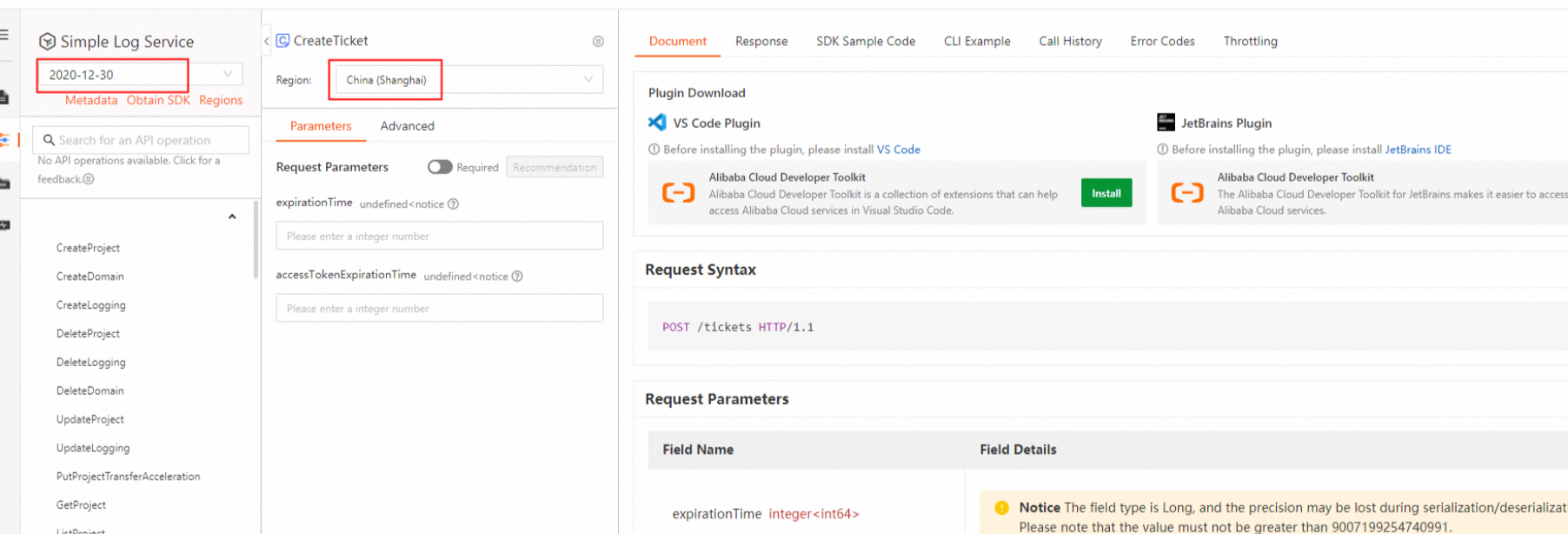
Step 4: Generate a password-free and logon-free URL
Concatenate the ticket obtained in Step 3 and the URL of a Simple Log Service console page obtained in Step 2 to generate a password-free and logon-free URL.
https://sls.console.alibabacloud.com/lognext/project/<Project name>/dashboard/<Dashboard ID>?slsRegion=<Region where the project resides>&sls_ticket=eyJ***************.eyJ******************.KUT****************&isShare=true&hideTopbar=true&hideSidebar=true&ignoreTabLocalStorage=trueTest the password-free and logon-free URL. You can enter the URL in the address bar of your browser to test the URL. If you can access the Simple Log Service console page, the URL is valid.
WarningThe first time you access a password-free and logon-free URL in a browser, you can test the URL. After the test is complete, the ticket becomes invalid. You must call the CreateTicket operation again to obtain a new ticket.
We recommend that you copy a password-free and logon-free URL to a file and transfer the file. If you directly send a password-free and logon-free URL to a third-party software, the URL may become invalid after the software reads the URL.
FAQ
How do I extend the validity periods of URLs to embedded console pages?
For more information, see Extend the validity periods of URLs to embedded console pages.
How is a ticket dynamically generated?
If you want to embed Simple Log Service console pages into third-party systems, you must dynamically call the CreateTicket operation in your application to obtain a ticket on a regular basis. If you use an AccessKey pair of a RAM user to call the CreateTicket operation, the procedure is simple but poses high security risks. We recommend that you use a RAM role that has a Security Token Service (STS) token to call the CreateTicket operation. This reduces security risks.
Create a RAM user and create a RAM role whose trusted entity is an Alibaba Cloud account.
Grant the AliyunSTSAssumeRoleAccess permission to the RAM user. Grant the permissions to call the CreateTicket operation and the permissions related to Simple Log Service to the RAM role. For more information, see Grant permissions to a RAM role and Examples of using custom policies to grant permissions to a RAM user.
Use the RAM role to call the CreateTicket operation.
Use the RAM user to call the AssumeRole operation to obtain an STS token and an AccessKey pair. An AccessKey pair consists of an AccessKey ID and an AccessKey secret. The AccessKeyId and AccessKeySecret parameters specify the AccessKey ID and AccessKey secret. The SecurityToken parameter specifies the STS token.
Use the RAM user to assume the RAM role based on the SecurityToken, AccessKeySecret, and AccessKeyId parameters. Then, call the CreateTicket operation to obtain a ticket.
Generate password-free and logon-free URLs based on the tickets that are obtained and allow different operations.
When I use Simple Log Service SDK to call the CreateTicket operation, the InvalidMethod error is reported. Why?
You must use the Simple Log Service endpoint for the China (Shanghai) or Singapore region to call the CreateTicket operation. However, after you obtain the ticket, you can use the ticket regardless of the region.
What are the limits on tickets?
The default validity period of a ticket is one day and the maximum validity period is 30 days.
You can use a ticket to access a URL only in the same browser or host. For example, if you access a password-free and logon-free URL in Browser A by using a ticket, you can continuously access the URL before the validity period of the ticket ends. However, you cannot use the ticket to access the URL in Browser B.
The total number of tickets is unlimited. You can call the CreateTicket operation up to 10 times per second per account.
What are the limits on third-party cookies?
You can embed console pages and share log data without the need to use third-party cookies. For more information, see Embed console pages and share log data (new version).
What is the loading speed of embedded pages?
Simple Log Service provides old and new versions of the feature that you can use to embed console pages and share log data. If you use the new version, embedded pages can be loaded faster. For more information, see Embed console pages and share log data (new version).
What do I do if I want to open multiple embedded pages that support the same operation permissions?
You can obtain a ticket and refresh embedded pages in the same browser. If the ticket expires, obtain a new ticket and replace the expired ticket with the new ticket on all pages.
Different browsers or computers are considered different users. A ticket can be used only once. If you use a different browser or computer, you cannot use the same ticket and the following error message is returned:
{"code":"TicketUnavailable","message":"There are no more tickets available.","requestId":"xxxxxx","success":false}
What do I do if I want to open multiple embedded pages that support different operation permissions?
You can obtain multiple tickets that are associated with different permissions. However, you can refresh only the embedded pages that use the last ticket in this case. This is because the system records only one cookie as the credential of the current user and refreshes pages only based on the recorded cookie. The recorded cookie corresponds to the last ticket.
If you do not refresh pages, cookies are not required. You can switch between pages and perform different operations on different pages.
If you refresh an embedded page that does not use the last ticket, the following error message is returned:
{"code":"TicketUnavailable","message":"There are no more tickets available.","requestId":"xxxxxx","success":false}