Configure data conversion rules to process query results before visualizing them in charts. For example, merge results from multiple query statements or classify results by field values.
-
Only charts (Pro) support data conversion. For more information about the charts (Pro) supported by Simple Log Service, see Chart types.
-
Each data conversion rule has a unique ID. The ID is composed of an uppercase letter T and another uppercase letter. Examples: TA and TB.
-
Before you can configure a data conversion rule, you must execute a query statement. For more information, see Query and analysis.
Types of data conversion rules
When you create a chart, you can configure data conversion rules. The supported types are Connect, Category, Parse Timestamp, Group By, and Transpose Rows and Columns.
-
Category: groups the results of a query statement based on specified fields and performs calculation for each group. The following table describes the parameters. For more information, see Example for Category.
Parameter
Description
Select Data Source
Select the query statement whose results you want to classify. For example, if you select A, the results of Query Statement A are classified.
X-axis
Select a field as the x-axis.
Y-axis
Select a field as the y-axis.
Aggregate Column
Select a field to further classify and aggregate data. For example, selecting the kind field classifies and aggregates data by that field.
-
Connect: merges the results of multiple query statements by using Left Join, Right Join, or Full Join and displays the merged results in the chart. The following table describes the parameters. For more information, see Example for Connect.
Parameter
Description
Connection Mode
Select the join method for merging query results.
Connection Field
Select a field common to all query results as the join key.
For example, for data conversion TA, set the type to Category, Select Data Source to A, x-axis to Time, y-axis to count, and aggregate column to kind. For data conversion TB, set the type to Connect, Connection Mode to Left Join, and Connection Field to Time.
Example for Connect
Query statements A and B both return results that include the time field. You can use Left Join on the time field to merge the results and display them in a table.
-
Query and analysis configuration: Query and analysis A uses LogStore (SQL). The Logstore is sls-mall-traces and the statement is
* | select __time__ - __time__ % 60 as time, count() as pv, 'computer' as icon, 'database' as database from log group by time order by time asc limit 2000. Query and analysis B uses LogStore (SQL). The Logstore is sls-mall-traces-deps and the statement is* | select __time__ - __time__ % 60 as time, count() as pvb from log group by time order by time asc limit 2000. -
Results of query and analysis A: The returned table contains four columns:
time,pv,icon, anddatabase. It shows statistical data grouped in 60-second intervals. -
Results of query and analysis B: The returned table contains two columns:
timeandpvb. It shows PVB statistical data grouped in 60-second intervals. -
Data conversion configuration: Set the type to Connect, Connection Mode to Left Join, and Connection Field to time.
-
Data conversion results: After the Left Join, the combined table contains five columns:
time,pvb,pv,icon, anddatabase. The two result sets are merged based on thetimefield.
Example for Category
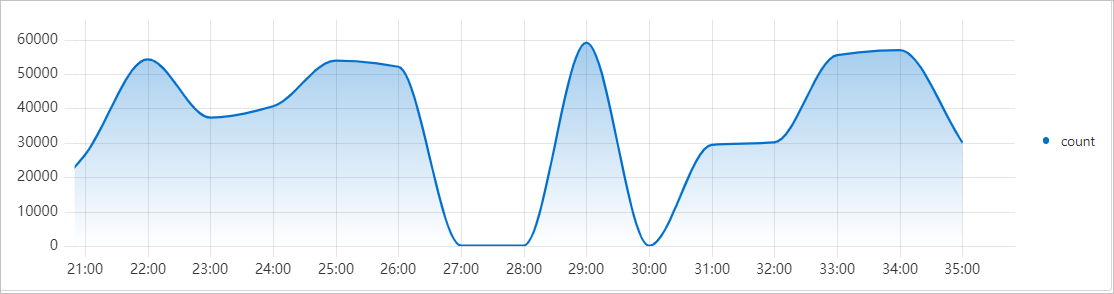
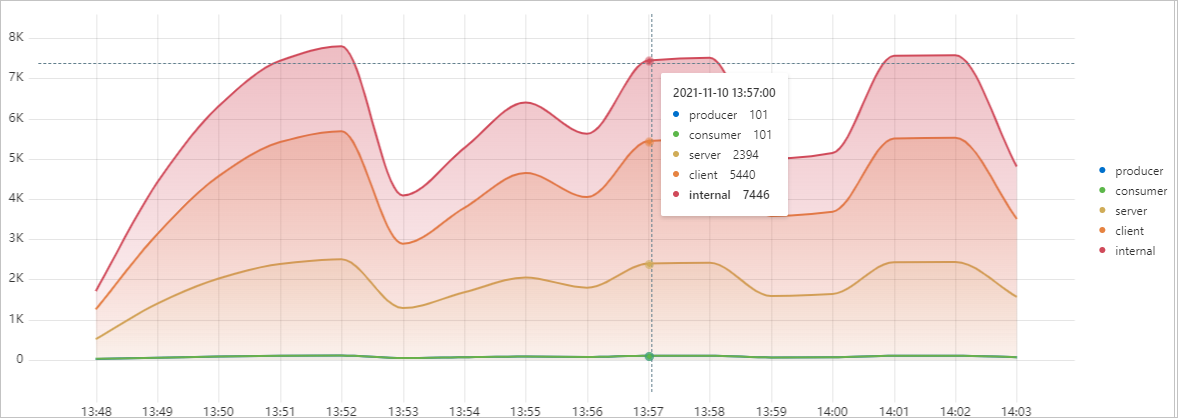
Query statement A aggregates data and groups it by the kind and time fields. A line chart displays only part of the results. To show all categories, configure a Category data conversion rule that classifies the results into five groups based on the kind field: producer, consumer, server, client, and internal. The line chart then displays the count for each category.
-
Query and analysis configuration: Query and analysis A uses LogStore (SQL). The Logstore is sls-mall-traces and the statement is
* | SELECT __time__ - __time__ % 60 AS Time, count(1) AS count, kind GROUP BY Time, kind ORDER BY Time LIMIT 1000. -
Query results before data conversion
-
Table: The returned table contains three columns,
Time,count, andkind, with 80 rows in total. Each time point has a corresponding count for the five kind types: producer, consumer, server, client, and internal. -
Line chart
-
-
Data conversion configuration: Set the type to Category, Select Data Source to A, x-axis to Time, y-axis to count, and aggregate column to kind.
-
Query results after data conversion
-
Table: The categorized table splits the data into five separate columns based on the
kindfield:consumer,producer,internal,server, andclient. Each row displays the count for each category at the same time point. -
Line chart
-
Example for Parse Timestamp
After query statement A returns results, you can configure a Parse Timestamp data conversion rule to parse a specific field into a UNIX timestamp.
-
Query statement
Query and analysis A uses Logstore (SQL). The query statement is
* | select *. -
Results of Query Statement A
The returned table includes columns such as
__line__,file,info,time,__time__, and_source_. Thetimecolumn contains values in the format2024-03-04T10:31:27.427014. The result set has 82 rows. -
Data conversion configuration
Set the data conversion type to Parse Timestamp, Select Data Source to A, field to time, and Format to YYYY-MM-DD HH:mm:ss.
-
Data conversion results
In the converted table, the values in the time column are parsed from a time string into a UNIX timestamp format (such as 1720578030). The table contains 82 rows.
Example for Group By
Query statements A and B both return results that include the request_method field. You can use Group By on this field to merge and aggregate the results in a table.
-
Query statements
Both query and analysis A and B use Logstore (SQL). The Logstore is nginx-access-log. The query statement for both is
* | SELECT request_method, COUNT(*) as c group by request_method. -
Results of Query Statement A
The result table for query and analysis A contains two columns,
request_methodandc, with counts for each method: HEAD(1), GET(237), DELETE(17), POST(62), and PUT(64). -
Results of Query Statement B
The results for query and analysis B are identical to those of query and analysis A, containing the same
request_methodvalues and corresponding counts. -
Data conversion configuration
Set the data conversion type to Group By, group by the request_method field, and apply the Sum function to the c field.
-
Data conversion results
The result after the Group By data conversion shows the combined statistics from both query and analysis operations: GET(474), POST(124), PUT(128), DELETE(34), and HEAD(2).
Example for Transpose Rows and Columns
After query statement A returns results, you can configure a Transpose Rows and Columns data conversion rule to swap the rows and columns.
-
Query statement
Query and analysis A uses Logstore (SQL). The query statement is
* | select *. -
Results of Query Statement A
The returned table includes columns such as
__line__,file,info,time,__time__, and_source_. Thetimecolumn contains values in the format2024-03-04T10:31:27.427014. The result set has 82 rows. -
Data conversion configuration
Set the data conversion type to Transpose Rows and Columns and select A as the data source.
-
Data conversion results
The new table has 82 columns (one for each original row) and a number of rows equal to the original column count. In the transposed table, the original rows become columns, and the original columns become rows.