Log Audit Service provides built-in alert rule templates for real-time monitoring. You can create alert rules directly from these templates.
Prerequisites
The audit feature is enabled for your target cloud services on the Global Configurations page. Enable and manage log collection.
Built-in alerting resources
Log Audit Service includes these built-in alerting resources: alert rule templates, the SLS audit builtin alert policy, SLS audit builtin action policy, SLS audit builtin user group, and SLS audit builtin content template. These resources are connected as follows:
-
Each alert rule template uses the built-in alert policy.
NoteYou can modify the alert policy settings as needed.
-
The alert policy uses the built-in action policy.
-
The action policy uses the built-in user group and built-in alert template.
Procedure
Log on to the Simple Log Service console.
-
Go to the Log Audit Service page.
NoteStarting January 21, 2025, the console entry for the Log Audit Service will be removed. Existing users who activated the service before this date can still see the entry. New users who need to use the old version can access the Log Audit Service (New Version) and use its Back to Old Version feature.
-
In the Log Application section, on the Audit & Security tab, click Log Audit Service (New Version).
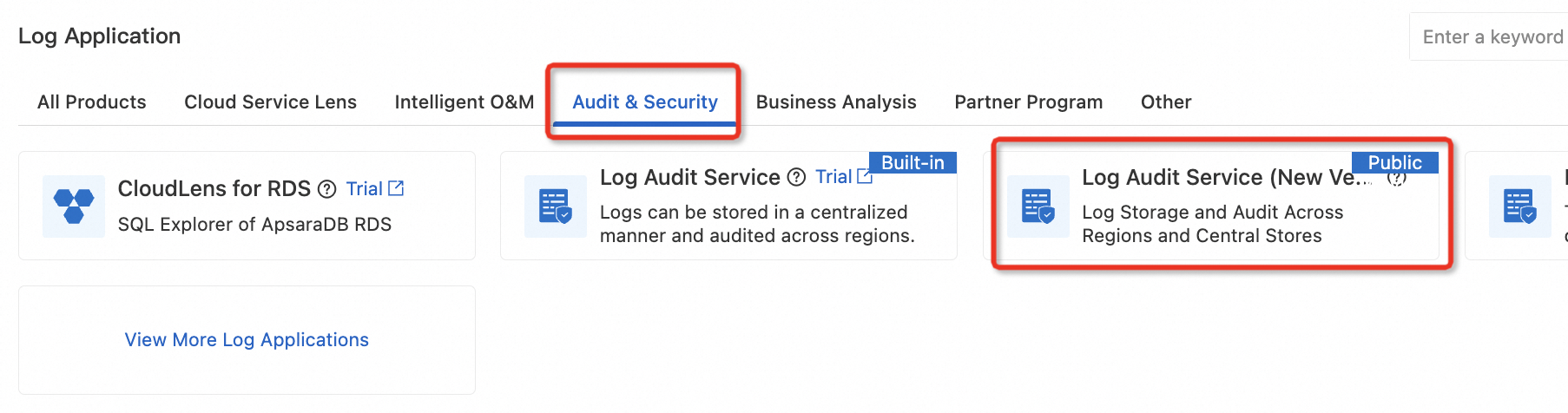
-
In the upper-right corner of the Log Audit Service (New Version) page, click Back to Old Version. Then continue to use the old version of Log Audit Service.
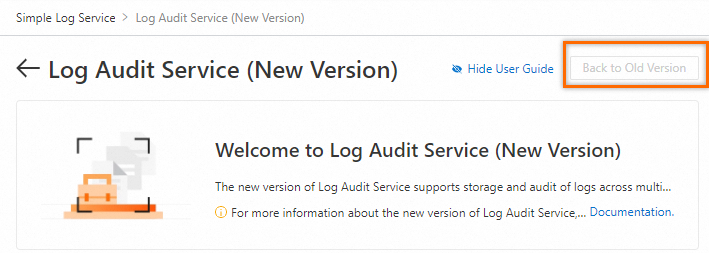
-
-
In the left-side navigation pane, choose Audit alerts > Policy Settings > Alert Rules.
-
On the Alert Rules page, click Create Alert, and then click Create from Template at the top of the panel.

-
Select a template, configure the parameters, and then click OK.
Parameter descriptions are available in Create an alert rule for logs.
What to do next
|
Operation |
Description |
|
Disable an alert rule |
A disabled rule stops triggering alerts. Its Status changes to Disabled. The rule configuration is preserved. You can re-enable it without reconfiguration. |
|
Pause an alert rule |
Temporarily stops the rule from triggering alerts for a specified period. |
|
Resume an alert rule |
Resumes a paused alert rule. |
|
Delete an alert rule |
Permanently removes the rule and its configuration, including the associated Alibaba Cloud account. To use this rule again, you must reconfigure it. |