The API Gateway log management feature, powered by Simple Log Service, enables real-time collection, querying, analysis, transformation, and consumption of API access logs.
API Gateway provides API hosting for microservice aggregation, frontend-backend separation, and system integration. Each API request generates an access log that records the caller IP address, requested URL, response latency, status code, and request and response sizes. 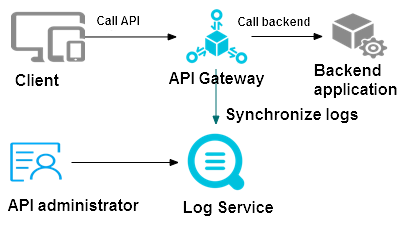
Assets
-
Custom Simple Log Service project and LogStore
Important-
Do not delete the project or LogStore used for API Gateway log management. Deleting them stops log delivery to Simple Log Service.
-
A custom LogStore generates different billable items depending on the billing method. Billable items.
-
-
Dedicated dashboard
One dashboard is generated by default.
ImportantDo not modify the dedicated dashboard — it may be upgraded at any time. To visualize query results, Create a dashboard.
Dashboard
Description
LogStore Name_apigateway access logs
Displays overall API Gateway statistics: request count, success rate, error rate, latencies, calling apps, error counts, and top API groups, operations, and latencies.
Billing
-
The log management feature is free on the API Gateway side.
-
If a LogStore uses pay-by-feature billing, Simple Log Service charges for storage, read traffic, requests, data transformation, and data shipping. Billable items of the pay-by-feature billing method.
-
If a LogStore uses pay-by-ingested-data billing, Simple Log Service charges based on the amount of raw data ingested. Billable items of the pay-by-ingested-data billing method.
Limits
-
The API Gateway instance and the destination Simple Log Service project must be in the same region.
-
Each region supports only one log configuration. All API Gateway access logs in the region are pushed to the LogStore specified in that configuration.