The AliyunLogDefaultRole default role has permissions to read data from Logstores and write data to Object Storage Service (OSS) buckets. You can authorize an OSS-HDFS data shipping job to assume the AliyunLogDefaultRole default role to read data from a source Logstore and write data to a destination OSS bucket.
Ship data within the same Alibaba Cloud account
If your Logstore and OSS bucket belong to the same Alibaba Cloud account, you can click Cloud Resource Access Authorization to create the AliyunLogDefaultRole role within the account.
After the AliyunLogDefaultRole role is created, you can select Default Role for OSS-HDFS Write RAM Role and Logstore Read RAM Role when you create an OSS-HDFS data shipping job. This way, the job is authorized to assume the AliyunLogDefaultRole role and can read data from the source Logstore and write data to the destination OSS bucket. 
Ship data across Alibaba Cloud accounts
If your Logstore and OSS bucket belong to different Alibaba Cloud accounts, you must log on to each account and click Cloud Resource Access Authorization to create the AliyunLogDefaultRole role. In this example, your Logstore belongs to Alibaba Cloud Account A, and your OSS bucket belongs to Alibaba Cloud Account B. After the role is created, perform the following steps:
Use Alibaba Cloud Account B to log on to the Resource Access Management (RAM) console.
In the left-side navigation pane, choose .
Modify the trust policy of the AliyunLogDefaultRole role.
On the Roles page, find the AliyunLogDefaultRole role and click the name of the role.
On the page that appears, click the Trust Policy tab. Then, click Edit Trust Policy.
Replace the existing script with the following script and click Save trust policy document.
Add ID of Alibaba Cloud Account A@log.aliyuncs.com to the Service element. Replace the ID of Alibaba Cloud Account A with the actual ID. You can view the ID of your Alibaba Cloud account in the Account Center console.
The following policy allows Alibaba Cloud Account A to obtain a temporary Security Token Service (STS) token to manage the cloud resources of Alibaba Cloud Account B:
{
  "Statement": [
   {
     "Action": "sts:AssumeRole",
     "Effect": "Allow",
     "Principal": {
       "Service": [
         "ID of Alibaba Cloud Account A@log.aliyuncs.com",
         "log.aliyuncs.com"
       ]
     }
   }
  ],
  "Version": "1"
}
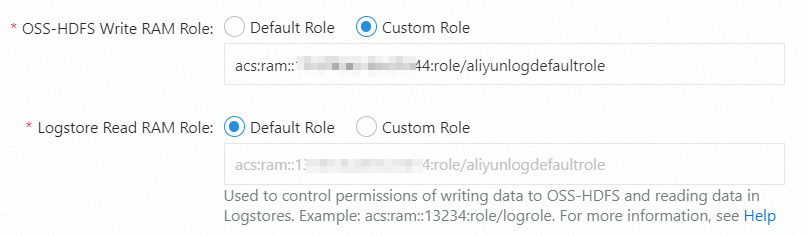
After you complete the preceding configurations, you can select Custom Role for OSS-HDFS Write RAM Role, enter the Alibaba Cloud Resource Name (ARN) of the AliyunLogDefaultRole role that belongs to Alibaba Cloud Account B, and select Default Role for Logstore Read RAM Role when you create an OSS-HDFS data shipping job. This way, the job is authorized to assume the AliyunLogDefaultRole role that belongs to Alibaba Cloud Account A to read data from the source Logstore and assume the AliyunLogDefaultRole role that belongs to Alibaba Cloud Account B to write data to the destination OSS bucket. ARN example: acs:ram::11****13:role/aliyunlogdefaultrole. For more information, see Obtain the ARN of the AliyunLogDefaultRole role.
Obtain the ARN of the AliyunLogDefaultRole role
Log on to the RAM console by using your Alibaba Cloud account.
In the left-side navigation pane, choose .
On the Roles page, find the AliyunLogDefaultRole role and click the name of the role.
On the page that appears, obtain the ARN of the role in the Basic Information section.
Record the ARN. If you use the default role when you create an OSS-HDFS data shipping job, you must enter the ARN.