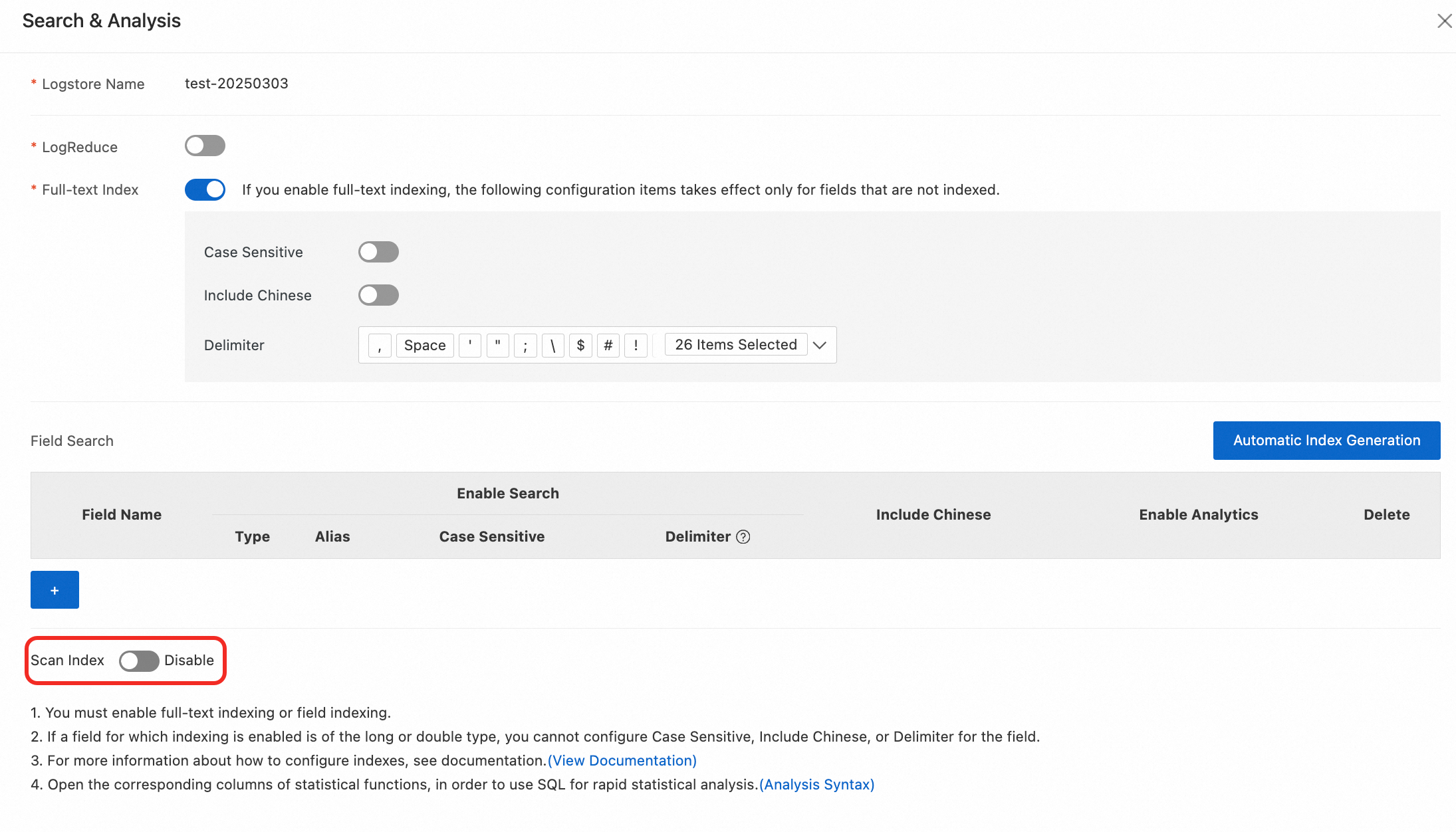
The scan index feature accelerates scan computation performance by leveraging the full-text indexing and field indexing capabilities already supported by Simple Log Service (SLS). By creating lightweight indexes for key fields (such as timestamps), this feature improves data scanning efficiency when enabled.
Usage notes
Scan indexes are supported only for Standard logstores, not for Query logstores. For more information, see Logstore specifications.
Scan indexes can be enabled only at the full-field granularity level. You cannot enable scan indexes for specific fields.
When scan indexes are enabled, the maximum number of concurrent query operations supported per project is 5.
Billing
For more information, see Billable items in the pay-as-you-go billing method.
Billable item | Description | Billing method | Free quota |
Storage usage of the hot storage tier | Includes the storage usage of compressed logs and the storage usage generated by indexes (including full-text indexes, field indexes, and scan indexes) created for uncompressed logs. For example, the size of raw log data that is uploaded to SLS is 1 GB, and indexes are created for two fields. The compression ratio is 5:1 when the raw log data is uploaded, and the size of the indexes is 0.5 GB. In this example, the storage usage of the hot storage tier is calculated using the following formula: 0.2 GB + 0.5 GB = 0.7 GB. |
| 500 MB per month Important Free quotas are provided only when you do not use resource plans to offset the fees of consumed resources. |
Index traffic-scanned indexes | Index traffic is calculated based on the volume of index data generated when scan indexes are created or recreated for uncompressed logs. The size of index traffic is related to the log fields and the length of field values. When both full-text indexing/field indexing and scan indexing are enabled for a field, only the index traffic corresponding to full-text indexing/field indexing is generated, and no scan index traffic is generated. Creating scan indexes generates index storage data equal to 20% of the original log volume.
|
| None |
Comparison of indexing capabilities
Comparison item | Full-text indexing/field indexing enabled | Scanning data without indexes enabled | Scanning data with scan indexes enabled |
Query syntax | SLS query syntax | SPL syntax | SPL syntax |
Analysis syntax | SQL syntax | SQL syntax | SQL syntax |
Query scale | Supports data volumes at the hundreds of billions level. | Suitable for data volumes at the millions level. | Suitable for queries on data volumes at the billions level |
Analysis scale | Supports data scales at the tens of billions level. Enabling the dedicated SQL version can achieve analysis capabilities at the hundreds of billions level. | Suitable for data volumes at the millions level. | Suitable for analyzing data volumes at the billions level |
Whether indexes need to be created | Full-text indexes/field indexes need to be configured, and the statistics feature needs to be enabled | No | Scan indexes need to be configured |
Billing item comparison | Index traffic and corresponding index storage fees | Scanning is billed based on traffic, which is calculated based on the volume of data hit by scanning after index-based queries | Scan index and corresponding index storage fees |
Procedure
Console
Log on to the Simple Log Service console. In the Projects section, click the project you want.

On the tab, click the logstore you want.
On the Search and Analyze page of the logstore, select .
In the Search and Analysis panel, enable Scan Index.