Gateway Load Balancer (GWLB) performs health checks on backend servers to monitor their availability. If a backend server fails a health check, GWLB stops routing new requests to it and distributes them to other healthy servers. When the server recovers, GWLB automatically resumes forwarding traffic to it.
Health check states
Backend servers can be in the following health check states.
|
State |
Description |
|
Initializing |
A GWLB instance has been configured for health checks and is initializing the backend server list. |
|
Healthy |
The backend server is running as expected. |
|
Unhealthy |
The backend server failed the health check or did not respond. |
|
Unused |
The backend server is not in use. |
|
Disabled |
Health checks are disabled. |
How it works
During a GWLB health check, request packets are not encapsulated using the Geneve protocol.
TCP health check
GWLB uses custom TCP probes to check the status of backend servers efficiently.

The TCP health check process is as follows:
-
Based on the listener configuration, GWLB sends a TCP SYN packet to the private IP and health check port of the backend server.
-
If the port on the backend server is listening, the server responds with a SYN+ACK packet.
-
If GWLB does not receive a SYN+ACK packet from the backend server within the specified response timeout, the health check fails.
-
If GWLB receives a SYN+ACK packet from the backend server within the response timeout, the health check is successful. GWLB then sends an RST packet to terminate the TCP connection.
HTTP health check
HTTP health checks send GET requests to retrieve status information from backend servers.

The HTTP health check process is as follows:
-
Based on the listener configuration, GWLB sends an HTTP GET request to the private IP, health check port, and check path of the backend server. The request includes the configured domain name.
-
The backend server returns an HTTP status code based on its operational status.
-
If GWLB does not receive a response from the backend server within the specified response timeout, the health check fails.
-
If GWLB receives a response within the timeout, it compares the returned status code to the expected code. If they match, the health check is successful. Otherwise, the health check fails.
Health check time window
To prevent frequent failovers caused by transient failures, GWLB changes a server's health status only after it consecutively passes or fails a specified number of checks. The health check time window is determined by three factors:
-
health check interval: The interval between health checks.
-
response timeout: The maximum time to wait for a response.
-
health check threshold: The number of consecutive checks required to change a server's health status.
Use the following formulas to calculate the health check time window:
-
Failure time window = response timeout × unhealthy threshold + health check interval × (unhealthy threshold - 1)
-
Success time window = (Response time of a successful check × healthy threshold) + health check interval × (healthy threshold - 1)
NoteThe response time of a successful health check is the duration from sending the health check request to receiving the response. For a TCP health check, this time is negligible because the probe only checks if the port is active. For an HTTP health check, this time depends on the application server's performance and load but is typically on the order of seconds.
The health check state affects request forwarding as follows:
-
If a backend server fails a health check, new requests are no longer distributed to it. This does not affect client access.
-
If a backend server passes a health check, new requests are distributed to it. Client access proceeds normally.
-
If a backend server has an issue but has not yet met the unhealthy threshold, requests are still sent to it. This may cause those requests to fail. By default, the unhealthy threshold is three consecutive failures.

Example: Response timeout and health check interval
Assume the following health check settings:
-
response timeout: 5 seconds
-
health check interval: 2 seconds
-
healthy threshold: 3
-
unhealthy threshold: 3
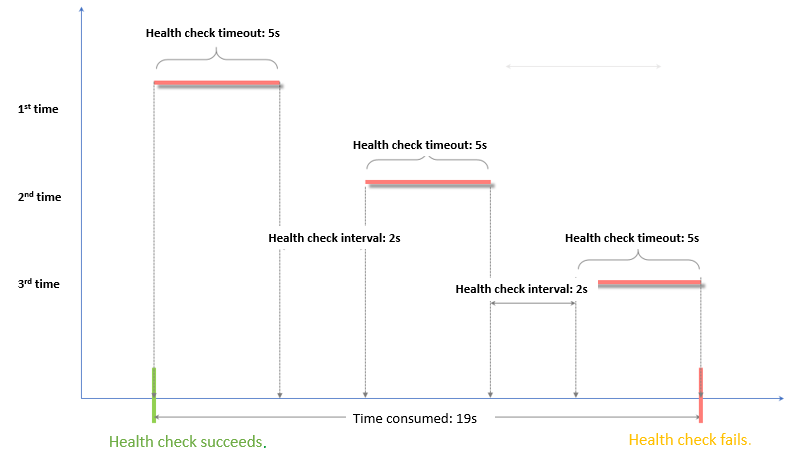
Failure time window = response timeout × unhealthy threshold + health check interval × (unhealthy threshold - 1). In this example, the time window is 19 seconds: 5 × 3 + 2 × (3 - 1) = 19 seconds. After 19 seconds of failed checks, the server's state changes to unhealthy.
The following figure shows the process of a server changing from a healthy to an unhealthy state.

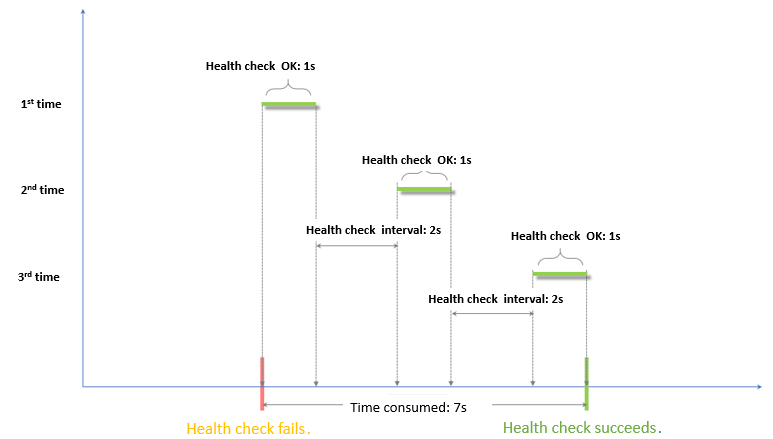
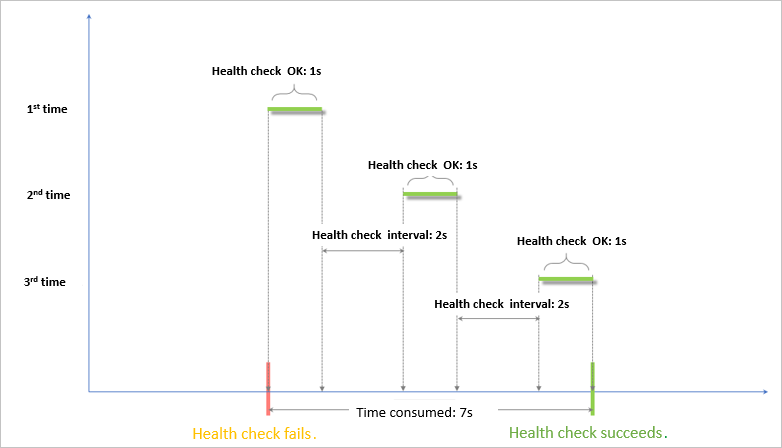
Success time window = (response time of a successful check × healthy threshold) + health check interval × (healthy threshold - 1). Assuming the server takes 1 second to respond, the time window is 7 seconds: (1 × 3) + 2 × (3 - 1) = 7 seconds. After 7 seconds of successful checks, the server's state changes to healthy.
The following figure shows the process of a server changing from an unhealthy to a healthy state, assuming the server takes 1 second to respond to requests.
Domain name for HTTP health checks
Specifying a domain name for HTTP health checks is optional. However, some backend servers validate the host header of incoming requests. If you specify a domain name, GWLB includes it in the host header of the health check probe. If you do not specify a domain name and select Use private IP of the backend server, GWLB uses the server's private IP address and port as the host value. The backend server might reject this request if it does not recognize the value, causing the health check to fail.
Therefore, if your backend server validates the host header, you must configure a domain name to ensure that health checks work correctly.