Classic Load Balancer (CLB) runs in clusters across regions, providing Layer 4 (TCP/UDP) and Layer 7 (HTTP/HTTPS) load balancing. Its cluster-based design synchronizes sessions across nodes, eliminating single points of failure (SPOFs) and keeping services available during maintenance, upgrades, and node failures.
How it works
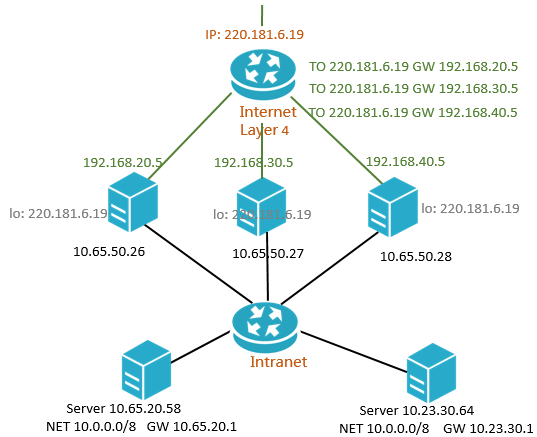
CLB uses different technologies at each layer:
Layer | Protocol | Technology | Description |
Layer 4 | TCP, UDP | Linux Virtual Server (LVS) + Keepalived | Open-source stack, customized for cloud-scale requirements |
Layer 7 | HTTP, HTTPS | Tengine | NGINX-based web server developed by Taobao, optimized for high-traffic sites |
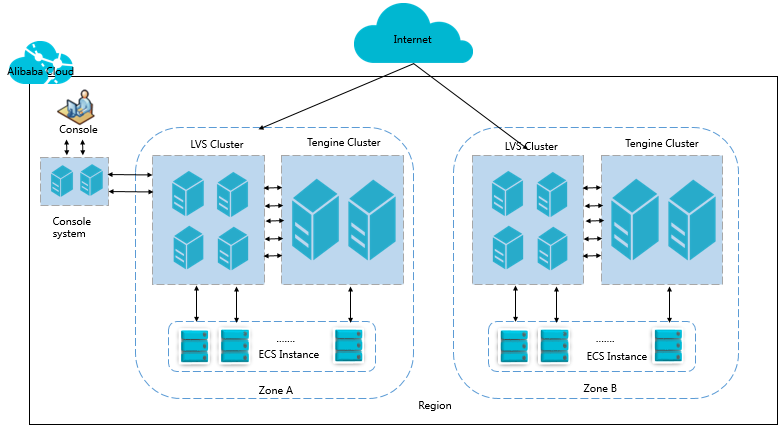
In each region, the Layer 4 cluster consists of multiple LVS physical servers. This architecture maintains availability and scalability even when individual nodes fail or go offline for maintenance.
Session synchronization
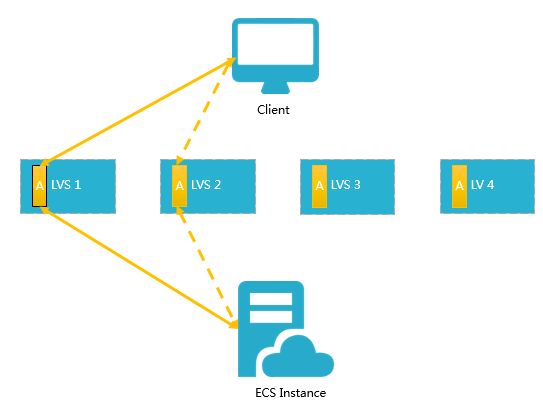
Each node in the LVS cluster uses multicast packets to synchronize sessions with all other nodes. In the following example, after the client sends three packets, Session A established on LVS1 is synchronized across the cluster. Solid lines show active connections; dashed lines show failover paths to healthy nodes (LVS2) when LVS1 fails or goes into maintenance.
This design lets you perform hot upgrades, troubleshoot individual servers, and take nodes offline — all without disrupting your applications.
If a connection is not established because the three-way handshake fails, or if a connection has been established but sessions are not synchronized during a hot upgrade, your services may be interrupted. In this case, you must re-initiate a connection request from the client.
Inbound traffic flow
CLB distributes inbound traffic based on the forwarding rules configured in the CLB console or via API operations.
Figure 1. Inbound traffic flow

All inbound traffic — TCP, UDP, HTTP, and HTTPS — enters through the Layer 4 cluster first. The cluster distributes traffic evenly across nodes and synchronizes sessions for high availability. From there, the path depends on the listener type:
TCP/UDP listeners: The Layer 4 cluster distributes requests directly to backend Elastic Compute Service (ECS) instances based on your forwarding rules.
HTTP listeners: The Layer 4 cluster forwards requests to the Layer 7 cluster, which then distributes them to backend ECS instances based on your forwarding rules.
HTTPS listeners: Same path as HTTP, but the Key Server validates certificates and decrypts data packets before requests reach backend ECS instances.
Outbound traffic flow
CLB and backend ECS instances communicate over the internal network.
Figure 2. Outbound traffic flow

A general principle for outbound traffic: traffic goes out from where it comes in.
Traffic through CLB:
Throttled and billed at the CLB instance level.
Internal communication between CLB and backend ECS instances is free.
Traffic through ECS public resources:
If your ECS instances only serve traffic distributed by CLB, you do not need to purchase public IP addresses, elastic IP addresses (EIPs), Anycast EIPs, or NAT gateways. No Internet traffic fees are generated even if traffic statistics appear on the elastic network interface (ENI).
If your ECS instances need to directly serve external requests or access the Internet, configure a public IP address, EIP, Anycast EIP, or NAT gateway on the instances.
Traffic from EIPs or NAT gateways is charged separately, and you can throttle speed at those resources. If public bandwidth is configured on ECS instances, traffic is charged and throttled at the instance level.
Previously created ECS instances are directly assigned public IP addresses, which you can check by running ipconfig. If such instances serve external traffic only through CLB, no Internet traffic fees are generated even if ENI traffic statistics are visible.
CLB supports responsive Internet access only. Backend ECS instances can access the Internet only if they need to respond to requests from the Internet. The requests are forwarded to the backend ECS instances by CLB instances. For proactive Internet access, associate an EIP or use a NAT gateway.
The public bandwidth resources configured for ECS instances, EIPs, Anycast EIPs, and NAT gateways allow ECS instances to access the Internet or be accessed from the Internet, but these resources cannot distribute or balance traffic.
FAQ
Does the maximum bandwidth I set when purchasing CLB apply to inbound and outbound traffic combined?
No. The maximum bandwidth applies independently to inbound traffic and to outbound traffic. Each direction can reach the configured maximum without affecting the other.
For details, see Bandwidth limits.