By default, Application Load Balancer (ALB) distributes incoming requests across backend servers in all zones of a region. For latency-sensitive workloads — such as financial trading, real-time communications, and IoT data collection — this cross-zone routing adds unwanted network overhead. Disabling cross-zone load balancing restricts each ALB node to route traffic only within its own zone, cutting out the cross-zone hop entirely.
Limitations
Before you configure this feature, check the following constraints:
Cross-zone load balancing can be disabled only on server groups associated with standard or WAF-enabled ALB instances. Basic ALB instances are not supported.
Session Persistence cannot be enabled when cross-zone load balancing is disabled.
For server groups of the IP type, cross-zone load balancing cannot be disabled if Remote IP is enabled.
This setting is not available for server groups of the Function Compute type.
How it works
When cross-zone load balancing is enabled (the default), each ALB node can forward requests to any backend server across all zones within the specified region. When cross-zone load balancing is disabled on a server group, each ALB node routes traffic only to backend servers in its own zone. Requests that arrive at Zone H go exclusively to Zone H's backend servers, and Zone K traffic stays within Zone K.

Before disabling cross-zone load balancing, make sure at least one backend server with adequate capacity is available in each zone where your ALB instance is deployed. If any zone has no healthy backend servers, ALB returns 503 errors for requests entering that zone.
Use cases
Disable cross-zone load balancing when your workload requires consistently low latency:
Financial trading: Quantitative trading strategies are sensitive to millisecond-level delays. Keeping requests within a single zone reduces the risk of transaction timeouts caused by cross-zone network latency.
Real-time communications: Video conferencing and instant messaging require low, stable latency for a smooth user experience.
IoT data collection: Real-time sensor data pipelines need fast, predictable response times to maintain data accuracy and system efficiency.
Prerequisites
Before you begin, ensure that you have:
A standard ALB instance deployed across multiple zones. In this example, the instance is deployed in Zone H and Zone K in the China (Hangzhou) region. See Create and manage an ALB instance
A server group with backend servers in each zone. In this example, ECS01 is in Zone H and ECS02 is in Zone K, each with a web service deployed. See Create and manage server groups
Listeners configured on the ALB instance, with the server group associated. See Add an HTTP listener, Add an HTTPS listener, and Add a QUIC listener
A registered domain name with an ICP (Internet Content Provider) filing, and a CNAME record pointing to the ALB instance's domain name. See Register a generic domain name, ICP filing process, and Configure a CNAME record for an ALB instance
Disable cross-zone load balancing
These steps show how to update an existing server group. If you are creating a new server group, you can disable cross-zone load balancing during creation.
Log on to the ALB console.
On the Server Groups page, click the ID of the server group you want to update.
On the Details page, in the Basic Information section, click Modify Basic Information.
In the Modify Basic Information dialog box, click Advanced Settings, turn off Cross-zone Load Balancing, then click Save.
Verify that cross-zone load balancing is disabled
This step verifies that the configuration change is in effect. The next step measures the actual network latency improvement.
On the Instance Details page of your ALB instance, open the Zone tab and copy the Elastic IP Address (EIP) for each zone.
Open a browser, navigate to
http://<EIP_of_Zone_H>, and refresh several times. All responses should come from ECS01 in Zone H only.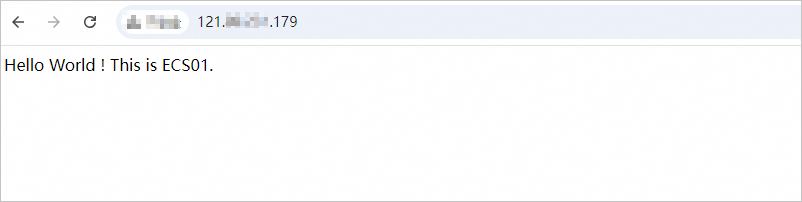
Navigate to
http://<EIP_of_Zone_K>and refresh several times. All responses should come from ECS02 in Zone K only.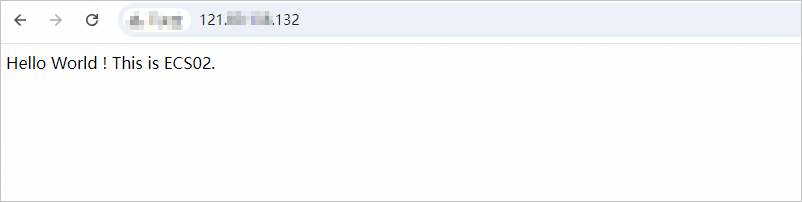
Test the network latency
Latency results vary by region and zone. The numbers below are from this specific test setup and are intended to illustrate the improvement, not to serve as benchmarks.
Create an internet-facing ECS instance in the Germany (Frankfurt) region to act as the test client. If you already have a suitable test machine, skip this step.
Log on to the test client and run:
curl http://www.example.com -s -w "time_connect: %{time_connect}\ntime_starttransfer: %{time_starttransfer}\ntime_total: %{time_total}\n"The three metrics in the output:
Metric Description time_connectTime to establish a TCP connection, in seconds time_starttransferTime from sending the request to receiving the first response byte, in seconds time_totalTotal time from sending the request to receiving the last response byte, in seconds Compare the results before and after disabling cross-zone load balancing.
With cross-zone load balancing enabled:

With cross-zone load balancing disabled:

After disabling cross-zone load balancing, connection time, data transfer time, and total time all decrease.
FAQ
Why am I getting 503 errors after disabling cross-zone load balancing?
A possible reason is that the zone where the incoming request arrived has no backend server available. Since your ALB instance has no backend server to forward requests, a 503 status code is returned. Add at least one backend server with adequate capacity in every zone where your ALB instance is deployed.
Why can't I enable session persistence after disabling cross-zone load balancing?
Session persistence works by pinning a client's requests to a specific backend server. When cross-zone load balancing is enabled, a client in one zone can be pinned to a backend server in another zone. Once cross-zone routing is disabled, this cross-zone affinity is no longer possible, so session persistence cannot be enabled.
What health check status does a backend server show if it's in a zone not covered by the ALB instance?
The backend server's status is shown as Unused. It is not in the routing path for any zone and receives no traffic.
What's next
For ALB regions and zones, see Regions and zones.
For general ALB troubleshooting, see FAQ about ALB.
For health check troubleshooting, see Troubleshoot ALB health check issues.
API reference: CreateServerGroup, UpdateServerGroupServersAttribute, ListServerGroups, and GetListenerHealthStatus.