When you run containerized workloads in ACK or ACK Serverless clusters, you need Layer 7 load balancing to route external HTTP, HTTPS, and QUIC traffic to your services. Application Load Balancer (ALB) Ingresses handle this by integrating ALB with the Kubernetes Ingress API. The ALB Ingress controller translates Ingress resources into ALB configurations, giving you complex routing, automatic certificate discovery, and compatibility with NGINX Ingresses.
How it works
The ALB Ingress controller runs inside a Kubernetes cluster and watches for changes to AlbConfig, Ingress, and Service resources on the API server. When changes occur, the controller translates them into ALB configuration and updates the ALB instance. For more information, see ALB Ingress controller.
Three components make up the ALB Ingress architecture:
AlbConfig (CRD): Configures ALB instances and listeners. Each AlbConfig corresponds to one ALB instance.
Annotations: Define forwarding rules that route HTTP and HTTPS requests to Services.
Services: An abstraction of a backend application running on a set of replicated pods. A single Service can represent multiple identical backend applications.
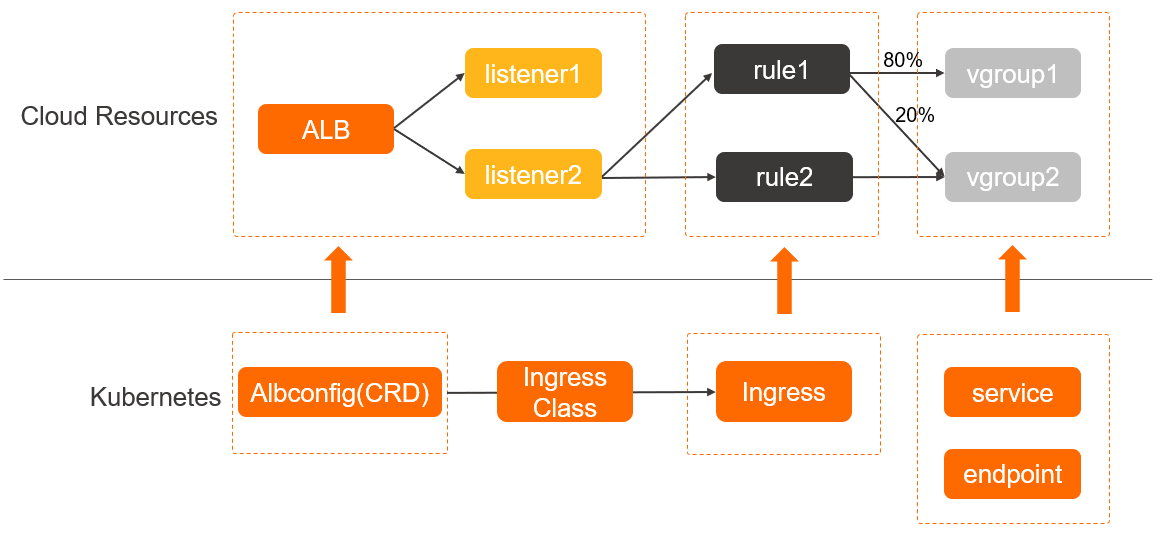
ALB Ingresses are compatible with NGINX Ingresses. Annotations also support session persistence, canary releases, and other advanced features. For more information, see:
ACK clusters: Advanced ALB Ingress configurations
ACK Serverless clusters: Advanced ALB Ingress configurations
Set up ALB Ingresses
ALB Ingresses are managed by ACK or ACK Serverless. Do not configure ALB Ingresses in the ALB console, or service exceptions may occur. For ALB quotas, see Limits.
The following table describes the steps to set up ALB Ingresses in an ACK or ACK Serverless cluster.

| Step | Description |
|---|---|
| Install the ALB Ingress controller | Install the ALB Ingress controller when you create a cluster or from the Add-ons page. For details, see:
Note The ALB Ingress controller requires ACK clusters version 1.18 or later. If you use the Flannel plugin, backend Services of ALB Ingresses support only the NodePort and LoadBalancer types. |
| (Optional) Grant access permissions to ACK dedicated clusters | To access Services through an ALB Ingress in an ACK dedicated cluster, grant the required permissions to the ALB Ingress controller before you deploy the Services. |
| Deploy backend services | Deploy Services and Deployments to which the ALB Ingress forwards traffic. For details, see:
|
| (Optional) Create an AlbConfig and IngressClass | When you create the ALB Ingress controller, if you set Gateway Source to New or Existing, the controller automatically creates an AlbConfig named alb and an IngressClass named alb. In that case, skip this step. Otherwise, create an AlbConfig and IngressClass and associate them. For details, see:
|
| Create an Ingress | Create an Ingress resource that defines forwarding rules for routing requests to backend Services. Associate it with the IngressClass and AlbConfig so that clients can access your Kubernetes applications through the ALB instance. For details, see:
|
When to use ALB Ingresses instead of NGINX Ingresses
ALB Ingresses are managed by Alibaba Cloud. Each ALB instance supports up to one million QPS, tens of millions of concurrent connections, automatic scaling, and 99.995% service uptime. NGINX Ingresses are self-managed and require manual scaling. For a detailed comparison, see Comparison between an NGINX Ingress and an ALB Ingress.
ALB Ingresses are a better fit in the following scenarios:
Persistent connections
Applications that require frequent interaction, such as IoT, Internet finance, and online gaming, rely on persistent connections. ALB Ingresses apply configuration changes through hot reloading without interrupting persistent connections. NGINX Ingresses must reload processes when configurations change, which temporarily closes persistent connections.
High concurrency
IoT services maintain a large number of concurrent connections from terminal devices. ALB Ingresses run on the Cloud Network Management platform and manage sessions at scale. Each ALB instance supports tens of millions of connections.
High QPS
Promotional activities and breaking events require high QPS capacity. ALB Ingresses support automatic scaling and automatically add virtual IP addresses as QPS increases. Each ALB instance supports up to one million QPS.
Workload fluctuations
E-commerce and gaming services experience large workload fluctuations. ALB supports the pay-as-you-go billing method and uses load balancer capacity units (LCUs). Fewer LCUs are consumed during off-peak hours, and ALB scales automatically without manual resource reservation.
Zone and geo-redundancy
For applications requiring high availability, such as social networking and streaming media, use Distributed Cloud Container Platform for Kubernetes (ACK One) to create ALB multi-cluster gateways and manage multi-cluster traffic with ALB Ingresses to implement active geo-redundancy and active zone-redundancy.
Capabilities
Load balancing and scheduling at multiple levels, up to one million QPS per instance
High-performance forwarding through hardware acceleration
Automatic scaling with 99.995% service uptime
Customizable routing for complex workloads