Application Load Balancer (ALB) Ingresses are a cloud-native Ingress gateway launched by Alibaba Cloud. They are deeply integrated with Kubernetes services such as Container Service for Kubernetes (ACK) and ACK Serverless to provide Layer 7 load balancing for external traffic routed to your cluster. This topic introduces the concepts, benefits, use cases, and setup of ALB Ingresses.
Concepts
ALB Ingresses can be used to balance external traffic to ACK or ACK Serverless clusters at Layer 7. The ALB Ingress controller, deployed in a Kubernetes cluster, watches for changes to AlbConfig, Ingress, and Service resources on the API server. It then dynamically translates these changes into the required ALB configuration, updating the ALB instance accordingly. For more information about the ALB Ingress controller, see ALB Ingress controller.
Work with ALB Ingresses
Empowered by ALB, ALB Ingresses provide more powerful management capabilities for network traffic. ALB Ingresses are compatible with NGINX Ingresses. This allows ALB Ingresses to perform complex routing, automatically discover certificates, and support HTTP, HTTPS, and QUIC. ALB Ingresses are ideal for cloud native scenarios that require high scalability and large-scale traffic forwarding at Layer 7.
Procedure
ALB Ingresses are managed by ACK or ACK Serverless. Do not configure ALB Ingresses in the ALB console, or service exceptions may occur. For more information about the ALB quotas, see Limits.
ALB Ingresses are deeply integrated with cloud native services. ALB Ingresses support a wide range of features and can be used out-of-the-box. The following procedure demonstrates how to use ALB Ingresses in an ACK or ACK Serverless cluster:

Operation | Description |
Install the ALB Ingress controller | You can install the ALB Ingress controller when you create a cluster or on the Add-ons page. For more information, see the following topics:
Note
|
(Optional) Grant access permissions to ACK dedicated clusters | If you want to access Services by using an ALB Ingress in an ACK dedicated cluster, you must grant the required permissions to the ALB Ingress controller before you deploy the Services. |
Deploy backend services such as Services and Deployments | You can deploy backend services such as Services and Deployments in Kubernetes to which the ALB Ingress forwards network traffic. For more information, see the following topics:
|
(Optional) Create an AlbConfig and an IngressClass | Important When you create the ALB Ingress controller, if you set Gateway Source to New or Existing, the controller automatically creates an AlbConfig named alb and an IngressClass named alb. In this case, you can skip this step. After you grant permissions to the ALB Ingress controller, you can create an AlbConfig and an IngressClass and associate them with each other. For more information, see the following topics:
|
Create an Ingress | Create an Ingress resource that defines the forwarding rules for routing requests to your backend Services. This Ingress is associated with the IngressClass and AlbConfig, enabling clients to access your Kubernetes applications through the ALB instance. For more information, see the following topics:
|
In addition to forwarding rules, you can add annotations to ALB Ingresses to configure advanced features such as session persistence and canary releases. For more information about other features of ALB Ingresses, see the following topics:
ACK clusters: Advanced ALB Ingress configurations
ACK Serverless clusters: Advanced ALB Ingress configurations
How ALB Ingresses work
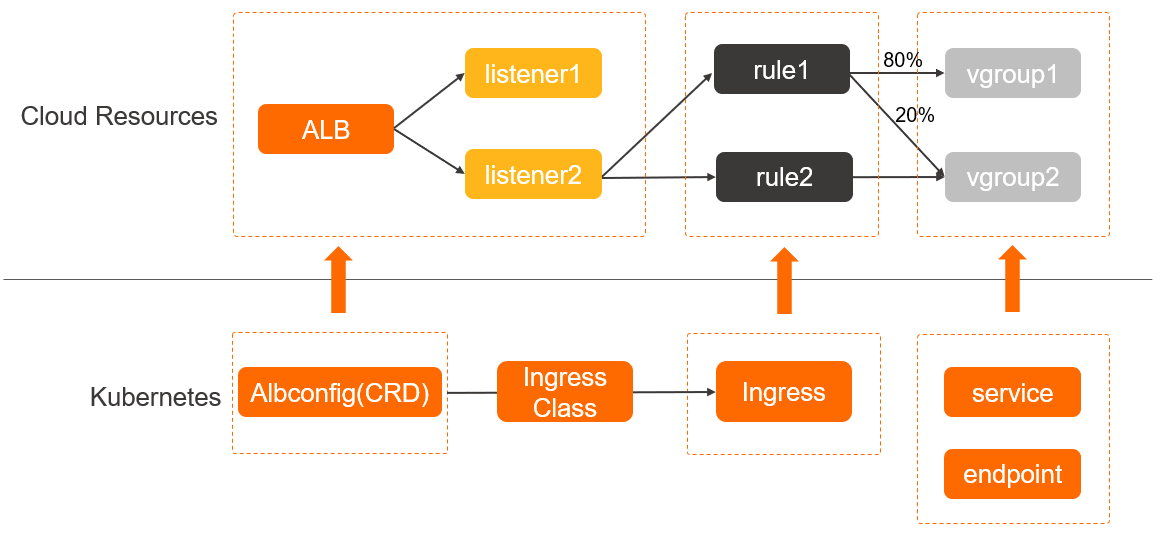
ALB Ingresses are compatible with Kubernetes features and allow you to use AlbConfig objects, which are CustomResourceDefinitions (CRDs) objects, and annotations to configure advanced settings.
AlbConfig CRD: AlbConfig CRDs are used to configure ALB instances and listeners. Each AlbConfig object corresponds to one ALB instance.
Annotations: used to configure forwarding rules, based on which, HTTP and HTTPS requests are forwarded to Services.
Services: An abstraction of a backend application that runs on a set of replicated pods, where a single Service can represent multiple identical backend applications.
Benefits
ALB Ingresses are fully managed by Alibaba Cloud and provide ultra-high processing capabilities. In comparison, NGINX Ingresses are highly customizable, but require manual management. NGINX Ingresses and ALB Ingresses provide different service scopes, architectures, and processing and security capabilities. For more details, see Comparison between an NGINX Ingress and an ALB Ingress.
ALB Ingresses outperform NGINX Ingresses in the following scenarios:
Persistent connections
Persistent connections are ideal for scenarios in which frequent interaction is required, such as Internet of Things (IoT), Internet finance, and online gaming. When configurations are modified, NGINX Ingresses must reload processes and temporarily close persistent connections. This may cause service interruptions. To prevent this issue, ALB Ingresses apply configuration changes through hot reloads, ensuring that persistent connections are not interrupted.
High concurrency
IoT services are expected to maintain a large number of concurrent connections initiated from terminal devices. ALB Ingresses run on the Cloud Network Management platform of Alibaba Cloud and can efficiently manage sessions. Each ALB instance supports tens of millions of connections. NGINX Ingresses support only a limited number of sessions, which require manual O&M. Scales-outs of NGINX Ingresses consume resources in clusters and require manual operations. The scale-out expense is relatively high.
High QPS
Internet services are expected to withstand high QPS in most scenarios, such as promotional activities and breaking events. ALB Ingresses support automatic scaling. Virtual IP addresses are automatically added as the QPS value increases. ALB Ingresses support lower network latency than NGINX Ingresses because each ALB instance supports up to one million QPS. In addition, NGINX Ingresses rely on resources in clusters and may experience performance bottlenecks in high QPS scenarios.
Large workload fluctuations
ALB provides more cost-effective pricing models that are ideal for services with large workload fluctuations, such as e-commerce and gaming services. ALB supports the pay-as-you-go billing method. Fewer Load Balancer Capacity Units (LCUs) are consumed during off-peak hours. In addition, ALB supports automatic scaling. You do not need to check traffic flows in real time. However, NGINX does not automatically release idle resources during off-peak hours. You must manually reserve a certain amount of resources in clusters to cope with workload fluctuations.
Active zone-redundancy and active geo-redundancy
For applications requiring high availability, such as those for social networking or streaming media services, you can use Distributed Cloud Container Platform for Kubernetes (ACK One) to create ALB multi-cluster gateways and manage multi-cluster traffic with ALB Ingresses to implement active geo-redundancy and active zone-redundancy.
Scenarios
ALB Ingresses are open, programmable, and fully managed. ALB Ingresses provide high performance and support auto scaling.
Supports load balancing and scheduling at multiple levels and can support up to one million QPS per instance.
Provides high-performance forwarding through hardware integration and acceleration.
Supports auto scaling to simplify O&M and guarantees 99.995% of service uptime.
Provides a customizable system to route complex workloads.