When ALB forwards requests, the source IP address visible to a backend server is the IP address of the ALB instance. ALB can append the real client IP to the X-Forwarded-For field in the HTTP header, which you can retrieve with a simple configuration on your backend server.
The X-Forwarded-For field has the following format:
X-Forwarded-For: <real client IP, proxy server 1-IP, proxy server 2-IP, ...>Procedure
Step 1: Verify listener configuration for X-Forwarded-For
Log on to the ALB console, and click the target instance ID to go to the Instance Details page.
On the Listener tab, click the ID of the target listener. On the Listener Details page, in the Basic Information section, verify that Add HTTP Header is configured to include
X-Forwarded-For.This option is enabled by default. If it is not enabled, click Modify Listener in the Basic Information section and enable it in the Advanced Settings section.
Step 2: Configure the backend server
This topic describes how to record the real client IP in the access log of your backend server (via the
X-Forwarded-Forfield). Server connection-layer variables (such as$remote_addrin Nginx and%hin Apache) remain set to the ALB forwarding IP (local IP) and are not affected.If you want to directly replace the connection-layer variables with the real client IP (so that existing logging, access control, and other rules based on these variables work without modification), see How to let Nginx or Apache directly retrieve the real client IP (replacing the connection-layer address).
Nginx server
This topic uses an Nginx server running Alibaba Cloud Linux 3.2104 and nginx/1.20.1 as an example. The actual configuration may vary depending on your environment.
Nginx uses the http_realip_module module to parse the X-Forwarded-For header and retrieve the real client IP.
Verify that the module is installed: On the server, run the
nginx -V 2>&1 | grep --color=auto http_realip_modulecommand. If the output contains--with-http_realip_module, the module is installed.
For mainstream Linux distributions, Nginx installed through a package manager such as
yumoraptusually includes this module by default. If the module is not installed, we recommend that you install or upgrade Nginx using a package manager.Modify the Nginx configuration file: Run
sudo nginx -tto find the path to the configuration file. The default path is typically/etc/nginx/nginx.conf.http { # Ensure the log format includes $http_x_forwarded_for to record the value of the X-Forwarded-For header. log_format main '$remote_addr - $remote_user [$time_local] "$request" ' '$status $body_bytes_sent "$http_referer" ' '"$http_user_agent" "$http_x_forwarded_for"'; # Ensure the access log uses the preceding log format. access_log /var/log/nginx/access.log main; # ... }Reload the configuration: Run
sudo nginx -tto check the configuration syntax. If the syntax is correct, runsudo nginx -s reloadto apply the changes.
Apache server
This topic uses an Apache server running Alibaba Cloud Linux 3.2104 and Apache/2.4.37 as an example. The actual configuration may vary depending on your environment.
Apache uses the mod_remoteip module to parse the X-Forwarded-For header and retrieve the real client IP.
Verify that the module is installed: On the server, run the
httpd -M | grep remoteip_modulecommand. If the output containsremoteip_module (shared), the module is installed.
For mainstream Linux distributions, Apache installed through a package manager such as
yumoraptusually includes this module by default. If the module is not installed, we recommend that you install or upgrade Apache using a package manager.Modify the Apache configuration file: Run
httpd -Vto find the path to the configuration file. The default path is typically/etc/httpd/conf/httpd.conf.# ... <IfModule log_config_module> # ... # Ensure the log format includes %{X-Forwarded-For}i to record the value of the X-Forwarded-For header. LogFormat "%h %l %u %t \"%r\" %>s %b \"%{Referer}i\" \"%{User-Agent}i\" %{X-Forwarded-For}i" combined # ... # Ensure the access log uses the preceding log format. CustomLog "logs/access_log" combined </IfModule> # ...Reload the configuration: Run
sudo systemctl restart httpdto apply the changes.
IIS server
This topic uses an IIS server running Windows Server 2022 21H2 and IIS 10.0 as an example. The actual configuration may vary depending on your environment.
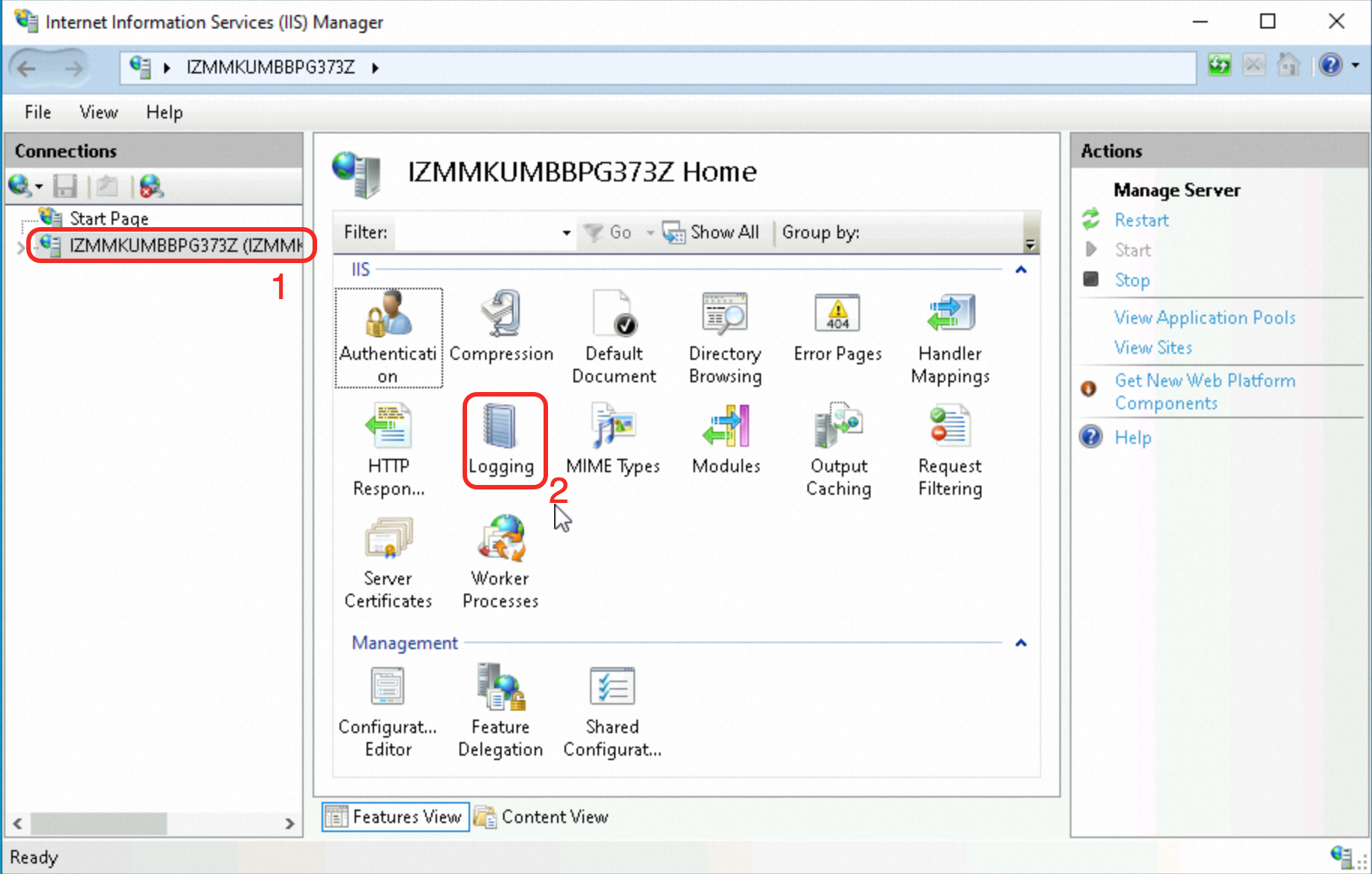
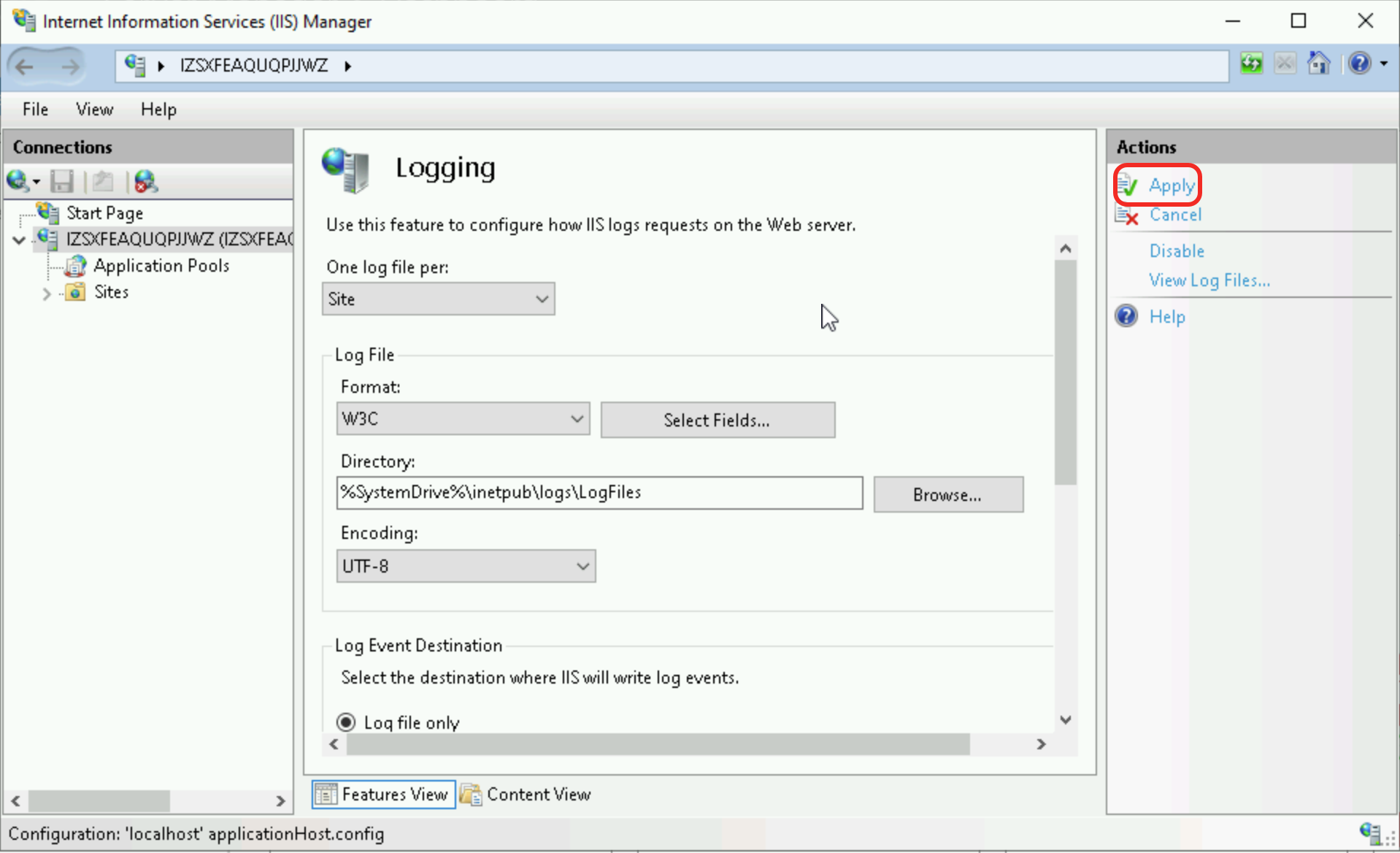
In the Connections pane of IIS Manager, select the target server. In the main pane, double-click Logging.
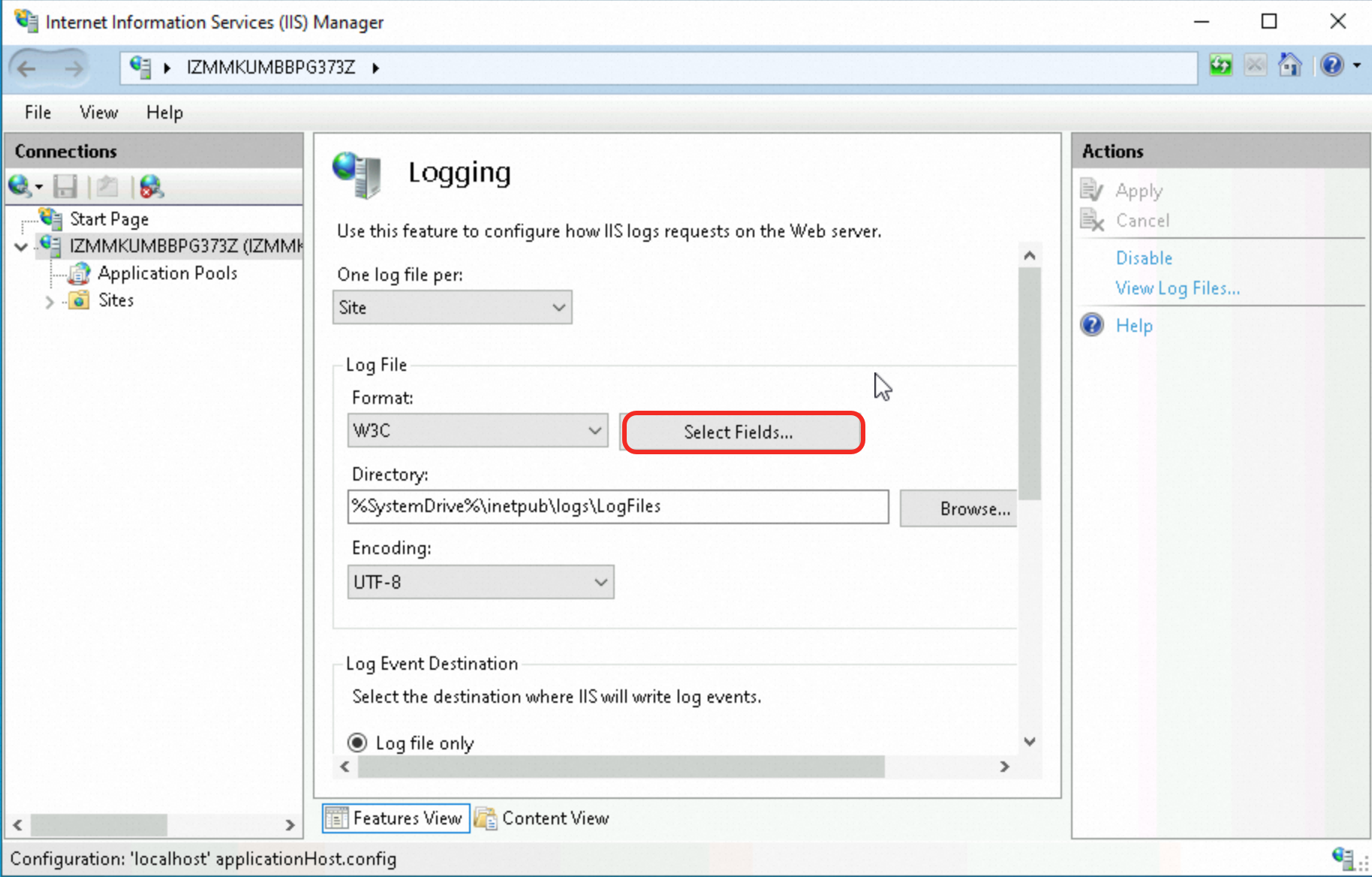
In the Log File section, click Select Fields.
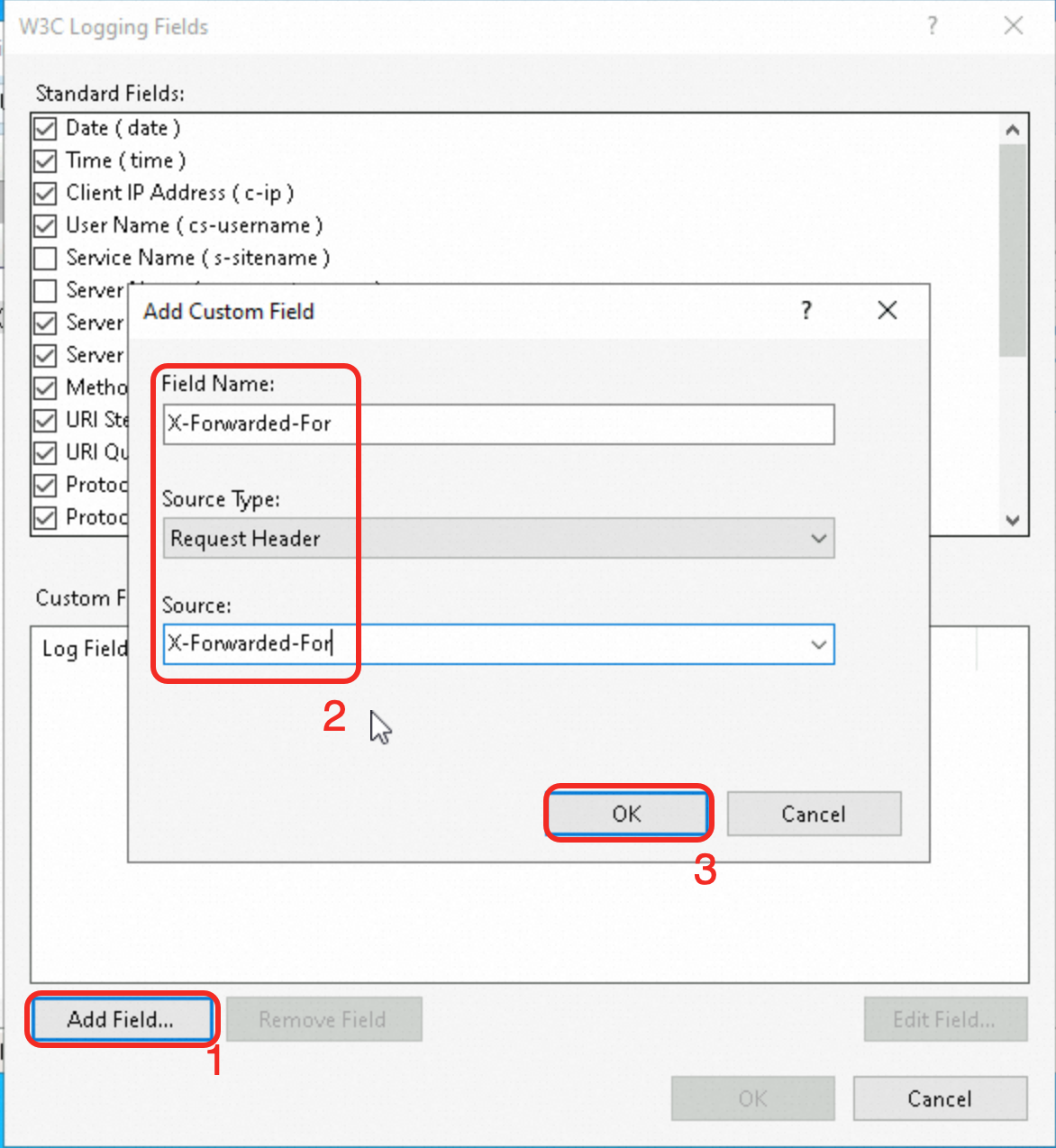
In the W3C Logging Fields dialog box, click Add Field. In the Add Custom Field dialog box, configure the field information, and then click OK.
Field Name: Enter
X-Forwarded-For.Source Type: Keep the default value,
Request Header.Source: Enter
X-Forwarded-For.
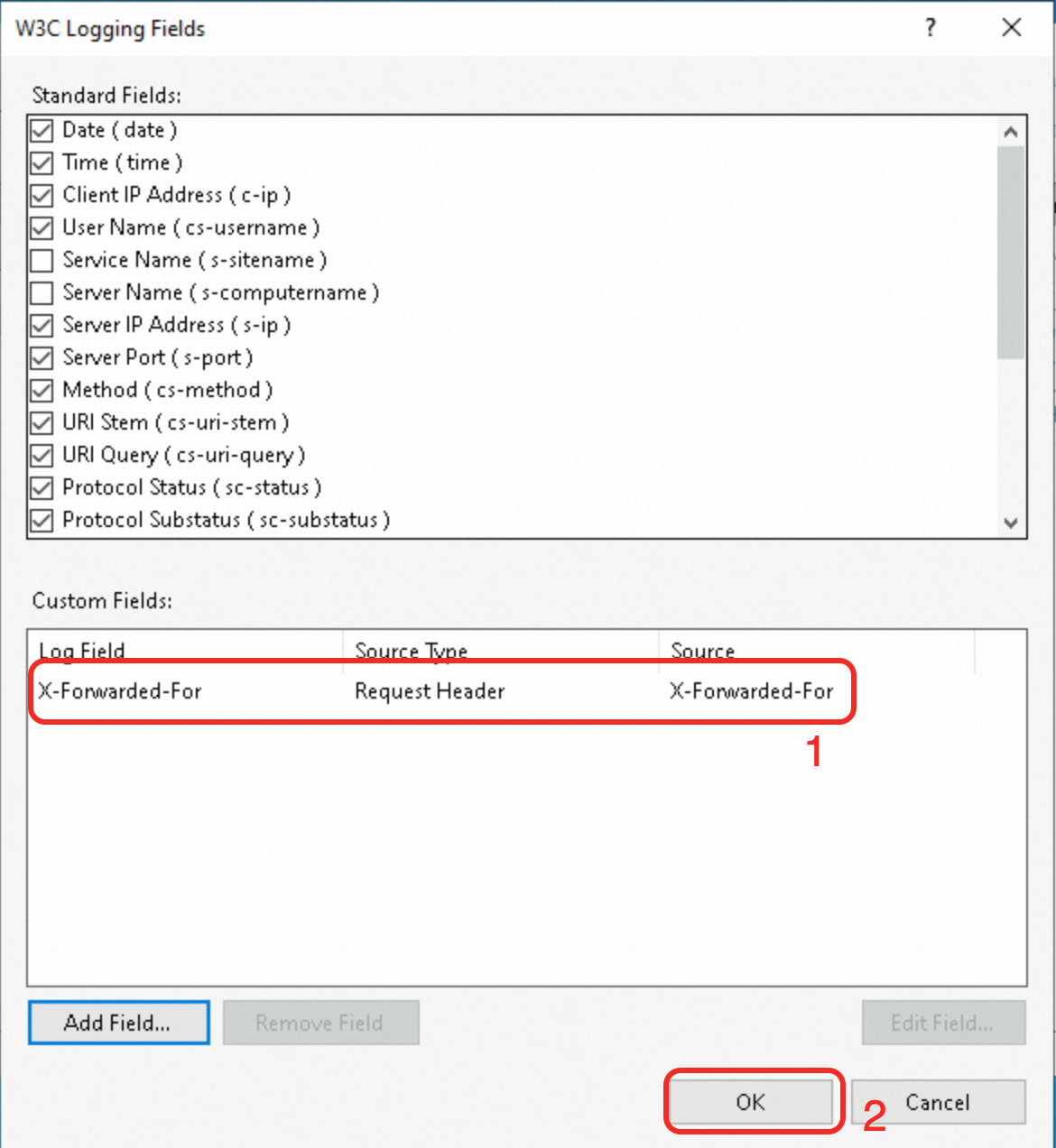
Confirm that the custom field has been added and click OK.
In the Actions pane on the right, click Apply to save the changes.
Step 3: Verify client IP retrieval
Check the access log of the backend web server to verify that it has retrieved the real client IP.
Nginx server
The default path for the Nginx access log is /var/log/nginx/access.log.
In each log entry, the value of the $http_x_forwarded_for variable is the real client IP.

Apache server
The default path for the Apache access log is /var/log/httpd/access_log.
In each log entry, the value of the %{X-Forwarded-For}i variable is the real client IP.

IIS server
The default path for the IIS access log is %SystemDrive%\inetpub\logs\LogFiles.
In each log entry, the value in the final X-Forwarded-For field is the real client IP.

Production best practices
Validate and filter the X-Forwarded-For header: On your backend server, validate and filter the X-Forwarded-For header. Reject entries that are improperly formatted or contain untrusted IP addresses.
Use security policies: Use security groups or other third-party security policies between ALB and your backend servers to restrict and filter malicious requests with a spoofed X-Forwarded-For header.
TLS encryption: Use TLS encryption to protect communications between components, including the transmission of the X-Forwarded-For header. This mitigates the risk of man-in-the-middle attacks and data tampering.
FAQ
Frequent access from IPs starting with 100
Upgraded ALB instances use private IP addresses (local IPs) from their associated vSwitch CIDR blocks to communicate with backend servers.
Non-upgraded ALB instances use the
100.64.0.0/10address range, which is reserved by Alibaba Cloud and poses no security risk, to communicate with backend servers.
In addition to forwarding requests to backend servers, ALB also performs continuous health checks on them. If you use a non-upgraded ALB instance, your backend server access logs will show numerous requests from IP addresses in the 100.64.0.0/10 range.
To ensure proper connectivity between your ALB instance and backend services, make sure that iptables or other third-party security software on your backend ECS instances does not block the ALB instance's vSwitch CIDR block or the 100.64.0.0/10 address range.
Retrieving client IP with WAF, CDN, or GA
If traffic is forwarded by services such as Web Application Firewall (WAF), Content Delivery Network (CDN), or Global Accelerator (GA) before it reaches ALB, you can also retrieve the real client IP from the X-Forwarded-For field. These products forward this header by default and require no additional configuration.
To prevent X-Forwarded-For spoofing, you can use other HTTP headers to record the real client IP:
Use the
Ali-Cdn-Real-Ipheader from Alibaba Cloud CDN. The architecture is Client > CDN > WAF > ALB > ECS.By default, CDN adds the
Ali-Cdn-Real-Iprequest header to requests forwarded to the origin server. This header passes the real IP address of the client that connected to the CDN point of presence (POP).When you integrate with WAF, select
Ali-Cdn-Real-Ipas the custom header for client IP detection.Configure the
$http_Ali_Cdn_Real_Iplog variable on the backend Nginx server to retrieve the real client IP from this field.
Use the Insert Header action in an ALB listener's forwarding rule to add an HTTP header (key-value pair) to the request. The architecture is Client > GA > ALB > ECS.
In the ALB listener forwarding rule, set the Action to Insert Header. In this example, the key is
client-real-ipand the value is set toSystem-defined-Client IP Address.For the listener, enable Retrieve Client IP and add the GA endpoint's public egress IP addresses to the trusted IP address list.
Configure the
$http_client_real_iplog variable on the backend Nginx server to retrieve the real client IP from this field.
Retrieving client IP in an ACK environment
For more information, see Configure ALB instances by using AlbConfig.
How to let Nginx or Apache directly retrieve the real client IP (replacing the connection-layer address)
Nginx
By default, $remote_addr in Nginx logs records the ALB forwarding IP (local IP). To replace it with the real client IP (so that existing logging and access control rules work without modification), use the ngx_http_realip_module module:
Run
nginx -V | grep http_realip_moduleto verify that the module is installed.In the configuration file (default:
/etc/nginx/nginx.conf), add the following to thehttpblock:set_real_ip_from <vSwitch CIDR block of the instance>; real_ip_header X-Forwarded-For; real_ip_recursive on;If you use a non-upgraded ALB instance, set
set_real_ip_fromto100.64.0.0/10.Run
sudo nginx -tto verify the syntax, then runsudo nginx -s reloadto reload the configuration.
After the configuration takes effect, check the access log (default:/var/log/nginx/access.log) to verify that$remote_addrnow shows the real client IP.
If traffic passes through multiple proxies such as WAF or CDN, add the origin IP ranges of each proxy layer to set_real_ip_from.Health check requests do not carry theX-Forwarded-Forheader, so$remote_addrfor these requests still shows the ALB instance's vSwitch CIDR block (or100.64.0.0/10for non-upgraded instances). This is expected behavior.
Apache
By default, %h in Apache logs records the ALB forwarding IP (local IP). To replace it with the real client IP (so that existing logging and Require ip access control rules work without modification), use the built-in mod_remoteip module in Apache 2.4:
Run
httpd -M | grep remoteip_moduleto verify that the module is installed.In the configuration file (default:
/etc/httpd/conf/httpd.conf), add the following:RemoteIPHeader X-Forwarded-For RemoteIPTrustedProxy <vSwitch CIDR block of the instance>If you use a non-upgraded ALB instance, set
RemoteIPTrustedProxyto100.64.0.0/10.Run
sudo systemctl restart httpdto restart Apache.
After the configuration takes effect, check the access log (default:/var/log/httpd/access_log) to verify that%hnow shows the real client IP.
If traffic passes through multiple proxies such as WAF or CDN, add the origin IP ranges of each proxy layer to RemoteIPTrustedProxy.Health check requests do not carry theX-Forwarded-Forheader, so%hfor these requests still shows the ALB instance's vSwitch CIDR block (or100.64.0.0/10for non-upgraded instances). This is expected behavior.