IVF
An IVF index is an efficient data structure for approximate nearest neighbor (ANN) search. It narrows the vector search scope, which significantly improves search speed. SelectDB has supported IVF-based ANN indexes since version 5.x. This document details the IVF algorithm, its key parameters, and best practices for building and tuning IVF-based ANN indexes in a production SelectDB cluster.
What is an IVF index
A brief history provides helpful context. The term IVF (Inverted File) originated in the field of information retrieval.
Consider a simple example with text documents. To search for documents containing a given word, a forward index stores a list of words for each document. You would have to scan every document to find matches.
|
Document |
Words |
|
Document 1 |
the,cow,says,moo |
|
Document 2 |
the,cat,and,the,hat |
|
Document 3 |
the,dish,ran,away,with,the,spoon |
In contrast, an inverted index contains a dictionary of all searchable words. For each word, it stores a list of document IDs that contain the word. This is the inverted list (or inverted file), limiting the search to the selected lists.
|
Word |
Documents |
|
the |
Document 1, Document 3, Document 4, Document 5, Document 7 |
|
cow |
Document 2, Document 3, Document 4 |
|
says |
Document 5 |
|
moo |
Document 7 |
Today, text data is often represented as vector embeddings. The IVF method defines cluster centroids, which are analogous to the word dictionary in the previous example. For each centroid, there is a list of vectors belonging to that cluster. This accelerates the search because the system checks only the selected clusters.
Efficient vector search with an IVF index
As datasets grow to millions or even billions of vectors, performing an exhaustive, exact k-nearest neighbor (kNN) search—calculating the distance between a query vector and every other vector in the database—becomes computationally infeasible. This brute-force approach is equivalent to a large matrix multiplication and does not scale.
Fortunately, many applications can sacrifice a small amount of accuracy for a significant gain in speed. This is the domain of approximate nearest neighbor (ANN) search, and the inverted file (IVF) index is one of the most widely used and effective ANN methods.
The fundamental principle of IVF is "divide and conquer." Instead of searching the entire dataset, IVF intelligently narrows the search to a few promising regions, dramatically reducing the number of comparisons required.
IVF works by partitioning a large dataset of vectors into smaller, more manageable clusters, each represented by a central point called a centroid. These centroids act as anchors for their respective partitions. During a search, the system quickly identifies the clusters whose centroids are closest to the query vector and searches only within those clusters, ignoring the rest of the dataset.
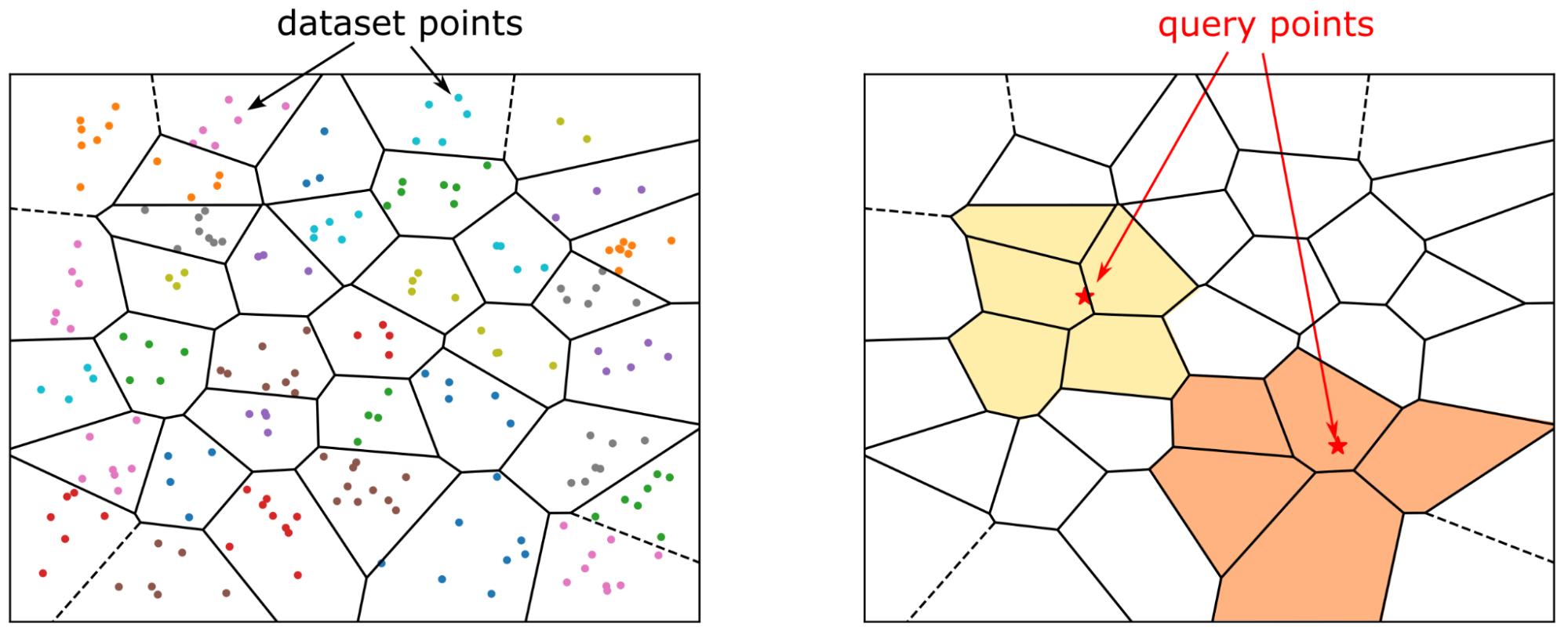
IVF in SelectDB
Build index
The index type used here is ANN. You can create an ANN index in two ways: define the index when you create a table, or use the CREATE/BUILD INDEX syntax. These two methods differ in when and how the index is built, and are therefore suitable for different scenarios.
Method 1: Specify the index on a vector column when creating the table. As data is loaded, an ANN index is built for each segment as it is created. The advantage is that the index can accelerate queries as soon as data loading is complete. The disadvantage is that synchronous index building slows down data ingestion and can lead to extra index rebuilds during compaction, which wastes resources.
CREATE TABLE sift_1M (
  id int NOT NULL,
  embedding array<float>  NOT NULL  COMMENT "",
  INDEX ann_index (embedding) USING ANN PROPERTIES(
      "index_type"="ivf",
      "metric_type"="l2_distance",
      "dim"="128",
      "nlist"="1024"
  )
) ENGINE=OLAP
DUPLICATE KEY(id) COMMENT "OLAP"
DISTRIBUTED BY HASH(id) BUCKETS 1
PROPERTIES (
  "replication_num" = "1"
);

INSERT INTO sift_1M
SELECT *
FROM S3(
  "uri" = "https://selectdb-customers-tools-bj.oss-cn-beijing.aliyuncs.com/sift_database.tsv",
  "format" = "csv");
CREATE/BUILD INDEX
Method 2: CREATE/BUILD INDEX.
CREATE TABLE sift_1M (
  id int NOT NULL,
  embedding array<float>  NOT NULL  COMMENT ""
) ENGINE=OLAP
DUPLICATE KEY(id) COMMENT "OLAP"
DISTRIBUTED BY HASH(id) BUCKETS 1
PROPERTIES (
  "replication_num" = "1"
);

INSERT INTO sift_1M
SELECT *
FROM S3(
  "uri" = "https://selectdb-customers-tools-bj.oss-cn-beijing.aliyuncs.com/sift_database.tsv",
  "format" = "csv");
After importing data, run CREATE INDEX. At this point, the table has an index definition, but the index is not yet built on the existing data.
CREATE INDEX idx_test_ann ON sift_1M (`embedding`) USING ANN PROPERTIES (
  "index_type"="ivf",
  "metric_type"="l2_distance",
  "dim"="128",
  "nlist"="1024"
);

SHOW DATA ALL FROM sift_1M;

mysql> SHOW DATA ALL FROM sift_1M;
+-----------+-----------+--------------+----------+----------------+---------------+----------------+-----------------+----------------+-----------------+
| TableName | IndexName | ReplicaCount | RowCount | LocalTotalSize | LocalDataSize | LocalIndexSize | RemoteTotalSize | RemoteDataSize | RemoteIndexSize |
+-----------+-----------+--------------+----------+----------------+---------------+----------------+-----------------+----------------+-----------------+
| sift_1M   | sift_1M   | 10           | 1000000  | 170.093 MB     | 170.093 MB    | 0.000          | 0.000           | 0.000          | 0.000           |
|           | Total     | 10           |          | 170.093 MB     | 170.093 MB    | 0.000          | 0.000           | 0.000          | 0.000           |
+-----------+-----------+--------------+----------+----------------+---------------+----------------+-----------------+----------------+-----------------+
Then, use the BUILD INDEX statement to build the index:
BUILD INDEX idx_test_ann ON sift_1M;BUILD INDEX runs asynchronously. Use SHOW BUILD INDEX to check the job status.
SHOW BUILD INDEX WHERE TableName = "sift_1M";

mysql> SHOW BUILD INDEX WHERE TableName = "sift_1M";
+---------------+-----------+---------------+-----------------------------------------------------------------------------------------------------------------------------------------------------+-------------------------+-------------------------+---------------+----------+------+----------+
| JobId         | TableName | PartitionName | AlterInvertedIndexes                                                                                                                                | CreateTime              | FinishTime              | TransactionId | State    | Msg  | Progress |
+---------------+-----------+---------------+-----------------------------------------------------------------------------------------------------------------------------------------------------+-------------------------+-------------------------+---------------+----------+------+----------+
| 1764392359610 | sift_1M   | sift_1M       | [ADD INDEX idx_test_ann (`embedding`) USING ANN PROPERTIES("dim" = "128", "index_type" = "ivf", "metric_type" = "l2_distance", "nlist" = "1024")],  | 2025-12-01 14:18:22.360 | 2025-12-01 14:18:27.885 | 5036          | FINISHED |      | NULL     |
+---------------+-----------+---------------+-----------------------------------------------------------------------------------------------------------------------------------------------------+-------------------------+-------------------------+---------------+----------+------+----------+
1 row in set (0.00 sec)

mysql> SHOW DATA ALL FROM sift_1M;
+-----------+-----------+--------------+----------+----------------+---------------+----------------+-----------------+----------------+-----------------+
| TableName | IndexName | ReplicaCount | RowCount | LocalTotalSize | LocalDataSize | LocalIndexSize | RemoteTotalSize | RemoteDataSize | RemoteIndexSize |
+-----------+-----------+--------------+----------+----------------+---------------+----------------+-----------------+----------------+-----------------+
| sift_1M   | sift_1M   | 10           | 1000000  | 671.084 MB     | 170.093 MB    | 500.991 MB     | 0.000           | 0.000          | 0.000           |
|           | Total     | 10           |          | 671.084 MB     | 170.093 MB    | 500.991 MB     | 0.000           | 0.000          | 0.000           |
+-----------+-----------+--------------+----------+----------------+---------------+----------------+-----------------+----------------+-----------------+
2 rows in set (0.00 sec)
DROP INDEX
You can also delete an unsuitable ANN index by using the ALTER TABLE sift_1M DROP INDEX idx_test_ann command. The DROP INDEX command is typically used during the hyperparameter tuning stage of an index. To ensure sufficient recall, you need to test different parameter combinations, which requires flexible index management.
Run queries
The ANN index can accelerate both top-n and range searches.
When working with high-dimensional vectors, representing the query vector as a string in raw SQL introduces significant parsing overhead. Therefore, in production environments, especially those with high concurrency, avoid executing vector searches with raw SQL. Using prepared statements to pre-parse the SQL is recommended to improve performance. We suggest using SelectDB's vector search python library. This library handles vector searches using prepared statements and integrates data conversion workflows. You can convert query results directly to a pandas DataFrame, which simplifies building AI applications on SelectDB.
from doris_vector_search import DorisVectorClient, AuthOptions

auth = AuthOptions(
    host="127.0.0.1",
    query_port=9030,
    user="root",
    password="",
)

client = DorisVectorClient(database="test", auth_options=auth)

tbl = client.open_table("sift_1M")

query = [0.1] * 128  # Example 128-dimensional vector

# SELECT id FROM sift_1M ORDER BY l2_distance_approximate(embedding, query) LIMIT 10;
result = tbl.search(query, metric_type="l2_distance").limit(10).select(["id"]).to_pandas()

print(result)
The output of the Python script above is:
       id
0  123911
1  926855
2  123739
3   73311
4  124493
5  153178
6  126138
7  123740
8  125741
9  124048
Recall optimization
In vector search, recall is the most important metric. Performance results are meaningful only after a target recall is achieved.
-
IVF index-building parameter (
nlist) and query-time parameter (nprobe). -
Index vector quantization.
-
The size and number of segments.
This article discusses the impact of factors 1 and 3 on recall. Vector quantization will be covered in a separate article.
Index hyperparameters
An IVF index organizes vectors into multiple clusters. During index building, a clustering algorithm groups the vectors. The search process then checks only the most relevant clusters.
Index building phase:
-
Clustering: Use a clustering algorithm (such as k‑means) to partition all vectors into
nlistclusters. Calculate and store the centroid of each cluster. -
Vector assignment: Each vector is assigned to the cluster with the nearest centroid and added to that cluster's inverted list.
Query phase:
-
Use
nprobeto select clusters: For a query vector, the distances to allnlistcentroids are calculated, and only thenprobenearest clusters are searched. -
Exhaustive search within the selected clusters: The query is compared with each vector in the selected
nprobeclusters to find the nearest neighbors.
In summary:
nlist defines the number of clusters, which is the number of inverted lists. It affects recall, memory overhead, and build time. A larger nlist creates more fine-grained clusters, which can improve search speed, but it also increases the clustering cost and the risk of neighbors being scattered across multiple clusters.
nprobe defines the number of clusters to search during the query phase. A larger nprobe increases recall and query latency because more vectors are scanned. A smaller nprobe makes queries faster but may miss neighbors in unprobed clusters.
In SelectDB, the default nlist is 1024, and the default nprobe is 64.
The preceding analysis of these two hyperparameters is qualitative. Actual experiments on the SIFT_1M dataset yield the following results:
|
nlist |
nprobe |
recall_at_100 |
|
1024 |
64 |
0.9542 |
|
1024 |
32 |
0.9034 |
|
1024 |
16 |
0.8299 |
|
1024 |
8 |
0.7337 |
|
512 |
32 |
0.9384 |
|
512 |
16 |
0.8763 |
|
512 |
8 |
0.7869 |
While it is difficult to recommend specific hyperparameter values, here is a practical method for selecting them:
-
Create a table named
table_multi_indexwith two or three vector columns, but without any indexes. -
Import data into the index-free
table_multi_indexusing methods like stream loading. -
Use
CREATE INDEXandBUILD INDEXto build indexes on all vector columns. -
Assign different index parameters to each column. After the indexes are built, calculate the recall for each column to find the most suitable hyperparameter combination.
Example:
ALTER TABLE tbl DROP INDEX idx_embedding;
CREATE INDEX idx_embedding ON tbl (`embedding`) USING ANN PROPERTIES (
  "index_type"="ivf",
  "metric_type"="inner_product",
  "dim"="768",
  "nlist"="1024"
);
BUILD INDEX idx_embedding ON tbl;
Index coverage
In SelectDB, data within a table is organized hierarchically. At the highest level is the Table, which distributes raw data as evenly as possible into N tablets based on a bucketing key. The tablet is the basic unit for data migration and rebalancing. Each import or compaction task creates a new rowset under the tablet. A rowset is the unit for version management, representing a versioned set of data that is physically stored in segment files.
Like an inverted index, a vector index operates at the segment level. The size of a segment depends on the write_buffer_size and vertical_compaction_max_segment_size settings in the BE configuration. During data ingestion and compaction, when the in-memory memtable reaches a certain size, it is flushed to a segment file, and a vector index is built for that segment (or multiple indexes for multiple indexed columns). The scope of this index is the number of rows in the corresponding column within that segment. As described earlier, a given set of IVF index parameters is effective only within a limited data range. When the data volume exceeds a certain threshold, recall may fall below your requirements.
You can view the compaction status of a table by running SHOW TABLETS FROM table. Clicking the corresponding URL reveals how many segments the table contains.
Impact of compaction on recall
Compaction can affect recall by creating larger segments. This can cause the original index hyperparameters to no longer provide sufficient coverage. Therefore, we recommend triggering a FULL COMPACTION before you run BUILD INDEX. Building an index on fully compacted segments helps maintain a stable recall and reduces the write amplification caused by index building.
Query performance
Cold loading of index files
SelectDB's ANN index is implemented on top of Meta’s open-source faiss library. An IVF index must be fully loaded into memory before it can accelerate queries. Before running high concurrency workloads, run an initial query to warm up the index. This ensures that the index files for all relevant segments are loaded into memory; otherwise, query performance can drop significantly.
Memory footprint and performance
An IVF index (without quantization compression) requires memory approximately 1.02 times that of the raw vectors.
For example, for a dataset with 1 million 128-dimensional vectors, an IVF FLAT index requires approximately 128 * 4 * 1,000,000 * 1.02 ≈ 500 MB of memory.
Some reference values:
|
dim |
rows |
Estimated memory |
|
128 |
1M |
496 MB |
|
768 |
1M |
2.9 GB |
To ensure query performance, the BE node must have sufficient memory. Otherwise, frequent index-related I/O can cause a significant drop in performance.