When queries use IN or = filters on high-cardinality columns, ApsaraDB for SelectDB can skip entire data blocks that cannot contain the queried value. Bloom filter indexes make this possible by providing per-block probabilistic membership checks, dramatically reducing I/O for selective point-lookup queries.
How it works
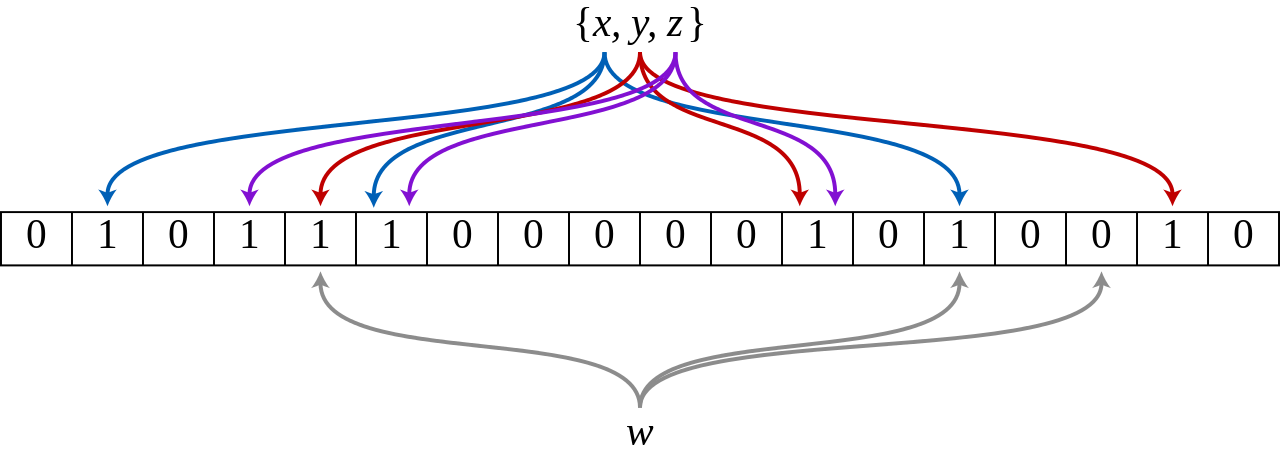
A Bloom filter is a probabilistic data structure invented by Burton Howard Bloom in 1970. It consists of a bit array and a series of hash functions. Initially, all bits are set to 0. When a value is added to the index, each hash function maps it to a bit position, which is then set to 1.
At query time, the same hash functions are applied to the query value:
If any resulting bit position is 0, the value is definitively absent from the block. The block is skipped.
If all resulting bit positions are 1, the value may be in the block (false positives are possible). The block is read.
Bloom filter indexes in SelectDB are built per block. For each block, the values in the indexed column form the Bloom filter set.
The following diagram shows a Bloom filter with m = 18 bits and k = 3 hash functions. Elements x, y, and z are mapped into the bit array. When element w is queried, one of its hash positions maps to a 0 bit, so w is confirmed absent from this block.
Limitations
Bloom filter indexes have the following limitations:
Unsupported operators: The index only acceleratesINand=filter conditions. Other operators are not accelerated.
Unsupported data types: Indexes cannot be created on columns of typeTINYINT,FLOAT, orDOUBLE.
Low-cardinality columns: Avoid indexing columns with few distinct values. For example, a gender column with only two values will appear in almost every block, so the index filters nothing and adds unnecessary overhead. To verify that a query is using a Bloom filter index, open the query profile and check the Bloom filter-related metrics.
Create an index
Bloom filter indexes are specified via bloom_filter_columns in the table's PROPERTIES.
Create an index during table creation
Add "bloom_filter_columns"="<col1>,<col2>" to the PROPERTIES clause of your CREATE TABLE statement, where the column names are comma-separated.
The following example creates Bloom filter indexes on saler_id and category_id in the sale_detail_bloom table:
CREATE TABLE IF NOT EXISTS sale_detail_bloom(
    sale_date date NOT NULL COMMENT "The date on which the product was sold",
    customer_id int NOT NULL COMMENT "The ID of the customer",
    saler_id int NOT NULL COMMENT "The ID of the seller",
    sku_id int NOT NULL COMMENT "The ID of the product",
    category_id int NOT NULL COMMENT "The ID of the category to which the product belongs",
    sale_count int NOT NULL COMMENT "The number of products that were sold",
    sale_price DECIMAL(12,2) NOT NULL COMMENT "The unit price of the product",
    sale_amt DECIMAL(20,2) COMMENT "The total sales amount"
)
Duplicate KEY(sale_date, customer_id, saler_id, sku_id, category_id)
distributed BY hash(customer_id) buckets 3
PROPERTIES("bloom_filter_columns"="saler_id, category_id");
Add an index to an existing table
Run ALTER TABLE ... SET to update bloom_filter_columns for an existing table. Replace k1,k3 with the columns to index:
ALTER TABLE <db.table_name> SET ("bloom_filter_columns" = "k1,k3");Index changes are applied asynchronously. To monitor progress, run:
SHOW ALTER TABLE COLUMN;View an index
Run SHOW CREATE TABLE to see the Bloom filter columns defined for a table:
SHOW CREATE TABLE <table_name>;Example — view the index configuration for sale_detail_bloom:
SHOW CREATE TABLE sale_detail_bloom;The output shows the bloom_filter_columns property in the PROPERTIES block:
+-------------------+---------------------------------------------------------------------------------------------------------------------------------------------------------------------------------------------------------------------------------------------------------------------------------------------------------------------------------------------------------------------------------------------------------------------------------------------------------------------------------------------------------------------------------------------------------------------------------------------------------------------------------------------------------------------------------------------------------------------------------------------------------------------------------------------+
| Table             | Create Table                                                                                                                                                                                                                                                                                                                                                                                                                                                                                                                                                                                                                                                                                                                                                                                |
+-------------------+---------------------------------------------------------------------------------------------------------------------------------------------------------------------------------------------------------------------------------------------------------------------------------------------------------------------------------------------------------------------------------------------------------------------------------------------------------------------------------------------------------------------------------------------------------------------------------------------------------------------------------------------------------------------------------------------------------------------------------------------------------------------------------------------+
| sale_detail_bloom | CREATE TABLE `sale_detail_bloom` (
  `sale_date` datev2 NOT NULL COMMENT 'The date on which the product was sold',
  `customer_id` int(11) NOT NULL COMMENT 'The ID of the customer',
  `saler_id` int(11) NOT NULL COMMENT 'The ID of the seller',
  `sku_id` int(11) NOT NULL COMMENT 'The ID of the product',
  `category_id` int(11) NOT NULL COMMENT 'The ID of the category to which the product belongs',
  `sale_count` int(11) NOT NULL COMMENT 'The number of products that were sold',
  `sale_price` decimalv3(12, 2) NOT NULL COMMENT 'The unit price of the product',
  `sale_amt` decimalv3(20, 2) NULL COMMENT 'The total sales amount'
) ENGINE=OLAP
DUPLICATE KEY(`sale_date`, `customer_id`, `saler_id`, `sku_id`, `category_id`)
COMMENT 'OLAP'
DISTRIBUTED BY HASH(`customer_id`) BUCKETS 3
PROPERTIES (
"bloom_filter_columns" = "category_id, saler_id",
"light_schema_change" = "true"
);                               |
+-------------------+---------------------------------------------------------------------------------------------------------------------------------------------------------------------------------------------------------------------------------------------------------------------------------------------------------------------------------------------------------------------------------------------------------------------------------------------------------------------------------------------------------------------------------------------------------------------------------------------------------------------------------------------------------------------------------------------------------------------------------------------------------------------------------------------+
1 row in set (0.03 sec)
Delete an index
To remove Bloom filter indexes from a table, set bloom_filter_columns to an empty string:
ALTER TABLE <db.table_name> SET ("bloom_filter_columns" = "");Index creation, modification, and deletion are all applied asynchronously. To monitor progress, run:
SHOW ALTER TABLE COLUMN;Best practices
A Bloom filter index is most effective when all three conditions are met:
The column is not the leading sort key (prefix-based filtering handles that case).
Queries on the column frequently use
INor=filter conditions.The column has high cardinality — many distinct values relative to the number of rows per block, such as user IDs or order numbers.
When not to use a Bloom filter index: If a column has low cardinality — for example, a status column with values like active and inactive — every block will likely contain both values. The index filters nothing but still incurs computation cost on every query. In this case, a Bloom filter index hurts rather than helps performance.