Security Center integrates with Simple Log Service (SLS) to collect, store, and analyze host logs and security logs from your assets in real time. Logs are retained for 180 days. With log analysis, you can query and analyze logs, view or edit dashboards, set alert monitoring rules, and deliver logs to downstream computing systems.
Prerequisites
Before you begin, ensure that you have:
Log analysis enabled in Security Center. For more information, see Enable log analysis.
Query logs in the Security Center console
Log on to the Security Center console.Log on to the Security Center console.
In the left navigation pane, choose Risk Governance > Log Analysis. In the upper-left corner, select the region where your assets are located: Chinese Mainland or Outside Chinese Mainland.
In the upper-left corner of the Log Analysis page, select the log type you want to view and set Log Status to Enabled.

On the Log Analysis page, query and analyze your logs:
The page displays query and analysis results for the log type selected in the previous step. The system automatically generates a corresponding search statement.

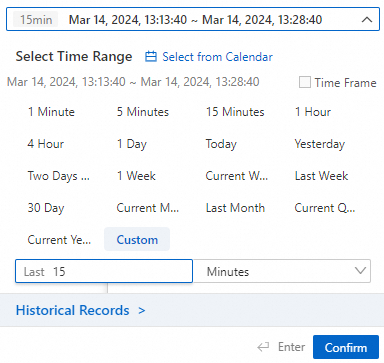
To filter by time, click the time field above the Search & Analyze button. In the Time panel, set a time range and click Search & Analyze.
Quotas and limits
| Item | Details |
|---|---|
| Log retention | 180 days. Log entries are automatically deleted after this period. |
What to do next
After querying logs, take the following actions from the Log Analysis page:
Investigate findings: Review query results to identify anomalous activity or threat indicators in your assets.
Set up alerting: Configure alert monitoring rules to get notified when specific log patterns are detected.
Build dashboards: View or edit dashboards to visualize log trends over time.
Forward logs: Deliver logs to downstream computing systems for further processing or long-term archiving.