Starting January 1, 2025, Alibaba Cloud SDK for Java V1.0 no longer supports Java 7 or earlier runtimes. Migrate to Java 8 or later to continue receiving updates and security patches.
Announcement
From January 1, 2025, Alibaba Cloud SDK for Java no longer supports the JDK 6 or JDK 7 runtime. For more information about SDK support policies, see SDK maintenance policies.
Alibaba Cloud SDK for Java is available in three versions: V1.0, V2.0, and Async. Java 8 or later supports all three versions. Java 6 or 7 supports only V1.0, so this end-of-support notice affects only Alibaba Cloud SDK V1.0.
In October 2017, Oracle ended support for Java virtual machines (JVMs) running Java 6 or 7 and stopped providing security updates. For the end-of-life (EOL) timetable of all Java versions, see Oracle Java SE Support Roadmap. Alibaba Cloud ended support for Java 6 and Java 7 in Alibaba Cloud SDK for Java on January 1, 2025. After this date, upgrading Alibaba Cloud SDK for Java on a Java 6 or 7 runtime produces a Java version mismatch error.
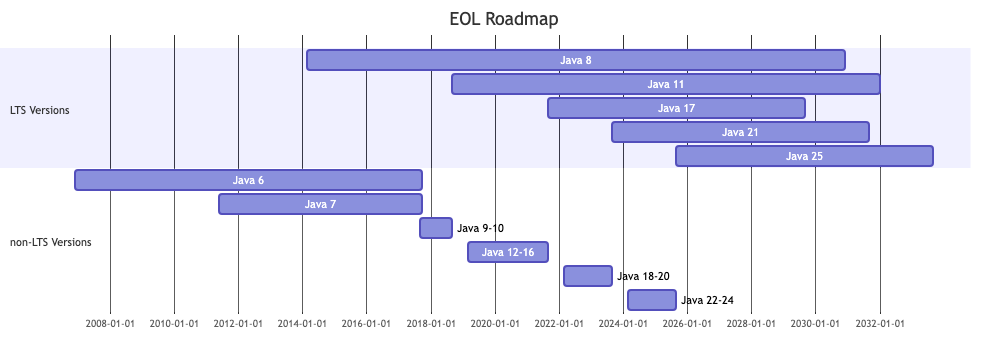

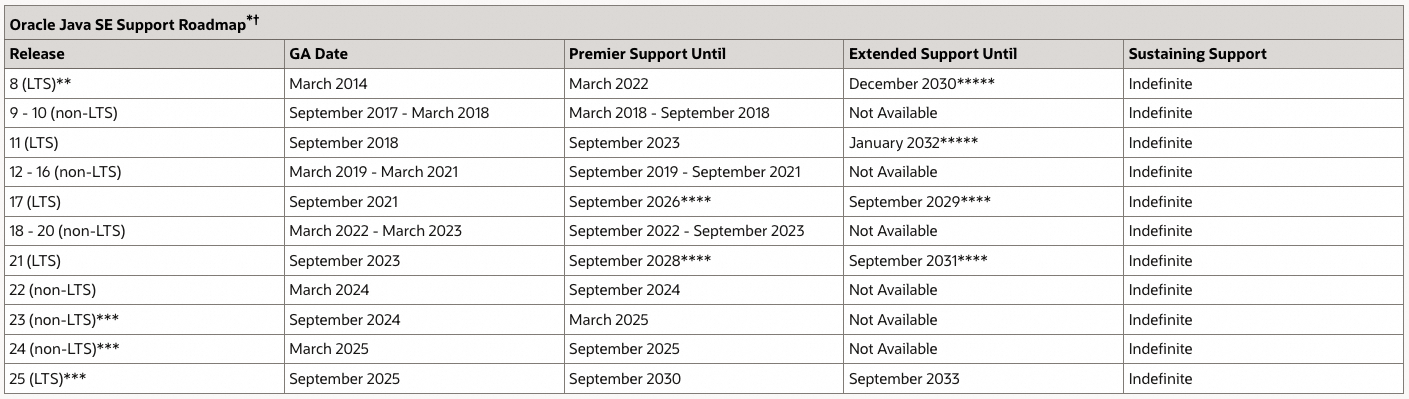
We recommend that you migrate to Java 8 or a later long-term support (LTS) runtime, such as Java 8, Java 11, Java 17, or Java 21, to continue receiving updates and support.
Alibaba Cloud SDK guarantees support for the latest LTS version of Java. For the complete list of Java versions and their maintenance status, see Oracle Java SE Support Roadmap.
Why will Alibaba Cloud end support for Java 6 and 7?
Oracle ended support for JVMs running Java 6 or 7 in October 2017 and stopped providing security updates.
Alibaba Cloud SDK for Java uses industry-standard dependencies. Many third-party libraries have dropped support for Java 6 or 7 and no longer provide security updates for those runtimes. Continuing to use Java 6 or 7 introduces security risks. To mitigate these risks, Alibaba Cloud raised the minimum Java version for Alibaba Cloud SDK to Java 8.
What does end-of-support mean?
After the end-of-support date, Alibaba Cloud SDK for Java no longer provides security patches or new features for the Java 6 or 7 runtime. The minimum Java version is raised to Java 8. If you upgrade Alibaba Cloud SDK for Java on a Java 6 or 7 runtime, you receive a version mismatch error similar to the following example:
$ java -version
java version "1.7.0_80"
Java(TM) SE Runtime Environment (build 1.7.0_80-b15)
Java HotSpot(TM) 64-Bit Server VM (build 24.80-b11, mixed mode)

$ mvn package
Exception in thread "main" java.lang.UnsupportedClassVersionError: com/aliyun/test/TestClass : Unsupported major.minor version 52.0
    at java.lang.ClassLoader.defineClass1(Native Method)
    at java.lang.ClassLoader.defineClass(ClassLoader.java:800)
    at java.security.SecureClassLoader.defineClass(SecureClassLoader.java:142)
    at java.net.URLClassLoader.defineClass(URLClassLoader.java:449)
    at java.net.URLClassLoader.access\$100(URLClassLoader.java:71)
    at java.net.URLClassLoader\$1.run(URLClassLoader.java:361)
    at java.net.URLClassLoader\$1.run(URLClassLoader.java:355)
    at java.security.AccessController.doPrivileged(Native Method)
    at java.net.URLClassLoader.findClass(URLClassLoader.java:354)
    at java.lang.ClassLoader.loadClass(ClassLoader.java:425)
    at java.lang.ClassLoader.loadClass(ClassLoader.java:358)
    at Main.main(Main.java:6)
Will the existing SDK for Java continue to operate?
Yes. Existing SDK versions continue to operate. However, we strongly recommend that you migrate to a supported runtime version to continue receiving security patches and technical support.
What do I need to do?
If you are not ready to upgrade Java, you can fix the Alibaba Cloud SDK for Java version to one that supports Java 6. This version continues to operate but no longer receives service updates, bug fixes, or security fixes.
We recommend that you upgrade to Java 8 or later. If you use Maven to manage your project, perform the following steps:
1. Confirm and update the current Java version.
-
Check whether you have an appropriate version of Java installed on your system.
-
If not, install Java 8 or a later version.
2. Configure Maven to use a specific JDK.
Modify the settings.xml file of Maven to specify the JDK version.
   <profile>
     <id>my-jdk-1.8-profile</id>
     <activation>
       <activeByDefault>true</activeByDefault>
       <jdk>1.8</jdk>
     </activation>
     <properties>
       <maven.compiler.source>1.8</maven.compiler.source>
       <maven.compiler.target>1.8</maven.compiler.target>
       <maven.compiler.compilerVersion>1.8</maven.compiler.compilerVersion>
     </properties>
   </profile>
3. Specify the Java version in the pom.xml file of your project.
Ensure that the required Java version is configured in your pom.xml file by setting the following properties:
   <properties>
       <maven.compiler.source>1.8</maven.compiler.source>
       <maven.compiler.target>1.8</maven.compiler.target>
       <maven.compiler.release>1.8</maven.compiler.release>
   </properties>
SDK for Java version maintenance matrix
For more information about Alibaba Cloud SDK maintenance and end-of-support policies, see SDK maintenance policies. Alibaba Cloud provides SDK dependency support for at least six months after the community or vendor ends support. For most dependencies, this period is about one year.
The following table lists the end-of-support dates for Java versions in Alibaba Cloud SDK for Java.
|
Java version |
Java end-of-support time |
Alibaba Cloud SDK end-of-support date |
|
Java 6 |
October 2017 |
January 1, 2025 |
|
Java 7 |
October 2017 |
January 1, 2025 |
|
Java 8 |
Scheduled in December 2030 |
Scheduled on January 1, 2032 |
|
Java 11 |
Scheduled in January 2032 |
Scheduled on January 1, 2034 |
|
Java 17 |
Scheduled in September 2029 |
Scheduled on January 1, 2031 |
|
Java 21 |
Scheduled in September 2031 |
Scheduled on January 1, 2033 |
|
Java 25 |
Scheduled in September 2033 |
Scheduled on January 1, 2035 |
What if I need extra help?
If you have any questions, submit your feedback in OpenAPI Portal or contact us by joining the DingTalk group (ID 60965016010).