This guide covers best practices for operating SAP MaxDB systems deployed on Alibaba Cloud. It does not replace standard SAP documentation.
Version control
| Version | Revision date | Types of changes | Effective date |
|---|---|---|---|
| 1.0 | 2018/5/25 |
Administering SAP MaxDB instances
Perform routine tasks such as starting, stopping, imaging, and cloning SAP MaxDB systems on Alibaba Cloud ECS.
Starting and stopping ECS instances
Stop SAP MaxDB before stopping the ECS instance to ensure a consistent state.
When the instance resumes, ECS starts it with the same IP address, network, and storage configuration.
Creating a custom image
Custom images create multiple ECS instances with identical OS and environment data for scaling.
Create a custom image from an existing instance through the Alibaba Cloud Management Console. For more information, see the Create a custom image using a snapshot section in the Alibaba Cloud documentation.
Stop the SAP MaxDB instance before creating the image to ensure a consistent state.
Use cases for custom images:
Full offline backup -- Back up the entire MaxDB system (OS, /usr/sap, data, log, and backup files).
Instance creation -- Create an ECS instance or change the system disk of an ECS instance.
Region migration -- Copy a custom image to another region to maintain a consistent environment and application deployment across multiple regions.
System cloning -- Create an image of an existing SAP MaxDB system to produce an exact clone. See the next section for details.
Cloning an SAP MaxDB system
Create a clone by making an image of an SAP MaxDB system in Alibaba Cloud ECS within the same zone. The image includes the operating system, preinstalled SAP MaxDB software, and the same storage system layout.
Managing accounts
Three types of administrator accounts are involved in managing SAP MaxDB on Alibaba Cloud.
| Account type | Scope | Details |
|---|---|---|
| Alibaba Cloud account | Cloud resource management | Manage ECS, configure VPC, and manage images or snapshots for the SAP MaxDB system through the Alibaba Cloud website. Create this account on the Alibaba Cloud website before using any products or services. |
| ECS instance administrator (usually root) | Operating system | Created at the OS level when the ECS instance is created. Alibaba Cloud does not create any additional accounts within the operating system; the default Linux system user is root only. Create or delete user accounts as needed through the operating system. |
| SAP MaxDB database system administrator | Database | Specify the SID during SAP MaxDB installation. SAP MaxDB uses [sid]adm as the system account and creates this account by default. |
Configuring networking
Use Virtual Private Cloud (VPC) as the default network type for SAP MaxDB. Alibaba Cloud VPC is a private network logically isolated from other virtual networks in Alibaba Cloud. Launch and use Alibaba Cloud resources within your own VPC.
VPC provides full control over:
IP address range selection
Subnet segmentation
Route table and network gateway configuration
See the user guide of Virtual Private Cloud in the Alibaba Cloud documentation.
Connect a VPC to an on-premises network using a physical connection or VPN to create an on-demand network environment. This allows smooth migration of applications to Alibaba Cloud.
Isolating networks with VPC
VPC provides multiple layers of network isolation:
| Isolation layer | Description |
|---|---|
| User isolation | Cloud servers of different users reside in different VPCs by default. |
| Tunnel ID isolation | Different VPCs are isolated by tunnel IDs. Use vSwitch for communication within the same subnet. Use VRouters for communication between different subnets within a VPC. |
| Inter-VPC isolation | Intranets between different VPCs are completely isolated and can only be interconnected through external IP mapping (Elastic IP and NAT IP). |
| Layer 2 isolation | IP packets of cloud servers are encapsulated with tunneling IDs. The data link layer (Layer 2 MAC address) of the cloud server does not transfer to the physical network. Layer 2 networks between different VPCs are therefore isolated. |
| Security group isolation | ECS instances within a VPC use a security group firewall to control network access. This is the third layer of isolation. |
Setting up NAT gateway access
If your security policy requires fully internal VMs, set up a NAT proxy manually on the network and configure a corresponding route so that VMs can reach the internet.
Fully internal VM instances cannot be reached directly by SSH. Set up a bastion instance with an external IP address and tunnel through it. For details on setting up a bastion instance, see the SAP MaxDB Deployment Guide on Alibaba Cloud.
When VMs do not have external IP addresses, they can only be reached by other VMs on the network or through a managed VPN gateway. Provision VMs in the network to act as trusted relays for inbound connections (bastion hosts) or network egress (NAT gateways). For transparent connectivity without setting up such connections, use a managed VPN gateway resource.
Controlling access with security groups
A security group is a logical group of instances in the same region with the same security requirements and mutual trust. Each instance belongs to at least one security group, which must be specified at the time of creation.
Communication rules:
Instances in the same security group can communicate through the network.
Instances in different security groups cannot communicate through the intranet by default. Authorize mutual access between two security groups as needed.
A security group functions as a virtual firewall that provides stateful packet inspection (SPI). Security groups set network access control for one or more ECS instances and divide security domains on the cloud. See the User Guide of Security Groups in the Alibaba Cloud documentation.
Enabling SAP support access with SAProuter
SAProuter is a software application that provides a remote connection between a customer network and SAP. It may be necessary to allow an SAP support engineer to access SAP MaxDB systems on Alibaba Cloud.
Prerequisite
A network connection from the customer network to the SAP network is required.
Setup steps
Launch the ECS instance where the SAProuter software will be installed. Purchase an Elastic IP (EIP) resource and dynamically bind it to a VPC ECS instance without restarting the ECS instance.
Create and configure a specific security group for the SAProuter instance. Allow only the required inbound and outbound access to the SAP support network, along with TCP port 3299.
Install the SAProuter software following SAP Note 1628296. Create a saprouttab file that allows access from SAP to the SAP MaxDB systems on Alibaba Cloud.
Set up the connection with SAP. Use Secure Network Communication (SNC) for the internet connection. For more information, see the SAP Remote Support documentation.
Securing SAP MaxDB environments
For IaaS deployments of SAP MaxDB systems, Alibaba Cloud maintains security of the infrastructure that supports the cloud. The customer is responsible for securing cloud resources and applications.
The following Alibaba Cloud services help achieve the required security level for SAP MaxDB environments.
Controlling resource access with RAM
Alibaba Cloud Resource Access Management (RAM) is an identity and access control service. It enables centralized management of users (including employees, systems, or applications) and secure control of their access to resources through permission levels.
RAM grants access permissions for Alibaba Cloud resources to selected privileged users, enterprise personnel, and partners. This ensures secure and appropriate usage of cloud resources and protects against unsolicited access. See the User Guide of Resource Access Management in the Alibaba Cloud documentation.
Receiving login notifications
Alibaba Cloud Message Center allows users to subscribe to notifications and configure the notification channel, including email and SMS message. Users are notified of any SSH login on their servers.
Monitoring with Server Guard
Alibaba Cloud Server Guard provides real-time monitoring of servers and databases. Around-the-clock monitoring of exposed vulnerabilities ensures optimal availability of services and applications. See the User Guide of Server Guard in the Alibaba Cloud documentation.
Server Guard capabilities:
Monitors generic web software vulnerabilities throughout the network in real time.
Provides access to Alibaba Cloud Security emergency vulnerability response capabilities, including vulnerability patches available before the release of official patches.
Repairs vulnerabilities with one click and intercepts attacks between the time a vulnerability is exposed and an official patch is released.
Backing up and recovering SAP MaxDB
Create regular backups when SAP MaxDB workload is low. Backups protect against unexpected system failures and enable recovery.
Understanding backup destinations on Alibaba Cloud
The primary difference from on-premises infrastructure is the backup destination. On-premises environments typically use tape. On Alibaba Cloud, backups are stored in OSS instead.
Benefits of storing backups in Alibaba Cloud OSS:
Read, write, delete, and store unlimited objects in an OSS bucket.
Three copies stored in multiple locations to ensure 99.999999999% data reliability.
Built-in security mechanisms including multi-level security, monitoring of unauthorized login attempts, DDoS attack protection, and data access policies.
By default, SAP MaxDB ECS instances are configured with cloud disk as the initial local backup destination. SAP MaxDB backups are first stored on these local cloud disk volumes, then copied to OSS for long-term storage.
Comparing backup strategies
| Aspect | Non-production systems | Production systems |
|---|---|---|
| System examples | Demo, training, sandbox, proof-of-concept, trial | Production workloads |
| Backup frequency | Infrequent | Frequent, schedule-based |
| Point-in-time recovery | Not required | Required |
| Backup method | Cloud disk snapshot | SAP MaxDB native backup to cloud disk, then to OSS |
| Restore method | Manually restore entire ECS instance from snapshot | Copy backup files from OSS to cloud disk, then restore database |
| Long-term storage | Snapshot retention policy | OSS with optional cross-region replication |
Managing identity and access for backups
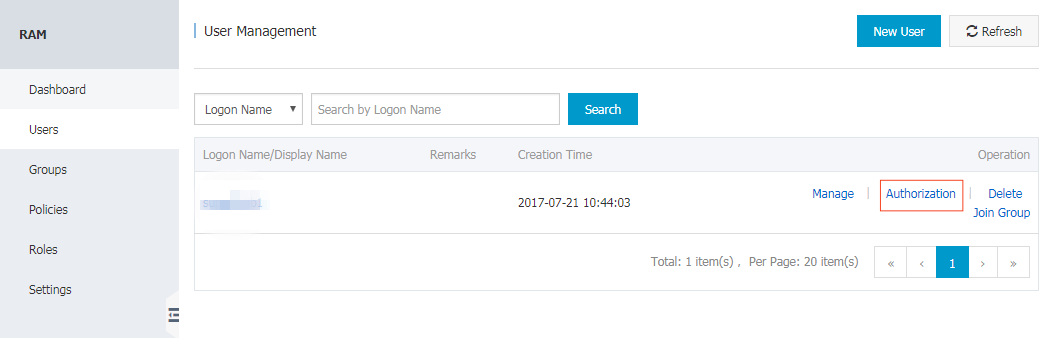
Grant access to backups in an OSS bucket by configuring the user with access rules in the RAM console.
Select the user to grant OSS access and click Authorization.
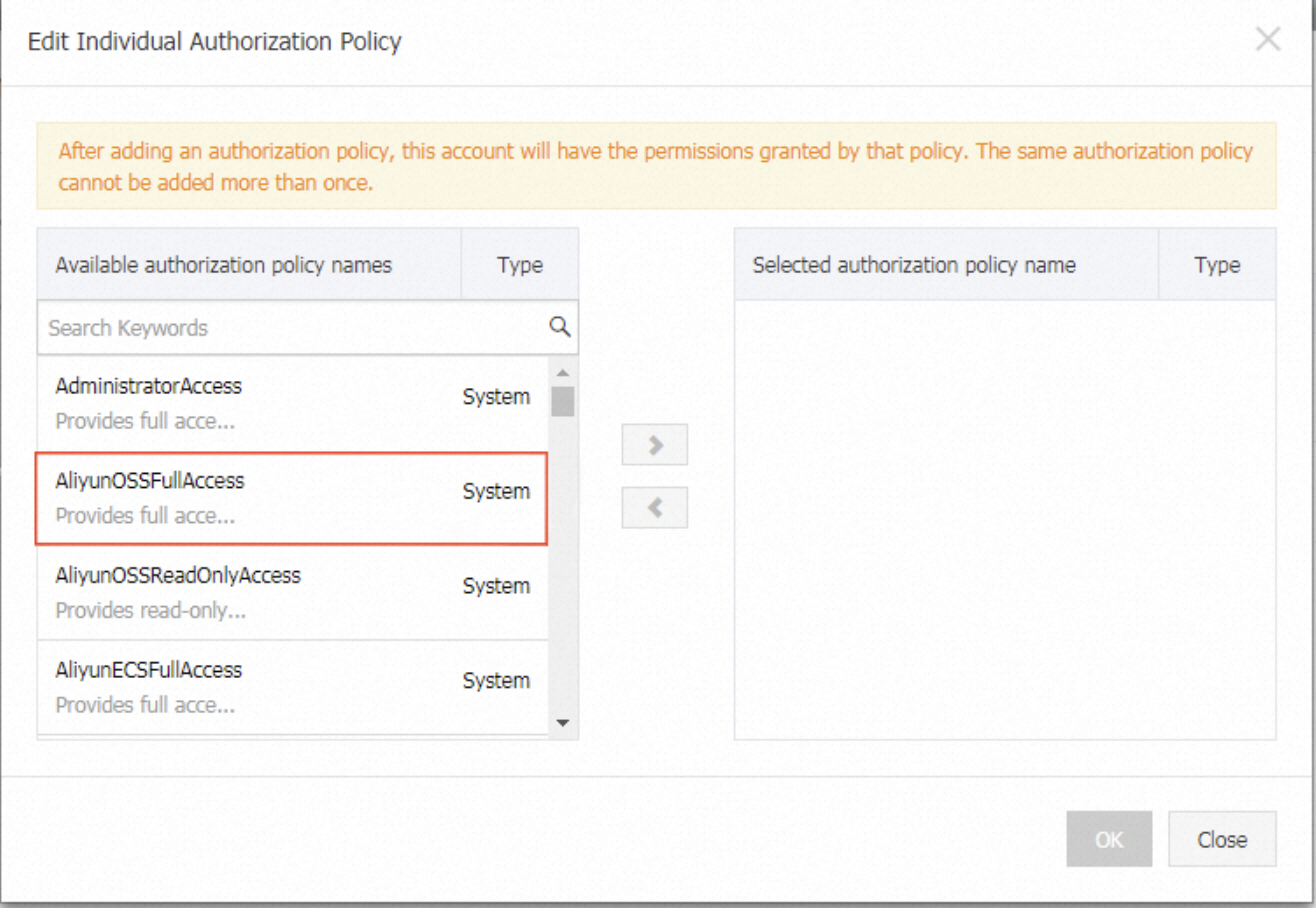
Select the authorization policy AliyunOSSFullAccess.
As the account owner, input a verification code through phone verification.
After phone verification, check the access in the policy management panel.
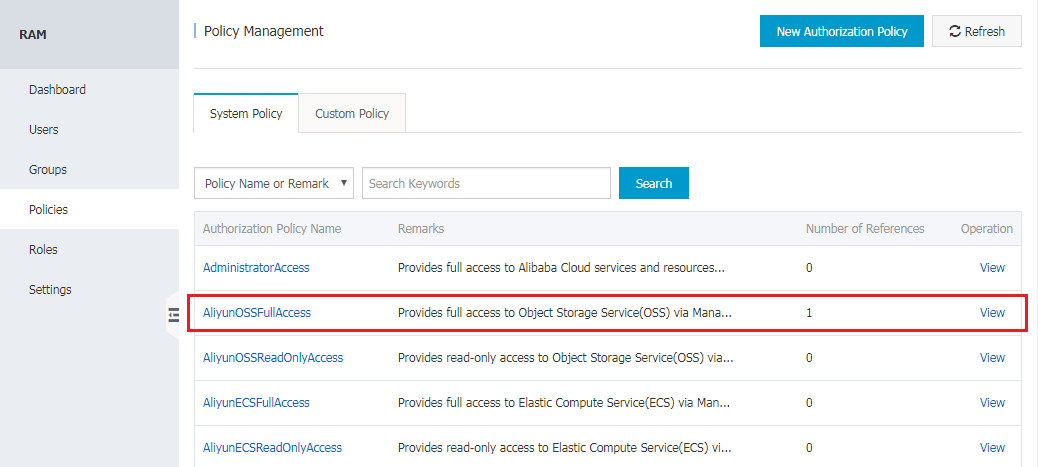
To create a customized policy, use the policy management panel. For more details, see RAM Policy Management.
Backing up non-production systems
Non-production systems include demo, training, sandbox, proof-of-concept, and trial systems. These systems typically require infrequent backups, no point-in-time recovery, and simple low-cost solutions.
Cloud disk snapshot offers a backup service that meets these requirements. Snapshot policy options include:
Hourly snapshots, multiple times per day
Any day as the recurring day for weekly snapshots
Configurable retention period or permanent retention
When the maximum number of automatic snapshots is reached, the oldest automatic snapshot is deleted. For more information, see Snapshot overview. Before using cloud disk snapshot for backup, check SAP Note 1928060 - Data backup and recovery with file system backup. Specific prerequisites must be met before taking a disk snapshot.
Backup approach
Configure automatic snapshots for cloud disk volumes attached to the SAP MaxDB ECS instance on a regular basis. This covers:
System disk (/usr/sap)
Data disk for data file system
Log file system
Restore approach
Use snapshots to manually restore an entire SAP MaxDB ECS instance of a non-production system.
Backing up production systems
Production systems require frequent schedule-based backups and point-in-time database recovery.
Backup approach
By default, the SAP MaxDB database initial local backup destination is configured on cloud disk volumes attached to the SAP MaxDB ECS instance.
Start or schedule SAP MaxDB data backups using SQL commands or the SAP DBA Cockpit. Log backups are written automatically unless disabled.
Copy SAP MaxDB database backup files from local cloud disk to Alibaba Cloud OSS for long-term storage.
(Optional) If cross-region redundancy is needed, configure backup files on OSS to replicate to different regions.
Restore approach
Copy backup files from OSS to a cloud disk backup directory on the SAP MaxDB ECS instance.
Restore and recover the SAP MaxDB database based on the backup files on the backup cloud disk.
Related documents
SAP MaxDB Deployment Guide on Alibaba Cloud
User Guide of Virtual Private Cloud
User Guide of Security Groups
User Guide of Resource Access Management
User Guide of Server Guard