Plan and deploy the SAP MaxDB database system on Alibaba Cloud ECS, including instance configuration, block storage, networking, and SUSE Linux Enterprise Server (SLES) setup.
Versions
|
Version |
Revision date |
Changes |
Release date |
|
V1.0 |
July 18, 2018 |
Overview
SAP MaxDB is a database management system developed and supported by SAP SE. SAP MaxDB is available on Microsoft Windows, Linux, and UNIX, and can be used on most leading hardware platforms and public clouds. For more information about SAP MaxDB, visit the official SAP website: https://maxdb.sap.com.
This guide covers planning and deploying the SAP MaxDB database system on Alibaba Cloud ECS, including Elastic Compute Service (ECS) instance configuration, block storage, networking, and the SUSE Linux Enterprise Server (SLES) operating system. It incorporates best practices from both Alibaba Cloud and SAP.
ECS instance type
This guide uses the ECS general-purpose instance family (sn2ne), certified by SAP MaxDB. The sn2ne family runs on the Intel Broadwell architecture and belongs to the ECS enterprise-level instance families. SSDs and enhanced SSDs (ESSDs) can be used for data volumes and logs in the SAP MaxDB database.
For information about instance types certified by Alibaba Cloud SAP, refer to the following documentation: SAP Note 2552731 - SAP Applications on Alibaba Cloud: Supported Products and IaaS VM Types.
Alibaba Cloud service
The following table lists the Alibaba Cloud services used in this deployment.
|
Service |
Description |
|
ECS |
A cloud computing service that provides scalable processing capacity. Compared to physical servers, ECS offers simpler and more efficient management. You can create instances, change operating systems, and add or release ECS instances at any time to meet your business requirements. |
|
SSD |
SSDs deliver consistently high random IOPS performance and are suitable for I/O-intensive applications. |
|
ESSD |
ESSDs are designed for medium I/O workloads and provide up to 3,000 random read/write IOPS for ECS instances. |
|
Virtual Private Cloud (VPC) |
A dedicated, logically isolated virtual network on Alibaba Cloud. You can launch and use Alibaba Cloud resources within a VPC that you create. |
|
Object Storage Service (OSS) |
A network-based storage service for structured and unstructured data, including text files, images, audio, and video. |
Deploy SAP MaxDB on Alibaba Cloud
Follow these steps to deploy SAP MaxDB on Alibaba Cloud.
Preparations
Alibaba Cloud account
If you do not have an Alibaba Cloud account, perform the following operations to register an account:
-
Log on to the Alibaba Cloud homepage. In the upper-right corner, click Register.
-
Follow the on-screen instructions to complete the registration.
Install SAP MaxDB media
-
Download the SAP MaxDB installation media from the SAP official website.
-
Upload the SAP MaxDB installation media to the required ECS instance.
Deployment procedure
Configure network settings
-
Create a VPC and a vSwitch
-
Log on to the VPC console.
-
In the left-side navigation pane, click VPC.
-
On the page that appears, select the region in which you want to create a region and click Create VPC.
-
On the page that appears, specify a VPC name and select a CIDR block. You can select one of the following standard CIDR blocks. After you create a VPC, you cannot change the CIDR block. We recommend that you use a large CIDR block to avoid the need for future expansion if additional capacity is required.
10.0.0.0/8 (10.0.0.0 - 10.255.255.255) 172.16.0.0/12 (172.16.0.0 - 172.31.255.255) 192.168.0.0/16 (192.168.0.0 - 92.168.255.255) -
Click OK. After the VPC is created, a VPC ID is generated. A router is also created for the VPC.
-
Click Next to create a vSwitch.
-
Configure the following parameters.
Name: Enter a name for the vSwitch.
Zone: Select the zone where you want to deploy the vSwitch.
IPv4 CIDR Block: Specify a CIDR block for the vSwitch. The CIDR block of the vSwitch can be the same as the CIDR block of the VPC to which the vSwitch belongs, or it can be a subnet CIDR block of the VPC. The subnet mask of the vSwitch must be 16 to 29 bits in length. Note: If the CIDR block of the vSwitch is the same as the CIDR block of the VPC, only one vSwitch can be created within the VPC.
-
Click OK. Return to the VPC page and click the ID of the VPC to go to its details page. Review the VPC and vSwitch details.
Configure a security group
Security group
A security group is a virtual firewall that controls network access for one or more ECS instances within the same region. Instances in a security group share the same security requirements and can communicate with each other by default. Each instance must belong to at least one security group, which you specify when creating the instance. By default, instances in different security groups cannot communicate over an internal network, but you can configure rules to allow cross-group access. Security groups provide stateful packet inspection (SPI) and serve as a key method for dividing security domains on the cloud.
-
Limit on security groups
-
A single security group can contain a maximum of 1,000 instances. If more than 1,000 instances need access each other over an internal network, you can distribute them to different security groups and configure permissions to allow different instances to access each other.
-
An instance can be added to up to five security groups.
-
Each user can create a maximum of 100 security groups.
-
Modifications to security groups do not affect your service continuity.
-
Security groups are stateful. If outbound packets are allowed, the inbound packets corresponding to this connection are also be allowed.
-
Security groups have two network types: the classic network and VPC.
-
Instances of the classic network type can be added to security groups on the classic network within the same region.
-
Instances of the VPC type can be added to security groups within the same VPC.
-
-
Security group rule
-
Security group rules can be configured to allow or block inbound and outbound access to or from ECS instances associated with the security group, whether for public or private networks.
-
You can add or remove security group rules at any time. Changes that you make will automatically apply to the ECS instances associated with the security group. When you configure a security group rule, keep the rule concise. If you assign multiple security groups to an instance, hundreds of rules may apply to the instance. When you access the instance, network disconnections may occur.
-
Each security group can contain a maximum of 100 rules.
Configure a security group
-
Log on to the ECS console.
-
In the left-side navigation pane, choose Network & Security > Security Groups.
-
On the page that appears, select a region in which you want to create a security group.
-
Click Create Security Group.
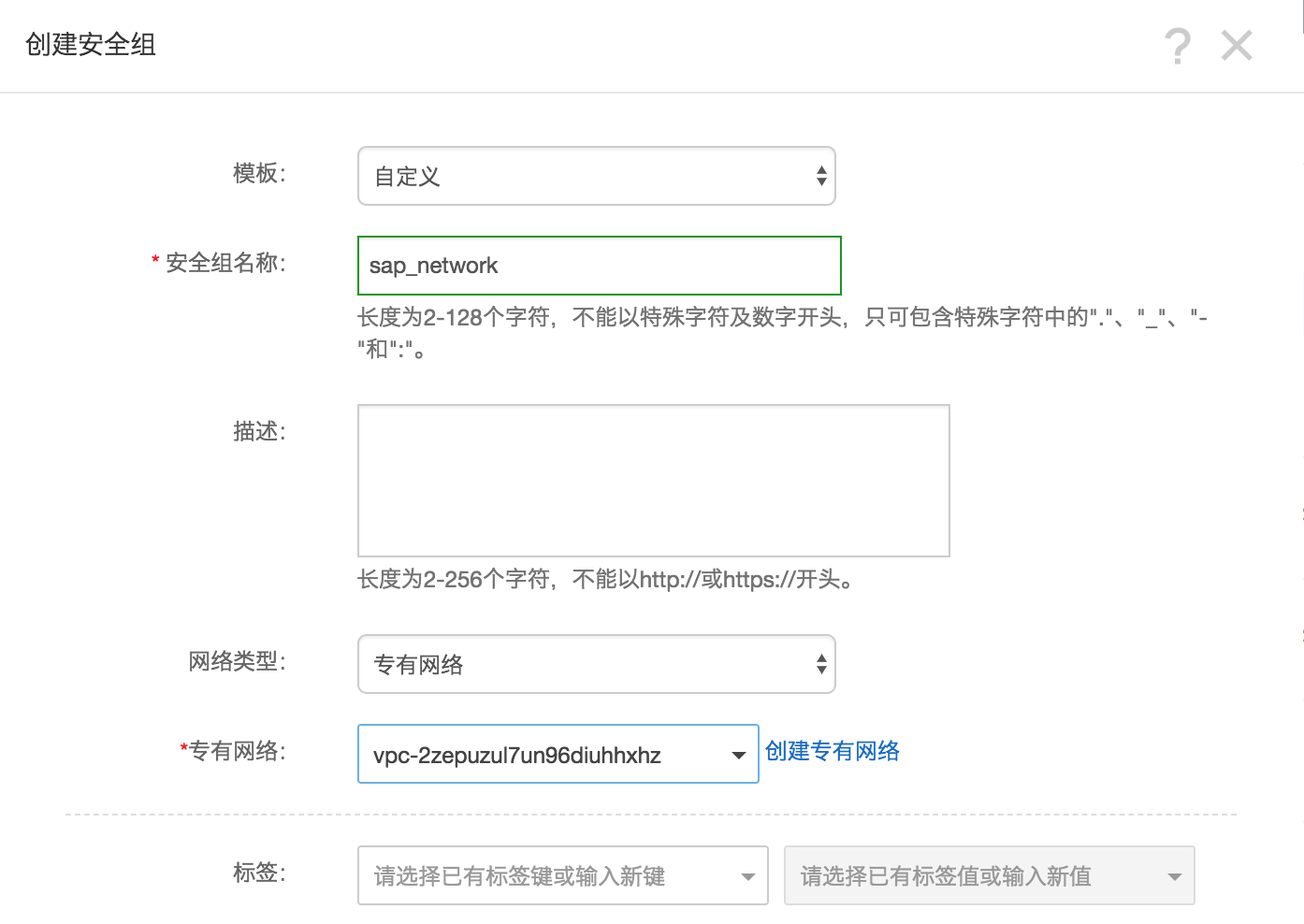
On the page that appears, configure the parameters as shown in the following figure.
-
Click OK. Then, click Add Rule.
-
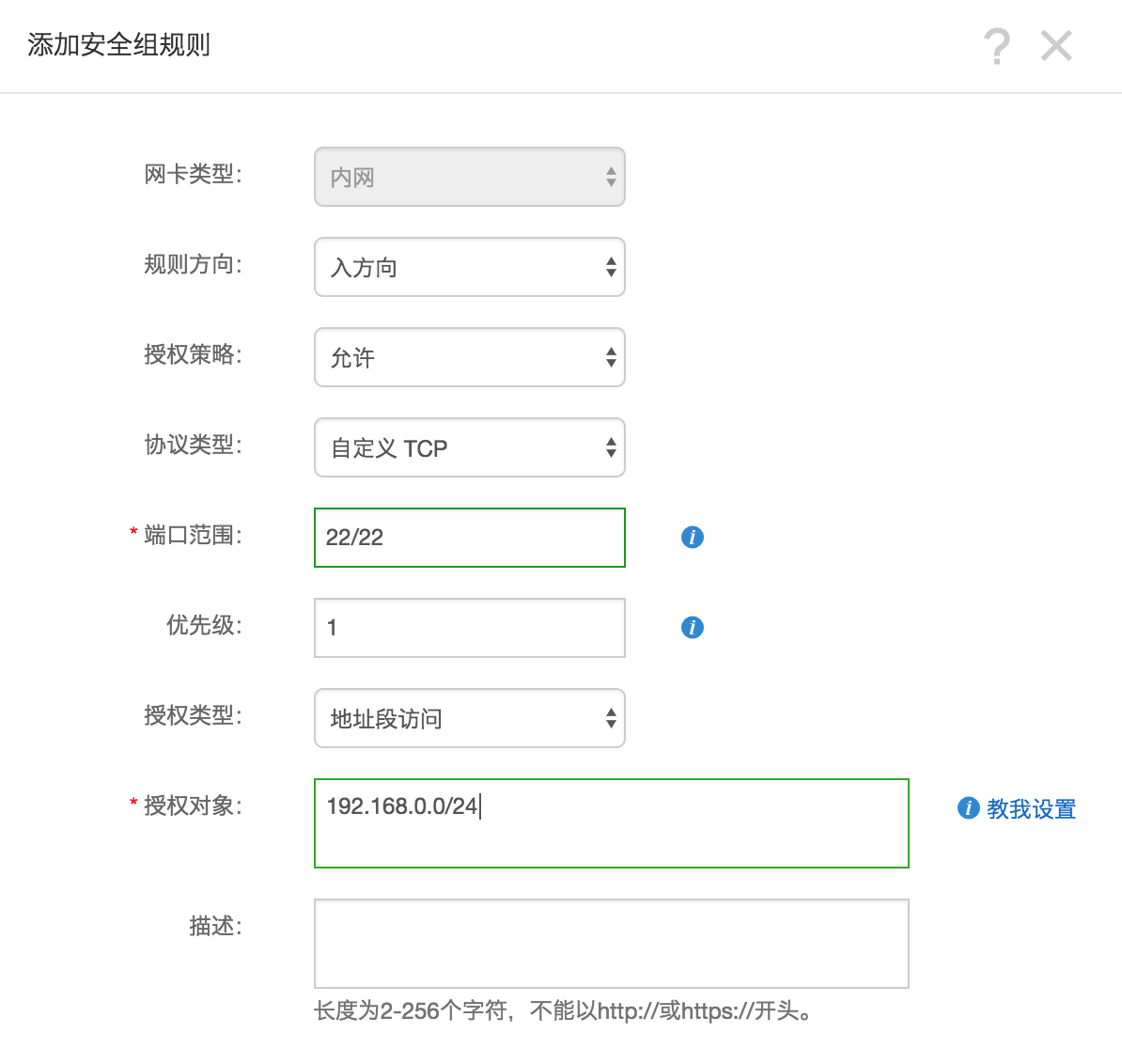
Follow the instructions to complete the rule settings. We recommend that you specify only the remote access port.
 Port configuration
When deploying SAP MaxDB, use a VPC. You only need to configure rules for the outbound and inbound directions. By default, no rules exist in a security group. When you create an ECS instance, make sure that the security group allows port 22 (Linux) or port 3389 (Windows). Otherwise, you cannot remotely log on to the instance. For information about the specific ports required by SAP and the related security group rules, refer to the official SAP documentation.
Create an SAP MaxDB ECS instance
-
Log on to the Alibaba Cloud ECS buy page.
-
Select Subscription as the billing method.
-
Select a region and a zone.
-
Select VPC as the network type.
After you specify the network type, complete the information about the created or existing VPC and vSwitch. In a multi-node architecture, SAP MaxDB does not directly provide external services. Therefore, you must set Public IP Address to Unassigned.
-
Select an instance type that you want to use. Select an instance type from the sn2ne ECS instance family.
-
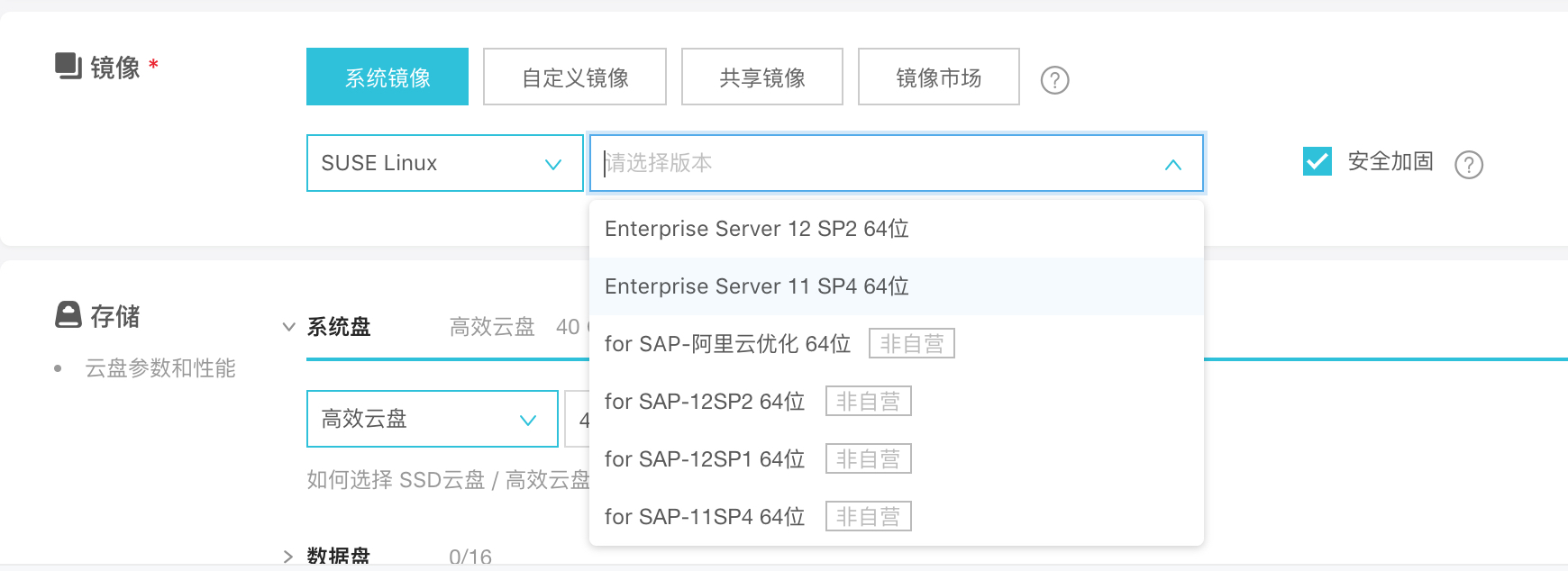
Select an operating system image. The operating system can be SUSE Linux Enterprise Server.
-
Configure storage disks. We recommend that you use a separate standard SSD for log and data file systems and a separate ESSD for backup file systems.
-
Configure initialization. After you configure the initial password, click Create. Wait a few minutes until the instance is initialized.
-
Create a bastion host. Follow the previous operations to create a bastion host with one vCPU and 2 GB of memory, ensuring that no additional storage resources exist within the same VPC in the same zone.
-
Configure a network for the bastion host. You can use multiple methods to configure a public IP address. In this topic, configure an elastic IP address (EIP). An EIP is a public IP address that you can purchase and use as an independent resource. It can be dynamically bound to or unbound from different ECS instances without stopping the ECS instances.
-
Log on to the EIP console.
-
Click Apply for EIP.
-
On the buy page, select a region, peak bandwidth, and payment method for the EIP, click Buy Now, and then complete the payment.
-
Note: The region of the EIP must be the same as that of the ECS instance to which you want to bind the EIP.
-
Return to the Elastic IP Addresses page, select the region of the EIP, and then click Refresh to review the created EIP.
-
Click Bind.
-
In the dialog box that appears, select the created ECS instance and click OK.
-
After the binding is complete, click Refresh on the Elastic IP Addresses page to check the EIP status.
-
If the EIP is in the Refresh state, you can access the ECS instance to which the EIP is bound over the Internet.
-
Log on to the ECS instance and run the following command to test access over the Internet:
ping www.aliyun.com
Instance logon: The SAP MaxDB ECS instance does not have a public IP address, so you must use a bastion host to log on.
Connect to SAP MaxDB
The SAP MaxDB instance does not have a public IP address. You can only connect to it via SSH from the bastion host.
-
Use your SSH client to connect to the bastion host first, and then connect to the SAP MaxDB instance from the bastion host.
References
1173395 - FAQ: SAP MaxDB and liveCache configuration
1142243 - SAP MaxDB release for virtual systems
1492000 - General Support Statement for Virtual Environments