A Smart Access Gateway (SAG) device connects your private network to Alibaba Cloud through a LAN port. This topic describes how to set the connection type for a LAN port in the SAG console.
Choose a connection type
Select the connection type that matches your network before you begin configuration.
| Connection type | When to use | Key benefit |
|---|---|---|
| Dynamic IP | Your local network has many devices that need IP addresses assigned automatically | Reduces manual IP management and improves address utilization |
| Static IP | Your LAN port connects to a switch and the local terminal does not need the SAG device to assign IP addresses | Simplifies network management with a fixed, predictable address |
Configure a LAN port
Log on to the Smart Access Gateway console.
Open the Device Management tab using either method:
Click the ID of the target SAG instance, then click Device Management on the instance details page.
Find the target SAG instance. In the Actions column, choose
 > Device Management.
Click Manage LAN Ports.
Find the target port and click Edit.
Select a connection type and configure the parameters.
Dynamic IP: The LAN port uses DHCP to dynamically assign IP addresses to connected devices.
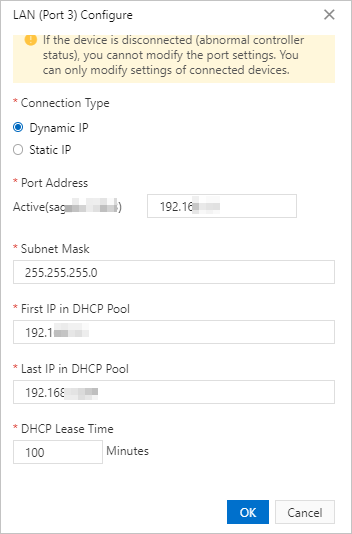
Parameter Description Connection type Select Dynamic IP. Port address The IP address of the LAN port. Subnet mask The subnet mask of the LAN port IP address. First IP in DHCP pool The first IP address in the DHCP pool. Last IP in DHCP pool The last IP address in the DHCP pool. DHCP lease time How long an assigned IP address remains valid. Valid values: 1 to 43200. Unit: minute. Note The DHCP pool must not include the LAN port's IP address or the broadcasting address of the CIDR block.Static IP: The LAN port uses a fixed IP address.
Parameter Description Connection type Select Static IP. Port address The IP address of the LAN port. Subnet mask The subnet mask of the LAN port IP address. Click OK.