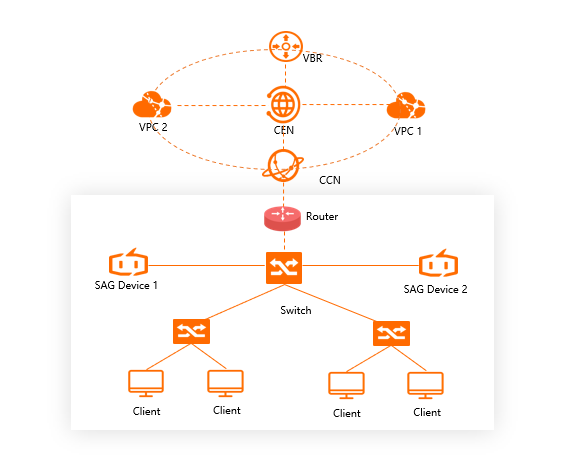
Deploy two Smart Access Gateway (SAG) devices to eliminate single points of failure (SPOFs) when connecting a private network to Alibaba Cloud.
HA modes
SAG supports two high availability (HA) modes for dual-device deployments.
Active-standby keeps one device handling all traffic while the other stays idle. If the active device fails, manually switch to the standby device in the SAG console.
Active-active runs both devices simultaneously. If one device fails, traffic automatically shifts to the other with no manual intervention required.
| Mode | Active-standby | Active-active |
|---|---|---|
| Failover | Manual | Automatic |
| Supported devices | SAG-100WM (default) | SAG-100WM (switchable), SAG-1000 |
SAG-100WM defaults to active-standby mode. To switch to active-active mode, see Switch from the active-standby mode to the active-active mode. SAG-1000 runs only in active-active mode.
Device-based HA in inline mode
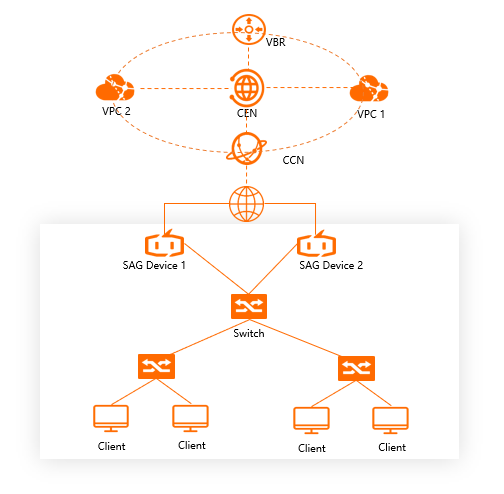
Deploy two SAG devices in inline mode to eliminate SPOFs. If one device fails, network connections automatically switch to the other device.
Device-based HA in one-arm mode
Deploy two SAG devices in one-arm mode with dynamic routing enabled. SAG automatically learns and selects the optimal routes to local devices, reducing latency and operations and maintenance expenses while improving network reliability. This mode suits large-scale networks with frequent networking changes.