Smart Access Gateway (SAG) supports two deployment modes: inline mode and one-arm mode. The right choice depends on whether you can modify your existing network topology.
| Inline mode | One-arm mode | |
|---|---|---|
| Traffic routed through SAG | All local network traffic | Private network traffic only |
| Internet traffic | Through SAG | Through your existing Internet-facing device |
| Network topology change required | Not avoided | No |
| Best for | Deployments where you have full control over all traffic | Existing networks where topology changes are not feasible |
Inline mode
In inline mode, all local network traffic must be transmitted through the SAG device. SAG acts as the primary gateway between your branch and Alibaba Cloud, handling all inbound and outbound traffic.
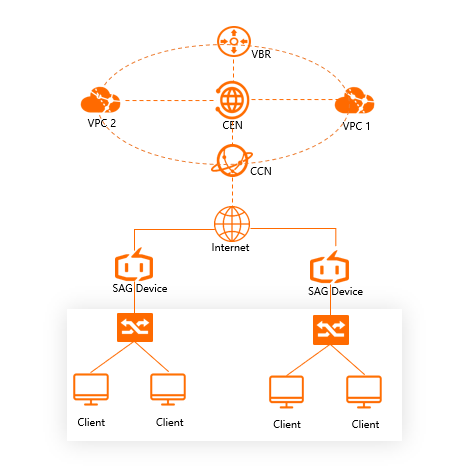
Use inline mode when connecting small office branches or organizations to Alibaba Cloud and you have full control over the network topology.
One-arm mode
In one-arm mode, only private network traffic passes through the SAG device. Internet-bound traffic continues to flow through your existing Internet-facing device, leaving your network topology unchanged.
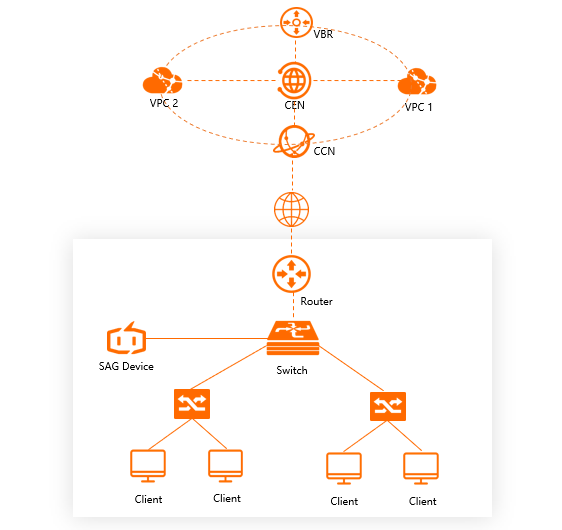
Use one-arm mode when you need to connect to Alibaba Cloud without reconfiguring your existing network infrastructure.