Migrate a Spring Cloud cluster running on Alibaba Cloud to Serverless App Engine (SAE) without interrupting live traffic. This topic covers the dual-registration and dual-subscription approach, where migrated and non-migrated applications coexist in the same service mesh until the cutover is complete. Applications restart only once during the entire process.
A working demo is available at sc-migration-examples.zip.
Before you begin
Review the following checklist before starting the migration. Identifying blockers early prevents incomplete migrations that require rollback.
| Check | Action if not met |
|---|---|
| All applications use Spring Cloud service discovery (Eureka or Consul) | Applications that bypass service discovery and call services directly by IP or hostname cannot use this approach. Update those clients before migrating. |
| ECS instance ports are available (not occupied by another process) | If ports are occupied, use the traffic-splitting solution instead. |
| Applications are stateless | Stateful applications require additional planning for state migration. |
| Alibaba Cloud services (ApsaraDB RDS, Message Queue) are used for storage and messaging | Off-Alibaba-Cloud storage and messaging require separate coordination. Join DingTalk group 32874633 for support. |
Migration overview

The migration consists of three phases:
| Phase | Steps | Required |
|---|---|---|
| Migration | Step 1: Migrate applications | Required |
| Post-migration | Step 2: Migrate SLB or update DNS | Optional |
| Post-migration | Step 3: Migrate storage and message queues | Optional |
Choose a migration solution
Two solutions support zero-downtime migration:
| Solution | How it works | When to use |
|---|---|---|
| Dual-registration and dual-subscription (this topic) | Register applications with both the original registry and Nacos simultaneously. Migrated and non-migrated applications discover each other throughout the process. | Use when ECS ports are available. Requires only one application restart. |
| Traffic splitting | Switch the registry to Nacos via Spring Cloud Alibaba, deploy a new set of applications on SAE, then redirect traffic using Server Load Balancer (SLB) and domain names. | Use when ECS ports are occupied and instances cannot be reused. |
For the traffic-splitting solution, see Modify service registration and discovery of applications to Nacos.
How dual-registration and dual-subscription works
The following diagrams show the system state at each migration stage.
Initial status

Stage 1

Stage 2

Stage 3

Stage 4

Key properties:
Migrated and non-migrated applications discover and call each other, ensuring business continuity.
The only code changes required are two new dependencies and one annotation on the main class.
Monitor consumer service calls and track migration progress in real time via SAE.
Control registration and subscription policies dynamically via SAE configuration management — no repeated restarts required. Applications restart only once.
Step 1: Migrate the first application
1. Select an application
Start with underlying providers — services that have no upstream dependencies. If the call trace is complex or difficult to map, select any application to start.
2. Add dependencies and update configuration
a. Add the Nacos discovery dependency
Add spring-cloud-starter-alibaba-nacos-discovery to pom.xml:
<dependency>
    <groupId>org.springframework.cloud</groupId>
    <artifactId>spring-cloud-starter-alibaba-nacos-discovery</artifactId>
    <version>{Version}</version>
</dependency>
b. Configure the Nacos server address
Add the following to application.properties:
spring.cloud.nacos.discovery.server-addr=127.0.0.1:8848c. Add the multi-registry migration dependency
By default, Spring Cloud allows only one registry. Adding a second registry causes an error. The edas-sc-migration-starter dependency removes this restriction and enables simultaneous registration with multiple registries.
Add it to pom.xml:
<dependency>
    <groupId>com.alibaba.edas</groupId>
    <artifactId>edas-sc-migration-starter</artifactId>
    <version>1.0.2</version>
</dependency>
3. Update the RibbonClients configuration
To subscribe to services from multiple registries, set @RibbonClients to use MigrationRibbonConfiguration in the main class.
Before:
@SpringBootApplication
public class ConsumerApplication {
    public static void main(String[] args) {
        SpringApplication.run(ConsumerApplication.class, args);
    }
}
After:
@SpringBootApplication
@RibbonClients(defaultConfiguration = MigrationRibbonConfiguration.class)
public class ConsumerApplication {
    public static void main(String[] args) {
        SpringApplication.run(ConsumerApplication.class, args);
    }
}
After deploying these changes — either on-premises or on SAE — you can control which registries the application registers with or subscribes to using Spring Cloud Config or Nacos Config, without restarting the application. For details, see Dynamically adjust service registration and subscription policies and Manage application configurations.
4. Deploy the application on SAE
Deploy the application based on your requirements. For details, see Deploy applications.
5. Verify the migration
Use either of the following methods:
Option 1: Check business behavior
Confirm that your business runs as expected after deployment.
Option 2: Check service subscription monitoring
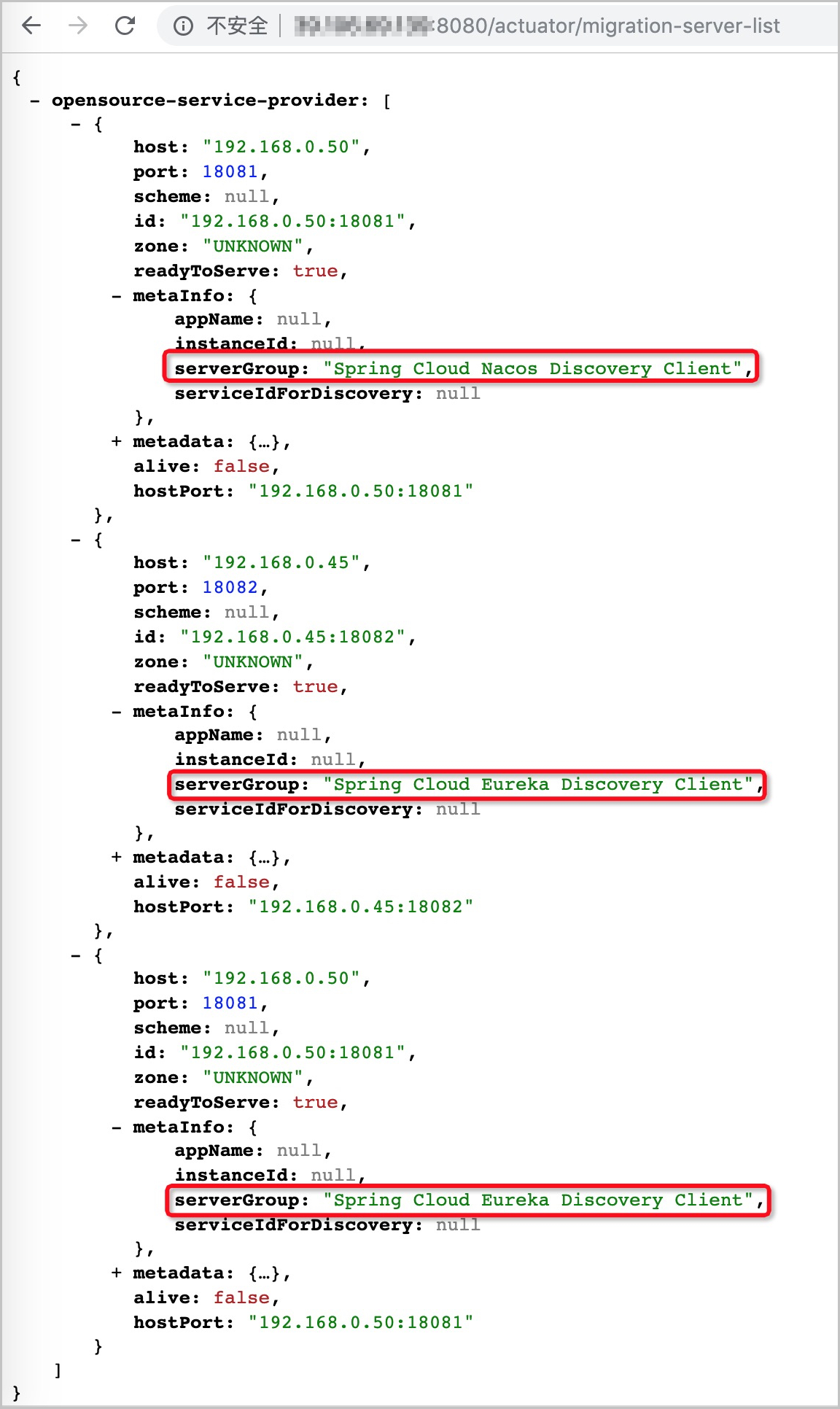
If Spring Boot Actuator is enabled, access the following endpoint to view the RibbonServerList for each subscribed service. The serverGroup field in metaInfo shows which registry a node belongs to.
| Spring Boot version | Endpoint |
|---|---|
| 1.x | http://ip:port/dubboRegistry |
| 2.x | http://ip:port/actuator/dubboRegistry |
Step 2: Migrate other applications
Migrate all remaining applications to SAE in sequence, following the same steps as Step 1.
Post-migration: Clean up and finalize
Remove migration dependencies
After all applications are on SAE, remove the original registry configuration and the edas-sc-migration-starter dependency.
edas-sc-migration-starter is a migration-only dependency. Leaving it in place does not affect service stability, but it limits Ribbon's load balancing effectiveness. Remove the dependency after migration and restart applications in batches during off-peak hours.
Migrate SLB or update DNS settings
After migrating your applications, handle your SLB instance and domain name configuration:
SLB instance
| Scenario | Action |
|---|---|
| SLB existed before migration | Reuse it. For binding details, see Bind a CLB instance to an application, and generate a public or private IP for it. |
| No SLB before migration | Create an SLB instance and bind it to the ingress application (such as an API gateway). |
| ECS ports are occupied | Use the traffic-splitting solution. Add new ECS instances, then reuse the existing SLB or create a new one. |
Domain name
| Scenario | Action |
|---|---|
| SLB reused | No domain name changes needed. |
| New SLB created | Add the new SLB to domain name settings and remove the old entry. See Update DNS servers. |
Migrate storage and message queues
If your application uses Alibaba Cloud services such as ApsaraDB RDS and Message Queue, you do not need to migrate storage or message queues. If your application is not deployed on Alibaba Cloud, join DingTalk group 32874633 for technical support.
Dynamically adjust service registration and subscription policies
Use SAE's configuration management feature to adjust registration and subscription policies at any time during migration — no application restart required.
Adjust the subscription policy
By default, SAE subscribes to and aggregates service data from all related registries.
To subscribe to specific registries only, set the spring.cloud.edas.migration.subscribes property:
# Subscribe to services from both Eureka and Nacos
spring.cloud.edas.migration.subscribes=nacos,eureka

# Subscribe to services from Nacos only
spring.cloud.edas.migration.subscribes=nacos
Adjust the registration policy
By default, SAE registers with all related registries.
To exclude specific registries, set the spring.cloud.edas.migration.registry.excludes property:
# Register with all registries (default — leave blank)
spring.cloud.edas.migration.registry.excludes=

# Disable registration with Eureka only
spring.cloud.edas.migration.registry.excludes=eureka

# Disable registration with Nacos and Eureka
spring.cloud.edas.migration.registry.excludes=nacos,eureka
Use SAE's configuration management feature to update this property at runtime without restarting your applications.