When you run a canary release on SAE applications backed by self-managed Spring Cloud or Zuul gateways, you need a way to route specific traffic to a gray version of each microservice — and have that routing propagate automatically through the entire service chain. This topic shows how to configure end-to-end traffic routing using a single HTTP request header, without changing any business code.
Key concepts
| Term | Description |
|---|---|
| Baseline environment | The stable production version of your microservices — Application A, B, and C. All traffic goes here by default. |
| Canary release environment | The new version under validation — Application A-gray, B-gray, and C-gray. Only requests carrying the canary header reach this environment. |
| End-to-end propagation | Once the ingress gateway routes a request to a gray instance, the gray tag propagates automatically through every downstream service call — A-gray → B-gray → C-gray — with no code changes required. |
x-mse-tag | An HTTP request header used exclusively in this scenario to route traffic to canary release environments. Do not use this header when configuring canary release rules for applications. |
Prerequisites
Before you begin, ensure that you have:
An Application Load Balancer (ALB) instance configured as an ingress gateway
A Nacos service registry available for service registration and discovery
The mse-simple-demo package downloaded
Deploy SAE demo applications
Deploy backbone applications
Deploy Application A (shopping cart), Application B (transaction center), and Application C (inventory center) to SAE. For setup instructions, see Modify service registration and discovery of applications to Nacos.
Deploy canary release applications
Deploy Application A-gray, Application B-gray, and Application C-gray. Add -Dalicloud.service.tag=gray to the startup command of each canary application so that the system can distinguish them from their baseline counterparts.
If your deployment uses a non-SAE built-in service registry, also add the following startup parameters: -Dnacos.use.endpoint.parsing.rule=false -Dnacos.use.cloud.namespace.parsing=falseDeploy the Spring Cloud or Zuul gateway
Forward requests from the same domain name using different URL paths. For configuration details, see Configure gateway routing for an application by using a CLB instance.
Route traffic to the canary release environment
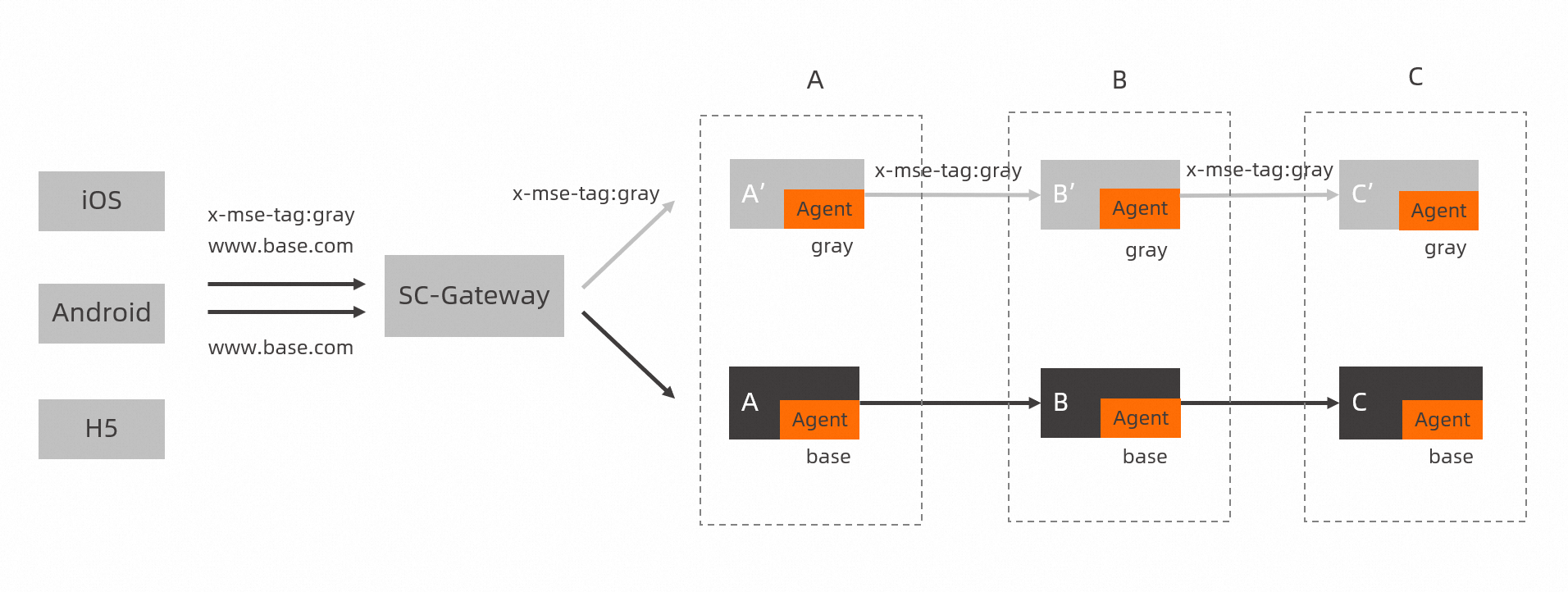
When a client's domain name cannot be changed, associate the www.base.com domain name with a route and add the x-mse-tag:gray header to requests that should go to the canary release environment. The ALB ingress gateway reads the header and routes the request to the gray service instances, which then propagate the gray tag to all downstream services.
The x-mse-tag header works only in this specific scenario. Do not use it when configuring canary release rules for applications. For more information, see Manage canary release rules for Java applications.
The following diagram shows how an incoming request is directed to the canary release environment after the x-mse-tag:gray header is added.
Verify the canary release
Run the following commands to confirm that traffic routes correctly.
Check baseline traffic — requests without the x-mse-tag header go to the production environment:
curl -H "Host:www.base.com" http://106.14.XX.XX/aExpected output:
A[172.18.XX.XX] -> B[172.18.XX.XX] -> C[172.18.XX.XX]Check canary traffic — add x-mse-tag:gray to route the request through all three gray instances:
curl -H "Host:www.base.com" -H "x-mse-tag:gray" http://106.14.XX.XX/aExpected output:
Agray[172.18.XX.XX] -> Bgray[172.18.XX.XX] -> Cgray[172.18.XX.XX]%The output confirms that the Classic Load Balancer (CLB) ingress controller routed the request to the canary release environment of Application A, and the gray tag propagated end-to-end through Application B-gray and Application C-gray.
What's next
To configure automated canary release rules for Java applications, see Manage canary release rules for Java applications.