A module is a UTF-8-encoded JSON or YAML text file, similar to a template. A module has its own naming convention, limits, and structure.
Naming convention
Modules use a four-part naming convention: MODULE::Organization::Service::Usecase.
-
MODULE: a fixed value. -
Organization: the name of your organization.-
The name must be at least two characters in length and can contain letters and digits.
-
The name cannot contain the following lowercase strings:
alicloud,alibaba, andaliyun. -
The name cannot start with the following lowercase string:
acs. -
The name cannot be set to one of the following lowercase strings:
ros,dev,test, ordebug.
-
-
Service: the name of the service.The name must be at least two characters in length and can contain letters and digits.
-
Usecase: the name of the resource.The name must be at least two characters in length and can contain letters and digits.
If you set Organization to SHARE when you create a module, you must set Service to the ID of the current Alibaba Cloud account. For example, you can specify MODULE::SHARE::123456789::Usecase in this scenario.
A custom module with Organization set to SHARE is called a shared module. Other users can view and use your shared module but cannot modify or delete it.
Limits
-
You cannot specify
TransformandWorkspacein a module. -
You can specify only empty
Rulesin a module. -
Custom modules can be nested up to three levels deep. If you use a public module together with custom modules, the custom modules are still limited to three levels of depth.
The following figure shows public modules nested four levels deep. ModuleA is at Level 1, ModuleB at Level 2, ModuleC at Level 3, and ModuleD at Level 4.
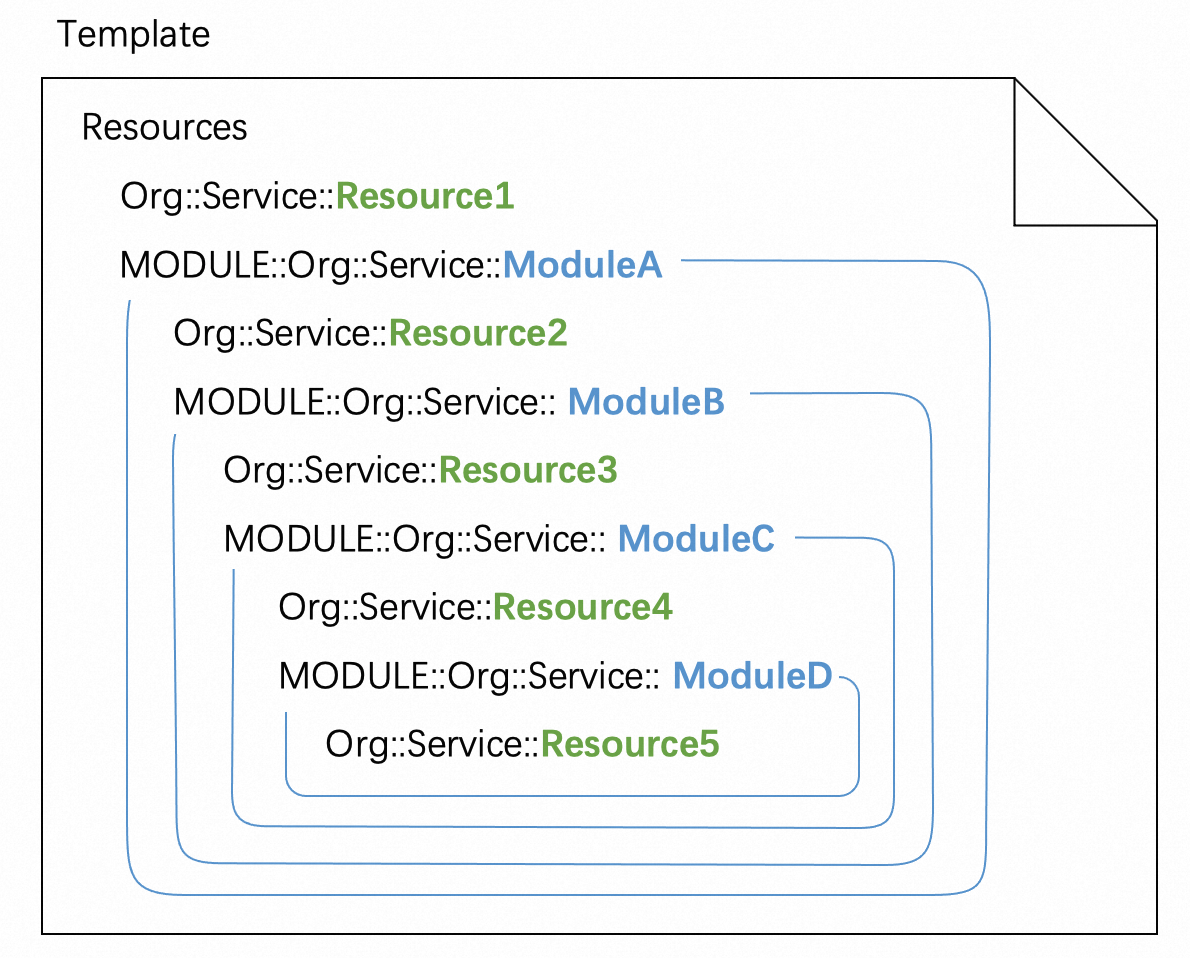
Module structure
ROSTemplateFormatVersion: '2015-09-01'
Description: The description of the module. The Description section provides information such as the scenarios, architecture, and method to use the module.
Metadata:
# The metadata of the module. The Metadata section provides information such as layouts for visualizations.
Parameters:
# The parameters of the module. When you use a module, you can specify parameter values from the template or module that contains the module.
Mappings:
# The mappings of the module, which are in a nested structure.
Conditions:
# The conditions of the module, which specify whether the system can create resources.
Resources:
# The details of resources or child modules that are contained in the module. The details include properties and associations.
Outputs:
# The outputs of the module. The outputs can be used by the template or module that contains the module.
(Required) ROSTemplateFormatVersion
This section follows the same requirements as the template section. For more information, see ROSTemplateFormatVersion (Required).
(Optional) Description
This section follows the same requirements as the template section. For more information, see Description (Optional).
We recommend that you specify Description, which supports multiple languages. The description helps users understand how to use a module. The Module Content tab on the module details page displays the description. The following example shows how to specify multiple languages in Description:
Description:
  en: |-
    This is a demo.
(Optional) Metadata
This section follows the same requirements as the template section. For more information, see Metadata (Optional).
During stack operations, ROS ignores the Metadata section in the module when processing and generating templates.
We recommend that you add Metadata to the module. The Metadata section is fully copied to the sample template on the Sample Template tab of the module details page, which improves the template display.
(Optional) Parameters
This section follows the same requirements as the template section. For more information, see Parameters (Optional).
Module parameters do not support constraint enforcement, including Type, AllowedValues, AllowedPattern, MaxLength, MinLength, MaxValue, and MinValue.
If a module parameter is left empty and has a default value specified by Default, the default value is used during stack operations when ROS processes and generates a template.
Limit: The parameter name cannot contain periods (.) or colons (:).
Recommended configurations:
-
For proper module usage, configure module parameter properties as comprehensively as template parameter properties.
-
The Properties tab on the module details page displays all properties in a one-to-one correspondence with the module parameters. The data in the Type, Required, Description, and Constraint columns of each property is generated based on the parameter properties configured in the module content.
-
The Sample Template tab on the module details page displays a sample template. The
Parameterssection in the template is generated from the parameter properties configured in the module, ensuring valid parameter settings and improving the template display.
-
-
You can configure properties that support multilingual configurations for module parameters, such as the
DescriptionandLabelproperties.
(Optional) Mappings
This section follows the same requirements as the template section. For more information, see Mappings (Optional).
Limit: The fully-qualified names of mappings cannot be duplicated. For more information about fully-qualified names, see Reference conditions in a module.
(Optional) Conditions
This section follows the same requirements as the template section. For more information, see Conditions (Optional).
Limits:
-
The condition name cannot contain ampersands (
&). -
The fully-qualified names of conditions cannot be duplicated. For more information about fully-qualified names, see Reference conditions in a module.
(Optional) Resources
This section follows the same requirements as the template section. For more information, see Resources (Optional).
You can set DependsOn of a resource to an asterisk (*). During stack operations, the resource then depends on all other resources whose DependsOn is not set to an asterisk (*).
Limits:
-
The logical name of a resource cannot contain periods (
.). -
You cannot use the
ALIYUN::ROS::Stack,ALIYUN::ROS::StackGroup, andALIYUN::ROS::StackInstancesresource types in the Resources section. -
You cannot use the
Fn::GetStackOutputfunction in the Resources section. -
You cannot specify
MetadataandCountfor child modules. -
You must specify
Versionfor child modules. -
The fully-qualified logical names of resources or modules cannot be duplicated. For more information about fully-qualified logical names, see Reference resources in a module.
-
You can use only public modules or other shared modules in a shared module.
(Optional) Outputs
This section follows the same requirements as the template section. For more information, see Outputs (Optional).
Limits:
-
The output name cannot contain periods (
.). -
You cannot use the
Fn::GetStackOutputfunction in the Outputs section.
Recommended configuration: You can specify Description for each output.
-
The Return Values tab on the module details page displays all return values in a one-to-one correspondence with the outputs configured in the module content. The data in the Description column of return values is generated based on
Descriptionspecified for the outputs in the module content. -
The Sample Template tab on the module details page displays a sample template. The
Outputssection in the template is generated from the outputs configured in the module, improving the template display.