An access control policy consists of the following elements: Effect, Action or NotAction, Resource, and Condition.
|
Element |
Description |
|
Effect |
Specifies whether the statement results in an explicit allow or an explicit deny. Valid values:
|
|
Action or NotAction |
One or more API operations to allow or deny. Specify either Action or NotAction in a policy.
|
|
Resource |
One or more objects that the statement applies to. |
|
Condition |
Conditions required for the policy to take effect. |
Effect
The Effect element specifies whether a policy allows or denies access. This element is required.
The valid values for the Effect element are Allow and Deny.
If a permission policy contains both Allow and Deny, Deny takes precedence.
Example:
"Effect": "Allow"Action/NotAction
A policy statement must include either an Action or a NotAction element. Action specifies the operations that are allowed or denied. NotAction specifies the operations that are exempt from the policy.
Valid values for the Action/NotAction element are the API operation names defined by the cloud service.
The format for the Action/NotAction element is <ram-code>:<action-name>.
ram-code: The RAM code of the cloud service. For more information, see the RAM Code column in Alibaba Cloud services that support RAM.action-name: The name of the relevant API operation.
The value of the Action/NotAction element is generally case-insensitive. However, to ensure consistent behavior, use the exact <ram-code> prefix and <action-name> as specified in the authorization documentation for the cloud service.
Examples:
Action example
"Action": [
  "oss:ListBuckets",
  "ecs:Describe*",
  "rds:Describe*"
]
NotAction example
The following example allows all operations except for those in RAM. The policy only lists the excluded operation (ram:*) instead of all allowed operations, which makes the policy statement shorter. However, this grants broad permissions. Use this with caution and ensure the policy behaves as you expect.
{
	"Effect": "Allow",
	"NotAction": "ram:*",
	"Resource": "*"
}
Resource
The Resource element describes one or more objects to which the policy applies. This element is used in identity-based policies and is required.
The value of the Resource element is the ARN (Aliyun Resource Name) of a resource defined by a cloud service.
The format for the Resource element is acs:<ram-code>:<region>:<account-id>:<relative-id>. Use the exact ARN as specified in the authorization documentation for the cloud service.
The format is described as follows:
acs: An abbreviation for Alibaba Cloud service. It identifies the request as targeting the Alibaba Cloud public cloud platform.ram-code: The RAM code for the cloud service. For more information, see the RAM Code column in Alibaba Cloud services that support RAM.region: The region information. For global resources, which can be accessed without specifying a region, use an asterisk (*). For more information, see Regions and availability zones.account-id: The ID of an Alibaba Cloud account. For example,123456789012****.relative-id: The part of the ARN that describes the resource, with semantics defined by the specific cloud service. This part supports a tree-like structure, similar to a file path. For example, to specify an OSS object, the format isrelative-id = "mybucket/dir1/object1.jpg".
Example:
"Resource": [
  "acs:ecs:*:*:instance/inst-001",
  "acs:ecs:*:*:instance/inst-002",
  "acs:oss:*:*:mybucket",
  "acs:oss:*:*:mybucket/*"
]
Condition
The Condition element specifies the conditions that must be met for a policy to take effect. This element is optional.
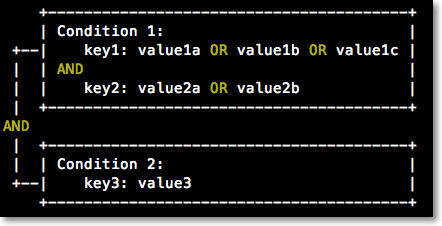
The Condition element, also called a condition block, consists of one or more condition clauses. Each clause contains a condition operator, a condition key, and one or more condition values.
Because the Condition element is optional, the system does not validate its presence. If you use the Condition element to specify conditions, ensure that you use the correct spelling and casing.
The name (key) of a condition key is case-sensitive. Whether the condition value (value) is case-sensitive depends on the condition operator that you use. For example, for a string-type condition key, if you use the StringEquals operator, it matches the value in the policy with the value in the request, and the match is case-sensitive. If you use the StringEqualsIgnoreCase operator, it matches the value in the policy with the value in the request, but ignores case.
The Condition element has the following characteristics:
Evaluation logic
The condition is met if the key's value in the request matches any of the values in the policy (a logical OR).
If a condition clause contains multiple condition keys, all keys must match for the clause to be met (a logical AND).
The entire condition block is met only if all its clauses are met (a logical AND).
Condition operator types
Condition operator types include String, Number, Date and time, Boolean, and IP address. For the meanings and examples of condition operators, see Condition operators.
Condition keys
Alibaba Cloud global condition keys use the format:
acs:<condition-key>.Global condition key
Type
Description
acs:CurrentTimeDate and time
The time when the web server receives the request.
NoteUse UTC time in the ISO 8601 standard format.
For example, 20:00:00 on January 10, 2023, in Beijing time (UTC+8) is represented as
2023-01-10T20:00:00+08:00or2023-01-10T12:00:00Z.acs:SecureTransportBoolean
Indicates whether the request was sent over a secure channel, such as HTTPS.
acs:SourceIpIP address
The client IP address from which the request was sent.
NoteThe value of
acs:SourceIpcan be a specific IP address or a CIDR block. Do not write a specific IP address in CIDR format. For example, do not write 10.0.0.1 as 10.0.0.1/32.acs:MFAPresentBoolean
Indicates whether the user logged on with multi-factor authentication (MFA).
NoteIf MFA for RAM user sign-in is set to Required Only for Unusual Logon in the RAM user's security settings, the
acs:MFAPresentcondition becomes ineffective. For more information, see Manage the security settings of a RAM user.acs:PrincipalARNString
The identity of the request principal. This can be used only in the control policies of Resource Directory and the trust policies of RAM roles. For example,
acs:ram:*:*:role/*resourcedirectory*.NoteCurrently, only the ARN of a RAM role is supported, and it must be in lowercase. You can find the ARN of a RAM role on its details page in the RAM console.
acs:PrincipalRDIdString
The ID of the Resource Directory to which the cloud account of the request principal belongs, for example,
rd-AA****. To view a Resource Directory ID, see View the basic information of a resource directory.This can be used only in the trust policies of RAM roles and OSS Bucket Policies.
acs:PrincipalRDPathString
The path of the cloud account of the request principal in the Resource Directory. The format is typically
<RD-Id>/<Root-folder-Id>/<Sub-folder-Id>/<Member-account-Id>, for example,rd-AA****/r-aQ****/fd-caiJfl****/199386846043****. For information about how to view the complete RDPath of a member account, see View the information of a member.To match all member accounts under a specified RDPath, you can use the wildcard character
*with theStringLikecondition operator. For example,"Condition": {"StringLike": {"acs:PrincipalRDPath": ["<RD-Id>/<Root-folder-Id>/<Sub-folder-Id>*"]}}.This can be used only in the trust policies of RAM roles and OSS Bucket Policies.
acs:RequestTag/<tag-key>String
The tags included in the request. Replace <tag-key> with your actual tag key. For supported cloud services and resource types, see the Authentication by Resource Type information in Alibaba Cloud services that support tags.
acs:ResourceTag/<tag-key>String
The tags attached to the requested resource. Replace <tag-key> with your actual tag key. For supported cloud services and resource types, see the Authentication by Resource Type information in Alibaba Cloud services that support tags.
Service-specific condition keys use the format:
<ram-code>:<condition-key>.For example, the OSS condition key
oss:Delimiteris used in ListObjects requests to group object names by a character.For the condition keys specific to each cloud service, see the authorization documentation for that service.
Condition examples
Condition clauses (such as IpAddress and Bool) within a single Condition block are evaluated with a logical AND. To create a logical OR, place each condition in a separate policy statement.
Example 1: Allow a RAM user to access ECS instances only if the user has enabled MFA and is making the request from the IP address 203.0.113.2.
{
  "Version": "1",
  "Statement": [
    {
      "Effect": "Allow",
      "Action": "ecs:*",
      "Resource": "*",
      "Condition": {
        "IpAddress": {
          "acs:SourceIp": [
            "203.0.113.2"
          ]
        },
        "Bool": {
          "acs:MFAPresent": [
            "true"
          ]
        }
      }
    }
  ]
}
Example 2: Allow a RAM user to access ECS instances if the user has enabled MFA or is making the request from the IP address 203.0.113.2.
{
    "Version": "1",
    "Statement": [
        {
            "Effect": "Allow",
            "Action": "ecs:*",
            "Resource": "*",
            "Condition": {
                "IpAddress": {
                    "acs:SourceIp": [
                        "203.0.113.2"
                    ]
                }
            }
        },
        {
            "Effect": "Allow",
            "Action": "ecs:*",
            "Resource": "*",
            "Condition": {
                "Bool": {
                    "acs:MFAPresent": [
                        "true"
                    ]
                }
            }
        }
    ]
}
References
-
Access control policies follow a similar syntax and structure to RAM permission policies. Policy structure and syntax.