You can use a tag policy only after you enable the Tag Policy feature.
Background information
Modes of the Tag Policy feature
Resource Management allows you to enable the Tag Policy feature in single-account mode or in resource directory mode. You can enable the Tag Policy feature that is in a specific mode based on your business scenario and the type of your logon account. The following table describes the two modes.
Scenario | Type of the logon account | Mode of the Tag Policy feature | References |
If your business in the cloud is simple and you use a single Alibaba Cloud account and the RAM users within the Alibaba Cloud account to perform management operations, you can use the Alibaba Cloud account to enable the Tag Policy feature that is in single-account mode. Then, you can use tag policies to manage the tag-related operations performed by using the Alibaba Cloud account or the RAM users. | Alibaba Cloud account that is not the management account or a member of a resource directory | Single-account mode: The Tag Policy feature in this mode can be used to manage tag-related operations performed by using an Alibaba Cloud account or the RAM users within the Alibaba Cloud account. | Use an Alibaba Cloud account to enable the Tag Policy feature in single-account mode |
If your business in the cloud is complex and you use a resource directory to manage all your accounts, you can use the management account of the resource directory to enable the Tag Policy feature that is in resource directory mode. Then, you can use tag policies to manage the tag-related operations performed by using a member of the resource directory. | Management account of a resource directory | You can enable the Tag Policy feature in both modes or in one of the modes based on your business requirements.
| |
Member of a resource directory | The following situations may occur based on whether the Tag Policy feature is enabled for a resource directory:
| Use a member of a resource directory to enable the Tag Policy feature in single-account mode |
RAM permissions
We recommend that you use a RAM user to enable the Tag Policy feature.
Tag Policy in single-account mode: Attach the following custom permission policy to a RAM user within your Alibaba Cloud account.
{
    "Version": "1",
    "Statement": [
        {
            "Action": [
              "tag:GetConfigRuleReport",
              "tag:GenerateConfigRuleReport",
              "tag:GetEffectivePolicy",
              "tag:ListConfigRulesForTarget",
              "tag:ListPoliciesForTarget",
              "tag:ListTargetsForPolicy",
              "tag:ListPolicies",
              "tag:GetPolicy",
              "tag:GetPolicyEnableStatus",
              "tag:DetachPolicy",
              "tag:DeletePolicy",
              "tag:ModifyPolicy",
              "tag:AttachPolicy",
              "tag:CreatePolicy",
              "tag:DisablePolicyType",
              "tag:EnablePolicyType",
              "tag:ListSupportResourceTypes"
            ],
            "Resource": "*",
            "Effect": "Allow"
        },
        {
            "Action": [
                "rd:ListAccountsForParent",
                "rd:ListFoldersForParent",
                "rd:GetResourceDirectory",
                "config:GetAggregateResourceComplianceByConfigRule",
                "config:ListAggregateConfigRuleEvaluationResults",
                "config:GetAggregateConfigRulesReport",
                "config:GetResourceComplianceGroupByRegion",
                "config:ListConfigRuleEvaluationResults",
                "config:GetConfigRulesReport",
                "config:ListRemediations",
                "oos:ListExecutions"
            ],
            "Resource": "*",
            "Effect": "Allow"
        },
        {
            "Action": "ram:CreateServiceLinkedRole",
            "Resource": "*",
            "Effect": "Allow",
            "Condition": {
              "StringEquals": {
                "ram:ServiceName": "tag.aliyuncs.com"
               }
            }
        }
    ]
}
Tag Policy in resource directory mode: Attach the AliyunResourceDirectoryFullAccess permission policy for resource directory management and the preceding custom permission policy to a RAM user within the management account of your resource directory.
For more information, see Create a custom policy and Grant permissions to the RAM user.
Use an Alibaba Cloud account to enable the Tag Policy feature in single-account mode
You can use an Alibaba Cloud account that is not the management account or a member of a resource directory to enable the Tag Policy feature that is in single-account mode.
Log on to the Resource Management console.
In the left-side navigation pane, choose .
On the Settings for Current Account tab, set Tag Policy to Enable.
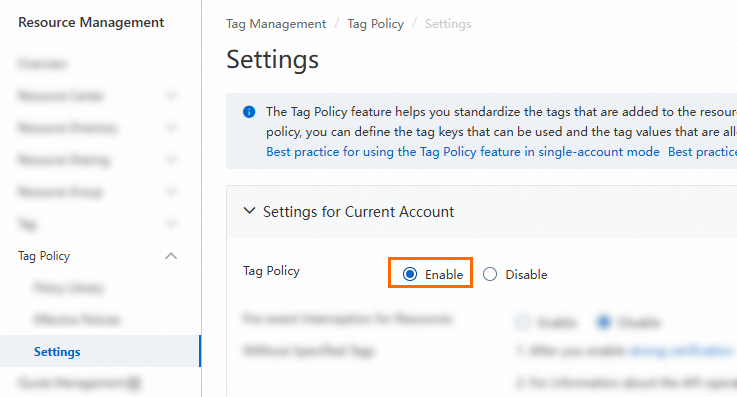
In the Enable Tag Policy dialog box, click Enable.
When you enable the Tag Policy feature, the system creates the service-linked role AliyunServiceRoleForTag. This role can resolve cross-service access issues. For more information, see Service-linked role for Tag.
Use the management account of a resource directory to enable the Tag Policy feature in resource directory mode
You can use the management account of a resource directory to enable the Tag Policy feature in resource directory mode. This feature takes effect on all members in the resource directory but does not take effect on the management account.
Log on to the Resource Management console.
In the left-side navigation pane, choose .
On the Settings for Resource Directory tab, set Tag Policy to Enable.
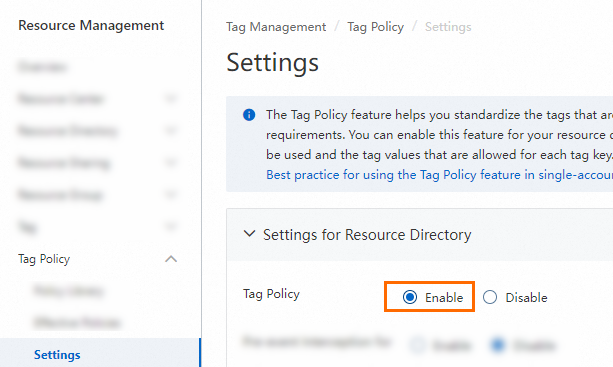 Note
NoteYou can also use the management account of a resource directory to enable the Tag Policy feature in single-account mode on the Settings for Current Account tab. This feature takes effect on the management account.
In the Enable Tag Policy dialog box, click Enable.
When you enable the Tag Policy feature, the system creates the service-linked role AliyunServiceRoleForTag. This role can resolve cross-service access issues. For more information, see Service-linked role for Tag.
Use a member of a resource directory to enable the Tag Policy feature in single-account mode
If the Tag Policy feature is not enabled for a resource directory, a member of the resource directory can be used to enable the Tag Policy feature that is in single-account mode. This feature takes effect only on the member.
Use a member of a resource directory to log on to the Alibaba Cloud Management Console.
For more information, see Use a member to log on to the Alibaba Cloud Management Console.
Log on to the Resource Management console.
In the left-side navigation pane, choose .
On the Settings for Current Account tab, set Tag Policy to Enable.
In the Enable Tag Policy dialog box, click Enable.
When you enable the Tag Policy feature, the system creates the service-linked role AliyunServiceRoleForTag. This role can resolve cross-service access issues. For more information, see Service-linked role for Tag.