Tag policies intercept non-compliant tags before they are applied, helping you enforce consistent tagging across your resources.
Use cases
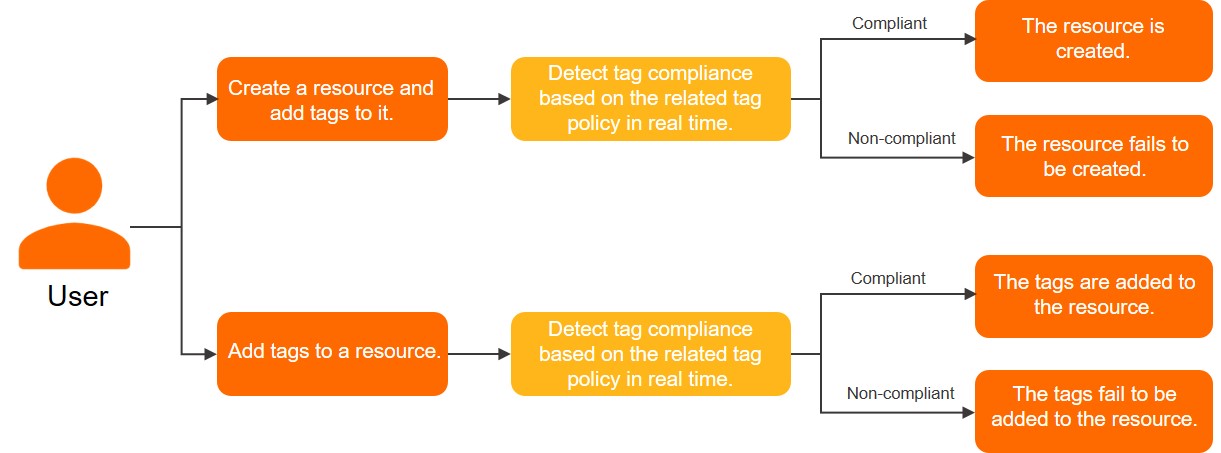
Use case 1: Intercept tags at resource creation
Default feature
If you create a resource with a compliant tag key but a non-compliant tag value, the tag policy intercepts the operation and the resource creation fails.
For example, a tag policy might require all new ECS instances to have the tag CostCenter:Beijing. If you try to create an ECS instance and attach a non-compliant tag, such as CostCenter:beijing or CostCenter:Shenzhen, the ECS instance creation fails.
For a list of supported resource types and API operations, see the API operations that support the default pre-event interception feature column in Cloud services that support tag policies.
Strong verification
If you create a resource without attaching a required tag, the tag policy intercepts the operation and the resource creation fails.
For example, a tag policy might require all new ECS instances to have the tag CostCenter:Beijing. If you try to create an instance but do not attach the required tag CostCenter:Beijing, the ECS instance creation fails. This applies whether you attach no tags or attach other non-compliant tags.
Strong verification is disabled by default and must be enabled manually. Once enabled for a Resource Directory, it applies to all members.
Log on to the Tag console. On the page, you can manually enable or disable the strong verification feature for your Resource Directory or for the current account.
For a list of supported resource types and API operations, see the API operations that support the strong verification feature column in Cloud services that support tag policies.
Use case 2: Intercept tags for existing resources
When you tag an existing resource, the system validates the tags against the attached tag policy. The tags are attached only if they are compliant; otherwise, the operation fails.
Best practices
-
Enabling pre-event interception can affect resource provisioning. Thoroughly test this feature in a non-production account before applying it to production.
-
Pre-event interception can affect other cloud services. For example, enforcing a tag policy on ECS instances may cause scaling failures in Auto Scaling or Container Service for Kubernetes (ACK) if those services cannot attach compliant tags to new instances. Confirm that all relevant services can perform compliant tagging before enabling this feature.
Procedure
Pre-event interception blocks non-compliant tagging operations by the current account or by members in a Resource Directory. The following example shows how a management account enforces a tag policy that requires all members to attach the tag key CostCenter with the value Beijing or Shanghai when creating an ECS instance. If the tags are compliant, the instance is created; otherwise, creation fails.
As a security best practice, create a RAM user in the management account, grant it AdministratorAccess permissions, and use it as the Resource Directory administrator. The following steps are performed by this administrator. For more information, see Create a RAM user and Manage RAM user permissions.
-
Log on to Tag console.
-
Enable the tag policy.
For more information, see Enable tag policy.
-
Create a tag policy.
-
On the Resource Directory tab of the Policy Library page, click Create Tag Policy.
-
Enter a policy name.
-
Enter a policy description.
-
Configure the policy in Quick Mode mode.
-
Set Policy Scenario to Add Tags with Specified Tag Values to Resources.
-
In the Tag Key text box, enter
CostCenter. -
Enter the allowed tag values.
To add multiple tag values, enter each value on a new line. In this example, add
BeijingandShanghai. -
Select Pre-event Interception, and then click Specify Resource Type.
-
In the Specify Scope for Pre-event Interception dialog box, read and confirm the risks of pre-event interception. Set the resource type to ECS Instance, and then click OK.
-
-
Click Create.
-
-
Bind the tag policy.
-
In the tag policy list, find the tag policy created in Step 3. In the Actions column, click Attach.
-
In the Add dialog box, select a binding target, and then click OK.
The scope of the policy varies by binding target. For testing, first bind the policy to a single member. After you confirm that the policy works correctly, bind it to the Root folder or a specific folder.
-
Root folder: The tag policy applies to all members in the entire Resource Directory.
-
Specific folder: The tag policy applies only to all members in the specified folder.
-
Specific member: The tag policy applies only to the specified member.
-
-
-
Verify that the tag policy is effective.
-
Log on to the Alibaba Cloud Management Console as the member attached in Step 4.
For more information, see Log on to the Alibaba Cloud Management Console as a member.
-
On the member's Alibaba Cloud Management Console, create an ECS instance to verify that the tag policy is effective.
-
Successful creation
The ECS instance is created if the tag
CostCenter:BeijingorCostCenter:Shanghaiis attached to the instance. -
Failed creation
By default, the policy applies only to the tags specified in the tag policy. The instance fails to be created in the following cases:
-
The case of the tag key or tag value is incorrect. For example:
costCenter:beijing. -
The tag key
CostCenteris specified, but the tag value is missing or invalid.
If strong verification is enabled, the instance also fails to be created if no tags are attached or if other tags are attached.
-
-
-
Error codes
|
Error code |
Example message |
Description |
|
Forbidden.TagPolicy |
The operation is failure, because the valid tag policy values of 'TagValue' are ["red","green","orange","blue","pink","white","black","grey"], but the value is "xxx". |
The tag key is compliant, but the tag value is not, which causes the resource creation to fail. Enter a tag value that is specified by |
|
The operation is failure, because the valid tag policy values of 'TagKey' are ["colorful"], but the value is "colorFul". |
Resource creation failed because the case of the tag key is incorrect. Enter a tag key with the same case as the |
|
|
The operation is failure, because the tag policy keys ["color"] are necessary. |
The tag is non-compliant because the tag key |