You can use the management account of a resource directory to change the billing account of a member in the resource directory.
Limits
You can change billing accounts for only members of the resource account type.
The real-name information of a member must be the same as that of its billing account.
Procedure
Log on to the Resource Management console as a management account.
In the left-side navigation pane, choose .
On the page that appears, click Resource Organization View or Member List View in the upper-right corner. Then, click the ID of a member.

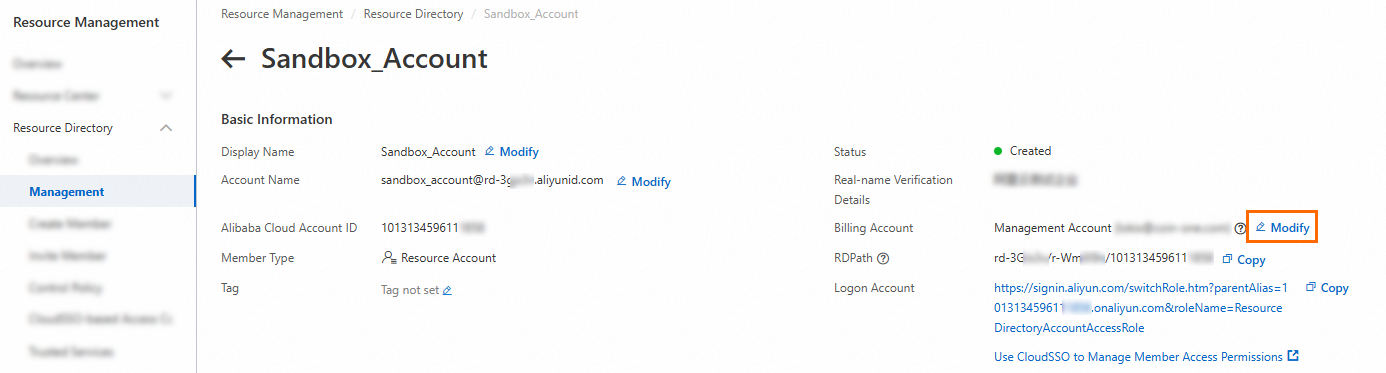
In the Basic Information section of the member details page, click Modify on the right side of Billing Account.
In the Change Settlement Method panel, change the settlement method and click OK.
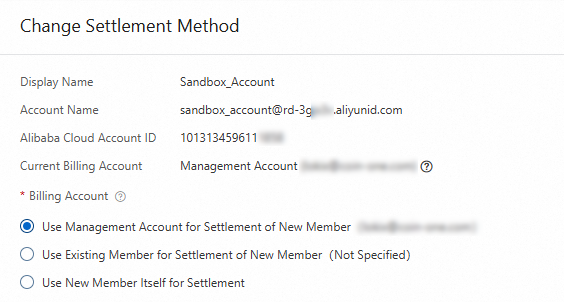
Use Management Account for Settlement of New Member: If you select this option, the management account of the resource directory is used as the billing account of the member that is being created.
Use Existing Member for Settlement of New Member: If you select this option, you need to select an existing member from the resource directory.
NoteA member that does not have the payment capability cannot be selected. For information about how to determine whether a member has the payment capability, see Trusteeship overview.
Use New Member Itself for Settlement: If you select this option, the member that is being created is used as its billing account.