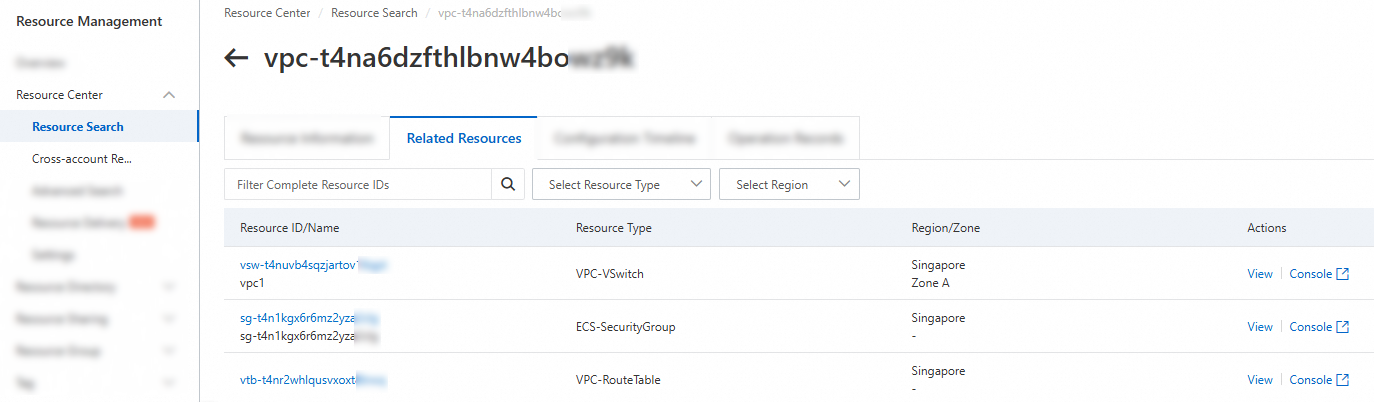
You can view resources related to a resource in Resource Center.
Scenarios
You want to view resources related to a resource and improve resource management efficiency during daily O&M or resource checks.
Examples:
In network O&M scenarios, before you delete a virtual private cloud (VPC), you need to query resources that are using the VPC.
In cost optimization scenarios, you need to check whether disks are unmounted and whether elastic IP addresses (EIPs) are not associated.
Supported resource types
For information about the types of related resources that you can view, see Types of related resources that can be viewed.
Resource Center will support more resource relationships. If you have new requirements, you can click Submit Feedback in the upper-right corner of the Resource Center console to submit feedback.
Procedure
You can use an independent Alibaba Cloud account to view related resources within the account. You can also use the management account of a resource directory to view related resources within the members in the resource directory.
Log on to the Resource Management console.
In the left-side navigation pane, choose or choose .
In the left-side navigation tree, click the desired node.
In the resource list, click View in the Actions column of the desired resource.
On the page that appears, click the Related Resources tab. On this tab, view the resources related to the desired resource.
Click View in the Actions column of a related resource to view the details of the resource in the Resource Center console.
Click Console in the Actions column of a related resource to go to the console of the resource and manage the resource.
NoteYou can perform this operation only if you use an independent Alibaba Cloud account to view related resources.