When a principal attempts to assume a Resource Access Management (RAM) role, RAM evaluates a set of policies to determine whether to allow or deny the request. This topic explains the evaluation logic that applies specifically to the sts:AssumeRole action.
Assuming a RAM role is a special action where two sets of permissions must be checked simultaneously:
The principal's permissions: The principal (a RAM user or another role) that is trying to assume the role must have an identity-based policy that grants it permission to call the
sts:AssumeRoleaction on the target role.The role's trust policy: The role being assumed must have a trust policy (a resource-based policy) that specifies the requester as a trusted principal.
Both of these conditions must be met for the request to be successful. The evaluation process is illustrated below.
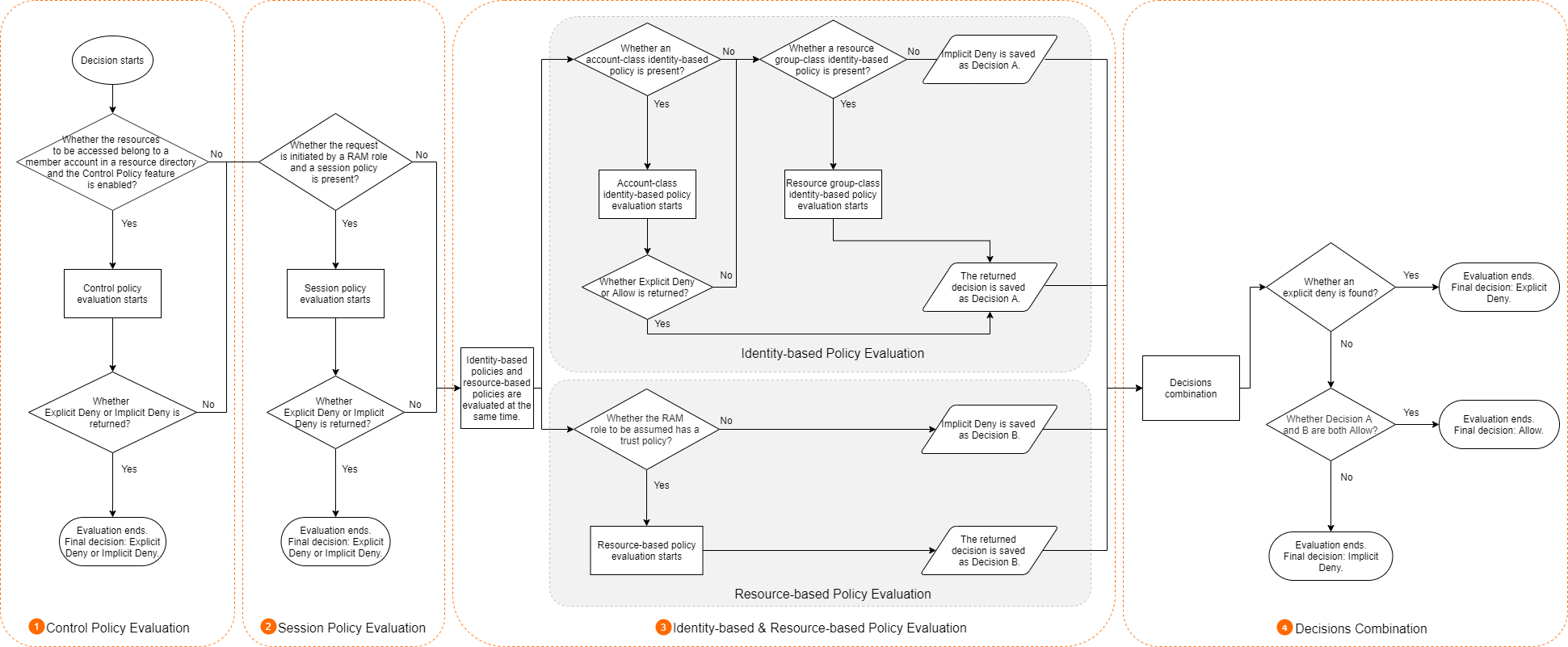
The process for evaluating policies when assuming a RAM role follows the standard evaluation logic, with one key exception: the decision combination step (Step 4).
Therefore, if you are already familiar with the standard process, you only need to review Step 4 of this topic. For a complete overview of the standard rules, see Policy evaluation logic.
Step 1: Evaluate the control policies of Resource Directory (if applicable)
If the account involved in the request is a member of a resource directory, RAM first evaluates the applicable control policies. Control policies act as permission guardrails for an account.
If the control policy does not allow the requested action, the request is denied and the evaluation stops.
If it is allowed, the evaluation proceeds to the next step.
If no control policies exist, this step is skipped.
Control policies apply to all RAM principals (users and roles) within a member account but do not apply to the owner of that account or any principals in the management account of the Resource Directory.
Step 2: Evaluate the session policies of RAM roles (if applicable)
If the requesting principal is a RAM role that was assumed with a temporary session policy (such as by calling the AssumeRole operation), RAM evaluates that policy.
If the session policy does not allow the requested action, the request is denied and the evaluation stops.
If it is allowed, the evaluation proceeds.
This step is skipped for requests made by RAM users or during federated SSO, as session policies are not involved.
Step 3: Evaluate identity-based and resource-based policies
RAM then evaluates both identity-based policies (attached to the RAM user or role making the request) and resource-based policies (attached to the resource being accessed).
Identity-based policy: RAM evaluates all policies attached to the requesting principal. If any of these policies explicitly deny the request, the result is an explicit deny. If at least one policy allows the request, the result is an allow. Otherwise, the result is an implicit deny.
NoteDuring an IdP-initiated SSO logon, the user has not yet assumed an identity, so there is no identity-based policy to evaluate. In this case, only the RAM role's trust policy is checked.
Resource-based policy: If the target resource has a resource-based policy (such as an OSS bucket policy or a RAM role's trust policy), RAM evaluates it. The logic is the same: the result is an allow, an explicit deny, or an implicit deny. If there is no resource-based policy, this check is skipped.
Step 4: Combine decisions and determine final outcome
Finally, RAM combines the results from Step 3 to make a final decision. The logic for assuming a role is stricter than for other actions:
The request is ALLOWED only if both the identity-based policy and the RAM role's trust policy result in an
Allow.In all other cases—including if either policy results in an implicit deny or an explicit deny—the request is DENIED.