AOF (append-only file) persistence is enabled by default for Tair (Redis OSS-compatible) instances. If your instance experiences request latency, jitter, or timeouts caused by AOF overhead, disable AOF by setting the appendonly parameter to no.
How AOF works
Tair (Redis OSS-compatible) supports two persistence options: AOF and Redis Database (RDB). With AOF enabled, the instance logs every write operation (such as SET) to an append-only file. When the file grows too large, the instance rewrites it automatically to reduce disk usage.
Rewrite trigger: An AOF rewrite runs when the AOF size exceeds 25% of instance memory and has grown more than 200% since the last rewrite (base rewrite). For empty instances, the base rewrite size is 1 byte.
Sync policy: Tair uses the AOF_FSYNC_EVERYSEC policy, which asynchronously flushes the AOF buffer to disk every second. This minimizes the performance impact of AOF on the instance.
When to disable AOF
Disable AOF when your instance experiences request latency, jitter, or timeouts caused by AOF overhead.
If you use Tair (Enterprise Edition) with Global Distributed Cache or data flashback (point-in-time data restoration) enabled, you cannot disable AOF.
Effects of changing the appendonly parameter
| Change | Effect |
|---|---|
appendonly: yes → no | AOF is disabled immediately. No restart required. |
appendonly: no → yes | AOF is enabled immediately. No restart required. After AOF is enabled, the instance performs periodic rewrites to compress the AOF file, which may cause a slight increase in latency (on the order of milliseconds). |
Default: AOF is enabled by default for all Tair and Redis Open-Source Edition instances, except Tair persistent memory-optimized instances.
Configure the appendonly parameter
Prerequisites
Before you begin, make sure you have:
A Tair (Redis OSS-compatible) instance
Access to the Alibaba Cloud console
Steps
Log in to the console and go to the Instances page. In the top navigation bar, select the region where your instance resides. Find the instance and click its ID.
In the left-side navigation pane, click Parameter Settings.
On the System Parameters page, find the
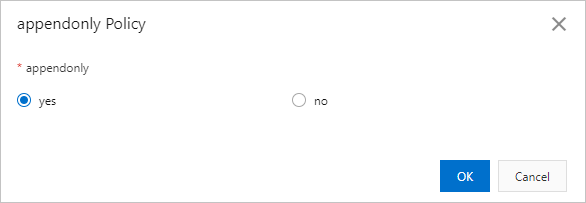
appendonlyparameter and click Modify in the Actions column.In the dialog box, set the
appendonlyparameter:yes: enables AOF persistenceno: disables AOF persistence
Click OK.
FAQ
Can I restore data that I accidentally deleted after disabling AOF?
Yes. Disabling AOF does not affect the full backup of the instance. Restore your data using the full backup feature.
API reference
| Operation | Description |
|---|---|
| DescribeParameters | Queries the configuration and operational parameters of an instance. |
| ModifyInstanceConfig | Modifies the parameter settings of an instance. |