Tair (Redis OSS-compatible) offers Serverless KV instances that feature automatic scaling and pay-as-you-go billing. The instances automatically scale out during peak hours to ensure service stability and scale in during off-peak hours to save costs. This seamless and automatic scaling process is transparent to your applications and significantly reduces O&M complexity.
Architecture
Tair Serverless KV instances use a distributed cluster architecture that is compatible with Redis Open-Source Edition 6.0. For more information, see Supported commands for Tair Serverless KV. The following figure shows the architecture and describes the components.

Component | Description |
Data shard (Partition) | An instance consists of multiple shards. Data distribution among shards is compatible with Redis Cluster (SLOT). Each data shard uses a high-availability (HA) architecture with one master node and multiple secondary nodes deployed on different machines. The number of secondary nodes is at least one. |
High availability (HA) service | If a master node fails, the system automatically switches over to a secondary node (Replica) within 30 seconds to ensure high service availability and data reliability. |
Serverless capabilities
When you create and use a Tair Serverless KV instance, you do not need to configure instance specifications. A Tair Serverless KV instance automatically adapts to your application's requirements for computing resources and storage capacity by scaling out or in based on the workload. The following concepts are used to measure resource usage:
Storage capacity: The storage capacity of a Tair Serverless KV instance ranges from 0 to 24 TB and automatically scales based on usage. You do not need to pre-provision resources.
RCU (read capacity unit): The smallest unit for a read operation. One RCU represents a single client read of up to 4 KB of data. For a read operation that exceeds 4 KB, the number of RCUs is calculated by rounding up the data size to the nearest multiple of 4 KB. The formula is: RCU = ⌈Data size of a single read / 4 KB⌉.
WCU (write capacity unit): The smallest unit for a write operation. One WCU represents a single client write of up to 512 B of data. For a write operation that exceeds 512 B, the number of WCUs is calculated by rounding up the data size to the nearest multiple of 512 B. The formula is: WCU = ⌈Data size of a single write / 512 B⌉.
Initial performance and elastic scaling
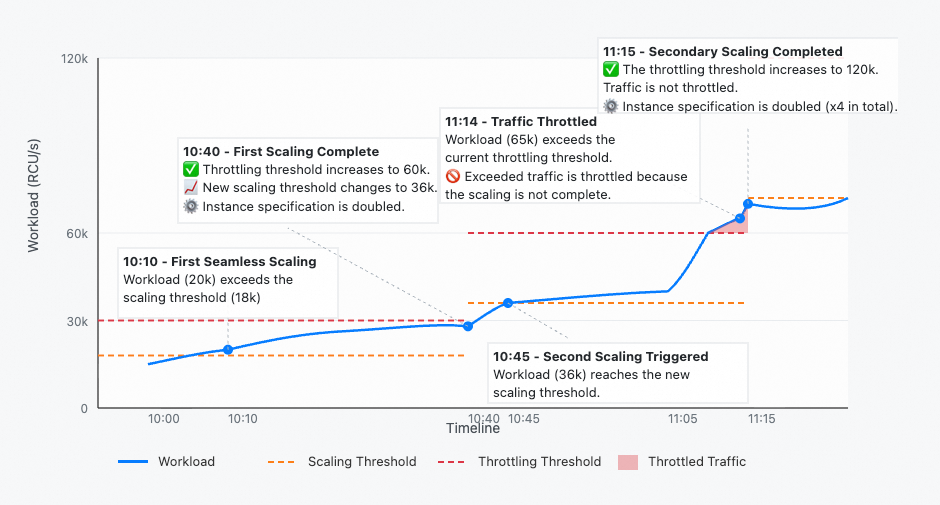
A Tair Serverless KV instance has an initial peak performance (throttling threshold) of 30,000 RCU/s and 20,000 WCU/s. When traffic exceeds 60% of the peak performance, the Tair Serverless KV instance starts to scale out. During the scale-out, traffic that exceeds the original peak is throttled. After the scale-out is complete, the new peak performance is twice the original peak performance. If the traffic continues to exceed 60% of the new peak, the instance automatically scales out again.
A Tair Serverless KV instance guarantees that a scale-out task is completed within 30 minutes.
When instance traffic exceeds the throttling threshold, the excess traffic is throttled. The default throttling behavior is to queue requests, which is consistent with the behavior of a traditional Redis instance. You can also choose to return an error. For more information, see Client-side throttling.
Instance limits
Maximum capacity: 24 TB.
Maximum bandwidth: The maximum inbound and outbound bandwidth for a Tair Serverless KV instance is 16 Gbit/s (2 GB/s) each. They are measured independently.
Maximum connections: The maximum number of connections for a Tair Serverless KV instance is 400,000.
Maximum throughput: The access performance limit is 7,680,000 RCU/s and 5,120,000 WCU/s.
Hot spot throughput: The request limit for a hot spot key is 30,000 RCU/s and 20,000 WCU/s.
Billing
The fees for a Tair Serverless KV instance consist of two parts: computing resource fees (RCU/WCU) and storage capacity fees. For more information, see Tair Serverless KV billing.
Get started with Tair Serverless KV
Create and release a Tair Serverless KV instance
Performance monitoring
The performance monitoring feature for Tair Serverless KV instances provides metrics such as usage, traffic, latency, number of requests, key statistics, and hit rate. You can query monitoring data for an instance over a specified time period within the last month to understand its performance and operational status, and troubleshoot performance issues.
Backup and recovery
Tair Serverless KV instances support the following backup and recovery solutions.
Category | Implementation | Description |
Data backup | An instance automatically backs up data based on the default policy. You can modify the automatic backup policy or initiate a manual backup as needed. | |
Data restoration | You can create a new instance from a specified backup set. The data in the new instance is identical to the data in the backup set. This can be used for scenarios such as data restoration, rapid business deployment, or data validation. |
FAQ
Q: Can I request an Internet endpoint for a Tair Serverless KV instance?
A: No, you cannot. Tair Serverless KV instances support access only over a VPC.
Q: After my instance scales out, my business traffic drops quickly. Do I need to pay for the scaled-up performance?
A: No, you do not. Fees are based only on the usage of CUs and storage, not on the provisioned backend resources. For example, if the current performance limit of an instance is 30,000 RCU/s and the traffic is 200 RCU/s, you are billed only for 200 RCU/s and the current storage capacity. The instance automatically scales in after the request load remains at a low level for a period of time.
Q: Is the data in Tair Serverless KV persistent?
A: Yes, it is. Data in Tair Serverless KV is persisted to disk in real time. Compared with traditional Redis, Tair Serverless KV is more suitable for use as a persistent database.