ApsaraDB RDS for SQL Server automatically synchronizes data from a source RDS instance to a disaster recovery RDS instance in a different region. If the source instance fails, you can switch workloads to the disaster recovery instance to maintain business continuity and service availability.
How it works
The geo-disaster recovery solution uses Cloud Enterprise Network (CEN) to establish a cross-region network connection between two virtual private clouds (VPCs). After the connection is established, Alibaba Cloud configures the disaster recovery instance in Region B as a secondary replica of the source instance in Region A, enabling continuous data synchronization.
Prerequisites
Before you begin, make sure you have:
-
Two RDS instances — one in Region A (the source) and one in Region B (the disaster recovery instance). Both must meet the following requirements:
-
Major engine version: SQL Server 2017 EE on RDS Cluster Edition, SQL Server 2019 EE on RDS Cluster Edition, SQL Server 2022 EE on RDS Cluster Edition, or SQL Server 2025 EE on RDS Cluster Edition
-
RDS edition: RDS Cluster Edition
-
Storage type: enhanced SSD (ESSD)
We recommend that both instances run the same major engine version and use the same instance type. To verify, go to the Basic Information page of each RDS instance.
-
-
VPC1 created in Region A and VPC2 created in Region B, with applications deployed on Elastic Compute Service (ECS) instances in both VPCs. For setup instructions, see Create a VPC with an IPv4 CIDR block.
Limitations
-
Logon information and jobs in the source instance database are not automatically synchronized to the disaster recovery instance.
-
The disaster recovery instance processes only read requests.
-
If you interrupt the cross-region network connection to enable read/write access on the disaster recovery instance, make sure the disaster recovery instance is no longer a secondary replica of the source instance. Otherwise, data synchronization and log truncation may fail, exhausting the storage capacity of the source instance.
-
If the source instance fails, contact Alibaba Cloud after-sales technical support to perform a switchover.
Set up geo-disaster recovery
To enable geo-disaster recovery, establish a cross-region network connection between the source instance in Region A and the disaster recovery instance in Region B using the following steps.
Step 1: Create a CEN instance
-
Log on to the CEN console.
-
On the Instances page, click Create CEN Instance.
-
In the Create CEN Instance dialog box, enter a Name and Description, then click OK.
Step 2: Connect VPC1 and VPC2 to the CEN instance
Attach both VPCs to the CEN instance to establish network connectivity between Region A and Region B.
-
On the Instances page, click the ID of the CEN instance you created in Step 1.
-
On the Basic Settings tab, go to the VPC section and click the
 icon.
icon. -
On the Connection with Peer Network Instance page, configure the parameters and click OK.
Repeat steps 1–3 for each VPC. Set Network Type to Virtual Private Cloud (VPC) for both. Use the following configuration:
| Parameter | VPC1 | VPC2 |
|---|---|---|
| Network type | VPC | VPC |
| Region | Region A | Region B |
| Resource owner ID | Your account | Your account |
| Network instance | VPC1 | VPC2 |
The Transit Router field is populated automatically based on the selected region.
Step 3: Purchase a bandwidth plan
A bandwidth plan sets the cross-region bandwidth between VPC1 and VPC2.
-
On the Instances page, click the ID of the CEN instance.
-
On the Basic Settings tab, click the Bandwidth Plans tab, then click Purchase Bandwidth Plan(Subscription).
-
Configure the required parameters and click Buy Now.
For parameter details, see Use a bandwidth plan.
Step 4: Create an inter-region connection
-
On the Instances page, click the ID of the CEN instance.
-
On the Basic Settings tab, click the Bandwidth Plans tab, then click Set Region Connection.
-
On the Connection with Peer Network Instance page, configure the following parameters and click OK.
| Parameter | Description |
|---|---|
| Network type | Select Inter-region Connection. |
| Region | Select Region A. |
| Transit router | Populated automatically. |
| Peer region | Select Region B. |
| Transit router | Populated automatically. |
| Bandwidth plan | Select the bandwidth plan associated with the CEN instance. |
| Bandwidth | Specify a bandwidth value (Mbit/s). |
Step 5: (Optional) Test network connectivity
After completing the previous steps, verify that VPC1 and VPC2 can communicate.
The following example uses the Alibaba Cloud Linux operating system. For other operating systems, refer to the relevant OS documentation.
-
Log on to the ECS instance in VPC1. For instructions, see Connection methods.
-
Run the following command to test connectivity to an ECS instance in VPC2:
ping <IP address of the ECS instance in VPC2>A successful echo reply confirms that VPC1 and VPC2 are connected.
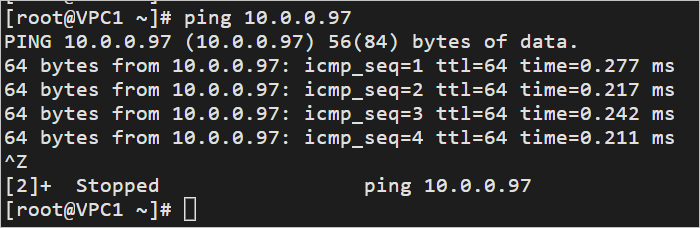
The cross-region network connection between the source and disaster recovery instances is now established.
What's next
Contact Alibaba Cloud after-sales technical support to complete the geo-disaster recovery setup. Support will configure settings such as security groups and firewalls so that the RDS instance in Region B can serve as the disaster recovery instance.
If the source instance fails, contact Alibaba Cloud after-sales technical support to perform a switchover.