When Alibaba Cloud technical support troubleshoots your ApsaraDB RDS for SQL Server instance, they may need temporary access to your databases. Grant them access by enabling permissions for the service account. ApsaraDB RDS automatically deletes the service account when the expiration time you set is reached.
Prerequisites
Before you begin, ensure that you have:
-
An RDS instance running SQL Server 2008 R2 with local SSDs
Which permission to grant
Choose the permission based on the type of issue you are troubleshooting:
| Permission | When to use |
|---|---|
| Configuration Permission | Issues related to IP address whitelists or instance parameters |
| Data Permission | Performance issues caused by applications |
Grant permissions
-
Go to the Instances page. In the top navigation bar, select the region where your RDS instance resides, then click the instance ID.
-
In the left-side navigation pane, click Accounts.
-
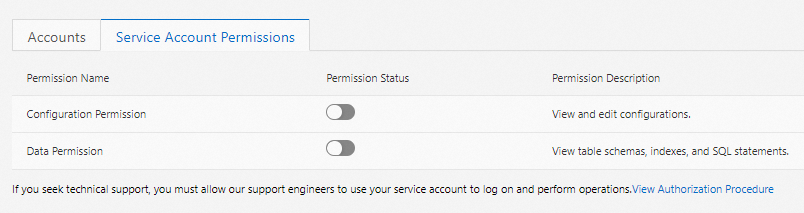
On the Service Account Permissions tab, find the permission type you want to grant and turn on the switch in the Permission Status column.
-
In the dialog box, specify an expiration time and click OK.
Revoke permissions or change the expiration time
After you grant permissions to the service account, you can revoke the permissions or change the expiration time on the Service Account Permissions tab at any time.