ApsaraDB RDS for PostgreSQL no longer supports the sql_firewall extension. Existing installations continue to work, but the extension may cause your system to break down. Stop using this extension as soon as possible to avoid potential risks. To remove the extension, run DROP EXTENSION sql_firewall; and remove sql_firewall from the shared_preload_libraries parameter. For instructions on modifying parameters, see Modify the parameters of an ApsaraDB RDS for PostgreSQL instance.
The sql_firewall extension is a database-level firewall that defends against SQL injection attacks. It builds a whitelist of allowed SQL patterns during a learning phase, then either warns or blocks any query that falls outside the whitelist.
Prerequisites
Before you begin, ensure that:
-
Your RDS instance runs one of the following PostgreSQL versions:
-
PostgreSQL 12
-
PostgreSQL 11
-
PostgreSQL 10
-
How it works
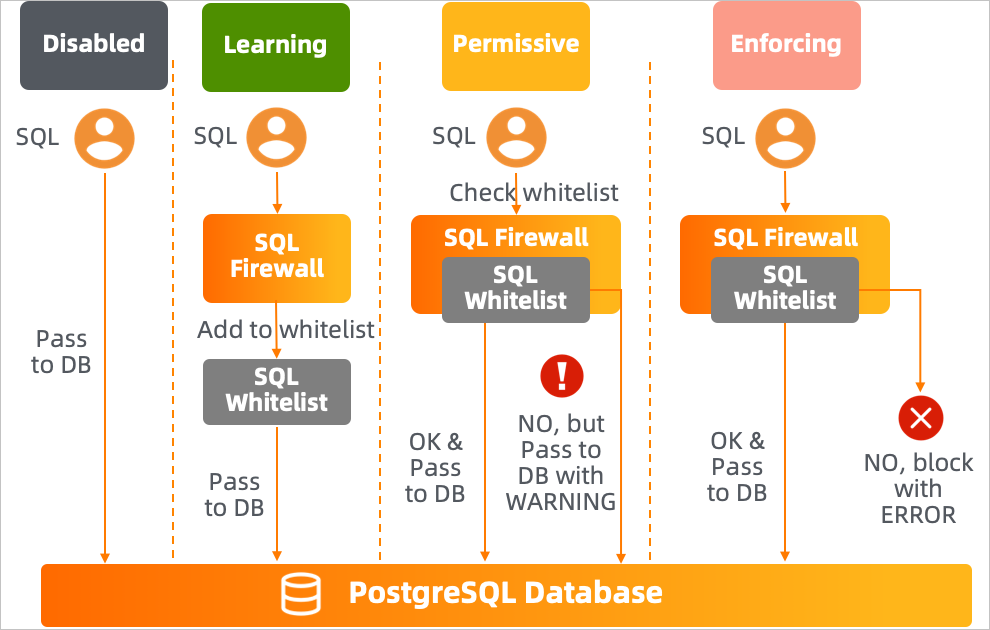
The extension operates in three modes, controlled by the sql_firewall.firewall parameter:
| Mode | Behavior |
|---|---|
| Learning | Records every executed query's (userid, queryid) pair and adds it to the whitelist |
| Permissive | Checks each query against the whitelist. Queries not in the whitelist are executed but generate a WARNING |
| Enforcing | Checks each query against the whitelist. Queries not in the whitelist are blocked with an ERROR |
Set up sql_firewall
Step 1: Install the extension
CREATE EXTENSION sql_firewall;Step 2: Enable learning mode
In the ApsaraDB for RDS console, set sql_firewall.firewall to learning, then restart your instance.
Run your typical workload during this phase. The extension records all executed queries into the whitelist. The longer you run in learning mode, the more complete the whitelist becomes.
Valid values for `sql_firewall.firewall`:
| Value | Effect |
|---|---|
disable |
Disables the extension |
learning |
Enables learning mode |
permissive |
Enables permissive mode |
enforcing |
Enables enforcing mode |
Step 3: Switch to permissive mode
Set sql_firewall.firewall to permissive and restart the instance.
In permissive mode, queries not in the whitelist still execute but generate a WARNING: Prohibited SQL statement alert. Review these alerts to identify any legitimate queries missed during the learning phase. If you find any, switch back to learning mode, execute those queries, then return to permissive mode.
Check the current whitelist contents and alert statistics:
-- View all whitelisted query patterns and their execution counts
SELECT * FROM sql_firewall.sql_firewall_statements;
Example output:
 userid |  queryid   |              query              | calls
--------+------------+---------------------------------+-------
     10 | 3294787656 | select * from k1 where uid = ? ; |     4
(1 row)
-- View alert and error counts
SELECT * FROM sql_firewall.sql_firewall_stat;Example output:
 sql_warning | sql_error
-------------+-----------
           2 |         1
(1 row)
The sql_warning column shows the number of alerts generated in permissive mode. The sql_error column shows the number of queries blocked in enforcing mode.
Step 4: Switch to enforcing mode
Once the whitelist covers your expected workload, set sql_firewall.firewall to enforcing and restart the instance.
In enforcing mode, any query not in the whitelist is blocked immediately:
-- A whitelisted query executes normally
SELECT * FROM k1 WHERE uid = 3;
uid | uname
-----+-----------
3 | Goo Ha-ra
(1 row)-- A SQL injection attempt is blocked
SELECT * FROM k1 WHERE uid = 3 OR 1=1;ERROR: Prohibited SQL statementPermissive mode behavior (for comparison):
-- The same injection in permissive mode: executes but raises a warning
SELECT * FROM k1 WHERE uid = 3 OR 1=1;
WARNING: Prohibited SQL statement
uid | uname
-----+----------------
1 | Park Gyu-ri
2 | Nicole Jung
3 | Goo Ha-ra
4 | Han Seung-yeon
5 | Kang Ji-young
(5 rows)Reference
Management functions
Both functions require the rds_superuser role and are available only when the extension is in disable, learning, or permissive mode. Set sql_firewall.firewall to one of these values before calling them.
| Function | Description |
|---|---|
sql_firewall_reset() |
Clears all entries from the whitelist |
sql_firewall_stat_reset() |
Resets the sql_warning and sql_error counters |
Views
| View | Description |
|---|---|
sql_firewall.sql_firewall_statements |
Lists all whitelisted (userid, queryid, query) patterns and the number of times each has been executed |
sql_firewall.sql_firewall_stat |
Shows the cumulative count of warnings (sql_warning) from permissive mode and errors (sql_error) from enforcing mode |
Remove the extension
DROP EXTENSION sql_firewall;After dropping the extension, remove sql_firewall from the shared_preload_libraries parameter in the ApsaraDB for RDS console, then restart the instance. For instructions, see Modify the parameters of an ApsaraDB RDS for PostgreSQL instance.