You can use PostgreSQL extensions, such as dblink and postgres_fdw, to perform cross-database operations on tables.
Background
Alibaba Cloud enables the dblink and postgres_fdw extensions on ApsaraDB RDS for PostgreSQL cloud disk instances. These extensions support cross-database operations between instances in the same VPC, including self-managed PostgreSQL databases.
Usage notes
Keep the following in mind when you use dblink and postgres_fdw for cross-database operations:
-
ECS and ApsaraDB RDS for PostgreSQL instances in the same VPC can perform cross-database operations directly.
-
A self-managed PostgreSQL instance can use oracle_fdw or mysql_fdw to connect to an Oracle instance or a MySQL instance outside the VPC.
-
When connecting to a different database in the same instance:
-
Set the host to
127.0.0.1instead oflocalhostto prevent connection failures on IPv6-enabled instances. -
Do not explicitly set the port. The port number can change during maintenance or a specification change, which can lead to connection failures. If you omit the port, the database automatically uses its current port, ensuring the connection remains valid.
-
If you must explicitly set the port, connect to the database and run the
SHOW PORT;SQL statement to query the current port number before you set it.
-
-
Add the VPC CIDR block of the ApsaraDB RDS for PostgreSQL instance, for example
172.XX.XX.XX/16, to the IP address whitelist of the destination database.NoteYou can view the VPC CIDR block on the Database Connection page for your ApsaraDB RDS for PostgreSQL instance.

dblink
-
Create the dblink extension.
create extension dblink; -
Create a dblink connection.
postgres=> select dblink_connect('<connection_name>', 'host=<internal_endpoint_of_the_destination_instance> port=<listening_port_of_the_destination_instance> user=<destination_database_username> password=<password> dbname=<destination_database_name>');

postgres=> SELECT * FROM dblink('<connection_name>', '<sql_command>') as <table_name>(<column_name> <column_type>);
Example
postgres=> select dblink_connect('a', 'host=pgm-bpxxxxx.pg.rds.aliyuncs.com port=3433 user=testuser2 password=passwd1234 dbname=postgres');


postgres=> select * from dblink('a','select * from products') as T(id int,name text,price numeric);  // Query a table in the destination database.
For more information, see the dblink documentation.
postgres_fdw
-
Create a new database.
postgres=> create database <database_name>;  // Create a database.

postgres=> \c <database_name>  // Switch to the new database.
Example
postgres=> create database db1; CREATE DATABASE postgres=> \c db1 -
Create the postgres_fdw extension.
db1=> create extension postgres_fdw; -
Create a foreign server for the destination database.
db1=> CREATE SERVER <server_name>
        FOREIGN DATA WRAPPER postgres_fdw
        OPTIONS (host '<internal_endpoint_of_the_destination_instance>', port '<listening_port_of_the_destination_instance>', dbname '<destination_database_name>');

db1=> CREATE USER MAPPING FOR <local_database_username>
        SERVER <server_name>
        OPTIONS (user '<destination_database_username>', password '<destination_database_password>');
Example
db1=> CREATE SERVER foreign_server1 FOREIGN DATA WRAPPER postgres_fdw OPTIONS (host 'pgm-bpxxxxx.pg.rds.aliyuncs.com', port '3433', dbname 'postgres'); CREATE SERVER db1=> CREATE USER MAPPING FOR testuser SERVER foreign_server1 OPTIONS (user 'testuser2', password 'passwd1234'); CREATE USER MAPPING -
Import foreign tables.
db1=> import foreign schema public from server foreign_server1 into <schema_name>;  // Import foreign tables.

db1=> select * from <schema_name>.<table_name>      // A table in the destination database.
Example
db1=> import foreign schema public from server foreign_server1 into ft;
IMPORT FOREIGN SCHEMA

db1=> select * from ft.products;
For more information, see the postgres_fdw documentation.
FAQ
Q: How do I use postgres_fdw to import a partitioned foreign table?
A: On the destination instance, you only need to import the name of the parent partitioned table. You do not need to import the individual partitions. The following example uses a range-partitioned table:
-- Source instance: source database
CREATE TABLE sales (id int, p_name text, amount int, sale_date date) PARTITION BY RANGE (sale_date);
CREATE TABLE sales_2022_Q1 PARTITION OF sales FOR VALUES FROM ('2022-01-01') TO ('2022-03-31');
CREATE TABLE sales_2022_Q2 PARTITION OF sales FOR VALUES FROM ('2022-04-01') TO ('2022-06-30');
CREATE TABLE sales_2022_Q3 PARTITION OF sales FOR VALUES FROM ('2022-07-01') TO ('2022-09-30');
CREATE TABLE sales_2022_Q4 PARTITION OF sales FOR VALUES FROM ('2022-10-01') TO ('2022-12-31');

INSERT INTO sales VALUES (1,'prod_A',100,'2022-02-02');
INSERT INTO sales VALUES (2,'prod_B', 5,'2022-05-02');
INSERT INTO sales VALUES (3,'prod_C', 5,'2022-08-02');
INSERT INTO sales VALUES (4,'prod_D', 5,'2022-11-02');

-- Run on the destination instance. Import only the parent partitioned table, not its partitions.
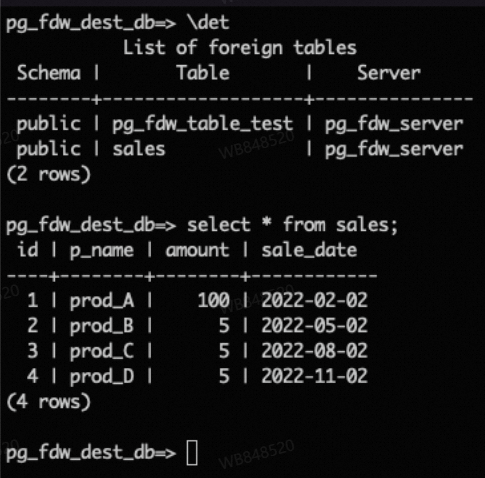
import FOREIGN SCHEMA public limit to (sales) from server pg_fdw_server into public;
select * from sales;
The following result is returned:
Q: What is the difference between pg_net and postgres_fdw?
A: ApsaraDB RDS for PostgreSQL supports both the pg_net and postgres_fdw extensions. They use different protocols and have different use cases. The pg_net extension sends requests over HTTP/HTTPS to call RESTful APIs or webhooks and cannot access databases that use the PostgreSQL protocol. The postgres_fdw extension connects to other PostgreSQL databases over the PostgreSQL protocol to perform cross-database queries and data access.