Computes the geometric union of multiple geometry objects, dissolving shared boundaries and merging overlapping regions into a single output geometry.
Syntax
geometry  ST_Union(geometry set  g1Field);
geometry  ST_Union(geometry  g1 , geometry  g2);
geometry  ST_Union(geometry[]  g1Array);
geometry  ST_Union(geometry set  g1Field, float8 gridsize);
geometry  ST_Union(geometry set  g1Field, cstring options);
geometry  ST_Union(geometry set  g1Field, float8 gridsize, cstring options);
geometry  ST_Union(geometry[]  g1Array, float8 gridsize);
geometry  ST_Union(geometry[]  g1Array, cstring options);
geometry  ST_Union(geometry[]  g1Array, float8 gridsize, cstring options);
Parameters
| Parameter | Description |
|---|---|
g1Field | The geometry column in the dataset to union. Used in the aggregate variant. |
g1 | The first geometry object. |
g2 | The second geometry object. |
g1Array | An array of geometry objects to union. |
gridsize | Grid cell size for snapping vertices during the union operation. Vertices within the same grid cell are merged. Default: -1.0 (disabled). |
options | JSON string to enable parallel computing and set the degree of parallelism (1–64). Example: '{"parallel": 4}' enables parallel computing with 4 workers. Default: '{}' (sequential computing). |
Description
ST_Union has two versions:
Version 1 — takes two geometry objects (
g1,g2) and returns their union as a MULTI, NON-MULTI, or GeometryCollection. If either input is NULL, the function returns NULL.Version 2 — operates as an aggregate function over a dataset column (
g1Field) or an array of geometry objects (g1Array). Returns a MULTI or NON-MULTI object.
Usage notes
ST_Union vs ST_Collect
ST_Union dissolves boundaries between input geometries and checks for overlapping regions. ST_Collect groups geometries without processing them. Because of this, ST_Union is generally slower than ST_Collect.
Use ST_Collect when the result does not need to be non-overlapping. Use ST_Union when you need topologically clean output — for example, when computing the total area of merged polygons.
Examples
Compare ST_Union and ST_Collect
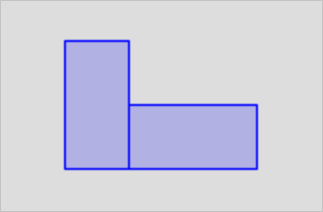
The following query runs both functions on two adjacent polygons. ST_Union dissolves the shared edge; ST_Collect preserves it.
SELECT ST_Union(g1,g2),ST_Collect(g1,g2)
             from (select 'POLYGON((0 0,1 0,1 2,0 2,0 0))'::geometry as g1,'POLYGON((1 0,3 0,3 1,1 1,1 0))'::geometry as g2) as t;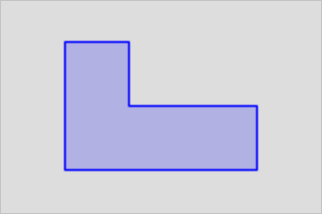
Use gridsize and options
The following examples show the aggregate variant with the optional gridsize and options parameters.
-- Specify the gridsize parameter.
select st_area(st_union(geom, 0.005)) from tableA;

-- Specify the options parameter.
select st_area(st_union(geom, '{"parallel": 4}'::cstring)) from tableA;

-- Specify the gridsize and options parameters at a time.
select st_area(st_union(geom, 0.005, '{"parallel": 4}'::cstring)) from tableA;